
Replies: 33 comments 1 reply

-
|
Showing difference of directory-tree is an interesting idea. I use a "diff tool" to see difference of two folders. The same usage is possible with PAR2 file and a directory. But, I don't want to implement the feature in par2j. It will require GUI to see result easily. Currently, I use Python script to make simple GUI tools. For example, I put GUI Queuing Create/Verify tools (script_sample_2023-02-04.zip) in "MultiPar_sample" folder on OneDrive. If Python language is available for you, I may write a sample script. Though it's not difficult technically, your usage is obscure. The design will need brushup sometimes. Or you may modify the script by yourself. Because users can edit Python script for their usage, I like script language. (I don't need to customize behavior of tools.) |
Beta Was this translation helpful? Give feedback.

-
|
Arigato! I agree that GUI is better to display the differential results. The original thought of implementation in command line tool is to use batch script to verify numbers of folders easily. I guess Python should work just the same. |
Beta Was this translation helpful? Give feedback.
-
I don't know about Python so much, too. Though I didn't test the length, there is an option. I found an article "How to Disable Path length Limit in Python". Please refer it. I made a simple tool. I put the sample (diff_sample_2023-02-09.zip) in "MultiPar_sample" folder on OneDrive. Currently, it accepts only one folder at a time. If you want to check some folders continuously, it will require more button like "Next folder". I may update after you test the behavior. |
Beta Was this translation helpful? Give feedback.
-
|
Big thanks! This is QUICK! Today or tomorrow (or worst no later than over this weekend) I'll test it thoroughly by simulating as many different cases as I can think of, and tell you the result ASAP. |
Beta Was this translation helpful? Give feedback.
-
|
Hello, sorry for late response. |
Beta Was this translation helpful? Give feedback.
-
|
Thank you for tests. I found 2 faults and fixed them.
I put the updated sample (diff_sample_2023-02-12.zip) in "MultiPar_sample" folder on OneDrive. If you see a problem still, please report again. |
Beta Was this translation helpful? Give feedback.
-
|
I improved the "PAR Diff" sample script to support multiple folders. It keeps list of directories. You may specify multiple folders at once by SendTo or command-line arguments. You may add a folder to list later. By pushing "Next folder" button, you move checking directory one by one. I put the updated sample (diff_sample_2023-02-15.zip) in "MultiPar_sample" folder on OneDrive. |
Beta Was this translation helpful? Give feedback.
-
|
WOW! That's a big improvement for my usage. I'll test it more in the following two days. Your effort is greatly appreciated. |
Beta Was this translation helpful? Give feedback.
-
|
I saw the script is included the newest release. Thanks. During these days, I tested a lot using this script. I don't have any bugs to report, but I do consider some improvements:
|
Beta Was this translation helpful? Give feedback.
-
Yes, it is. Status text can become multiple lines. I tested the behavior. But, I don't like long text for small window. Then, I changed format of header items. Now, you may see number of missing, additional, and/or different size files at the top of list. Also, you can edit the script for your requested output style. Because I just coomented out my sample summary at the bottom of window, you may enable it by uncommenting them.
Yes, I added the check-box. (But short text, hehe.) You may change initial state by editing script.
The feature exists already. Files of different size are shown as Yellow color line. I put new sample (diff_sample_2023-03-06.zip) in "MultiPar_sample" folder on OneDrive. I may update later, when I will find a problem or bug. |
Beta Was this translation helpful? Give feedback.
-
|
Thanks for your quick response. I'll test the new script in the following days. |
Beta Was this translation helpful? Give feedback.
-
|
These question are usage of par2j mostly.
I wrote some details on "Command_par2j.txt". When all options (/ss, /sn and /sr) are not set, "/sr10 /sn3000" is used as default setting. This default setting is same as MultiPar GUI;
You may select favorite way. Read about options:
Because
It will choose slightly better efficiency in close range of specified options. The range is written in my help documents. Setting proper options is important at first. On MultiPar GUI, you see initial block count after you select source files. The value is set by When you want to see how are the resulting PAR2 files for some given options, you may test "trial" command of par2j. I don't know variation of your file size. If all of your files is smaller than 10% redundancy, If you want to omit number of blocks (volume number) in PAR2 filename (such like, volXXX+YYY), you may set |
Beta Was this translation helpful? Give feedback.
-
|
May I ask the behind-scene reason of why the user suggested this "1% block rate"? If block number is 1, to achieve 10% redundancy rate, efficiency is 0.5% Then across 1 to 32768, when setting block number as 3456 and 32768, the efficiency can reach the highest 98%. The program choose the least block number (3456) to process the PAR2J file. The reason to choose the least number is because it should ease the calculation. By testing using GUI, this option can also be used with "/rpX.X" to achieve (much) better storage efficiency than using "1% block rate". If the user don't want to deal with larger block numbers, maybe gives out like "/so3000", which will only test 1 thru 3000 (max), and try to find the best block number between 1 and 3000 with best efficiency. I believe this will give the Par2j command line more intelligence. It seems the calculation of efficiency is not time-consuming comparing to PAR2j. How do you think? |
Beta Was this translation helpful? Give feedback.
-
Your suggested "search the highest efficiency" is an interesting idea. Technically, it's possible indead. It searches higher efficiency setting in close range already. I didn't adopt it to wide range yet, because it affects recovering capability largely. "Achieve the best efficiency" isn't so good decision, though I don't know how is your possible damage incident. I explain why PAR2 clients (QuickPar, MultiPar, par2j, or par2cmdline) don't care efficiency. Efficiency means rate of recovering source files against PAR2 files. For example, when 100 MB PAR2 files can recover 70 MB source files at the best, the efficiency is 70%. When 200 MB PAR2 files can recover 70 MB source files at the best, the efficiency is 35%. If their redundancy is same, efficient PAR2 files are smaller size. The value is multiplication of "Source block usage" and "Recovery block consumption". You may see the values on "Preview" window of MultiPar. "Source block usage" means how much rate source blocks contains file data. If a file is small 10 KB at 1 MB block size, the block includes only 1 % real data. Because it's a waste of source block, efficiency may become low for smaller files. When there are some very small files, efficiency tends to be lower. "Recovery block consumption" means how much rate PAR2 files contains recovery blocks. Because a PAR2 file consists of many packets, this value never becomes 100%. When there are many files or blocks, many packets will decrease efficiency. As I wrote the calculating system of efficiency above, less number of blocks (large block size) would achieve higher efficiency in most case. Only when size of source files are different largely, small block size (close to the smallest source file) may become good efficiency. Though 16-bit Reed-Solomon Codes supports upto 32768 source blocks, users would not set so many blocks normally. MultiPar's default setting (upto 3000 source blocks) would be faster and more efficient than setting 30000 blocks mostly. As a side note, current par2cmdline sets 2000 source blocks by default. Now, one problem is that less number of blocks causes bad recovering capability normally. For example, there are 10 source files of 1 MB size each. In the case, setting 1 MB block size (10 source blocks) achieves the highest efficiency. Creating 1 recovery block from 10 source blocks as 10% redundancy. The efficiency should be very high like 99%. You can recover any damage (or loss) of one source file with the PAR2 file. But, you cannot recover two or more source files, even when the damage is very small. 1 recovery block can restore only 1 source block. When there are two damage of 1 KB on two different source files, it causes loss of 2 source blocks. 1 recovery block of 1 MB cannot recover total 2 KB damage on 2 soruce blocks. Because the efficiency value is calculated for burst error, it's worthless for random error. To support recovery of random error, it requires many small blocks. Setting many small blocks on source files would cause lower efficiency mostly. For example, setting 10 KB block size in the same above case. Creating 100 recovery blocks from 1000 source blocks as 10% redundancy. While the total recovery data size (10 KB * 100 = 1 MB) is same, more packets increase PAR2 file size, and it causes lower efficiency value. Even though the resulting PAR2 file is larger (low efficiency), it can recover 100 position of random error on whole source files. I think that efficiency isn't so important to get ideal PAR2 file. |
Beta Was this translation helpful? Give feedback.
-
So my story is: Interestingly, I did more tests on those testing folders. It seems if I insist to use only one recovery file (actual result will be 2 PAR2J files, /rr10 /rf1), the above story will change hugely. What I observe in those folders, B3 has mostly similar size files. The others contain files with (quite or not quite) different sizes. Some extreme ones have KB-level files and GB-level files. If I slide redundancy to of at least one biggest file (same as /rp1.1), the block size and efficiency will also be increased at the same time to certain level of number of blocks. Based on the above findings, my suggestion is to better using "/so" if implemented, a range can be given. E.g. “/somin5000 /somax10000” will search from 5000 to 10000 block numbers to get the best efficiency. Of course, the user needs to know what he is doing. He will choose the balance between reliability of PAR2j and the acceptable processing time by his CPU's power. |
Beta Was this translation helpful? Give feedback.
-
Oh, I see. Thank you for refine. The good point of Python script is that a user can customize it for his usage. I will update the sample script for other users.
MultiPar GUI 's behavior depends on Windows Explorer setting. Only when you see hidden files on Windows Explorer, it adds them. If you don't see hidden files on Windows Explorer, it won' add them. Because you may set different setting for different folders, it checks setting of each folder. This complex behavior would be natural for users' feeling. A user will add files, when he see them. On the other hand, par2j is simple and excludes hidden files at searching always. At very old versions, it didn't ignore hidden files. Because it added unseen (hidden) files unintentionally, I changed the behavior to ignore them in current versions. As I don't see hidden files normally, this behavior is good for me.
(Answer) Change searching behavior of par2j Because the function exists in MultiPar GUI already, adding the same feature to par2j is easy. But, I don't know the behavior is good or not for you. I made a sample par2j to test the searching way. I put the sample (search_sample_2023-03-13.zip) in "MultiPar_sample" folder on OneDrive. If there is a problem, please post the incident with ease. |
Beta Was this translation helpful? Give feedback.
-
|
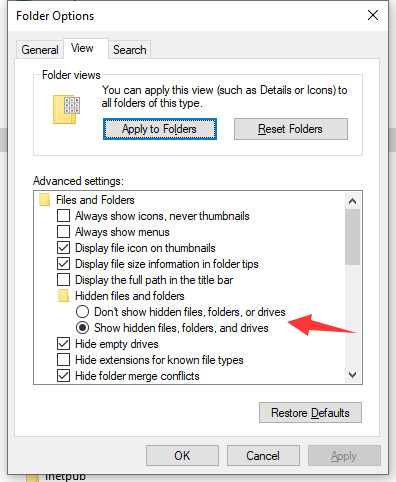
This behavior is good enough for me, as my universal folder and search setting is to show hidden files and system files.
Do you mean that you may set the behavior as "SHOW hidden files for certain folder AND HIDE hidden files for any other folder"?
|
Beta Was this translation helpful? Give feedback.
-
I'm not sure what users can do. Because I don't know well about Windows 10 settings, I might mistake. MultiPar was made for Windows 2000 at old time, hehe. See the "Folder views" section in your sample screen-shot. There are some types of folders. I thought that you might be able to set different setting for every types. I don't know that the hide setting belongs to the folder type or not. Maybe it doesn't need to check setting at searching every directories. Though it did useless checking, it would work. I will change my source code to check the setting once tomorrow. |
Beta Was this translation helpful? Give feedback.
-
|
I haven't tried Windows 11 yet. I don't know if things are same or not. I believe checking settings for each folder is a safer/better way. This should not cost much processing power for modern CPU. And this may also good for future implementations. Who knows what will happen in Windows 12. |
Beta Was this translation helpful? Give feedback.
-
|
Thank you for advice. Nowadays, I put non-compressed source code files on GitHub. This style is standard at GitHub. Users may know where is changed with ease at Diff view on Web Browser. I will put archived packages on OneDrive at every release still. I put alpha versions on GutHub, too. Users may test behavior of the latest version. I will put sample versions with intermediate feature or debug versions with extra output on OneDrive still. Now, I slightly changed function at MultiPar GUI and clients. (You may download the new version at alpha on GitHub.) MultiPar GUI checks setting of Windows Explorer at every searching, because a user may change setting while opening MultiPar. Though it's rare case, it's possible. On the other hand, it checks setting once at starting search in par1j, par2j, and sfv_md5. Users won't change setting while waiting finish of creation. If there is a problem, I will change again later. Because I'm lazy to test all possible cases, I public non-stable (not tested so much) versions sometimes. My motto is "Fix a problem, when a user complains and helps to solve it." |
Beta Was this translation helpful? Give feedback.
-
|
each_folder_efficiency.zip |
Beta Was this translation helpful? Give feedback.
-
When I started to read your script file, I found that my description might be bad. While searching the best efficiency rate, it used I explained how to calculate efficiency of PAR files ago. There are three rate values: In par2j's adjusting function, it tests rate (A) only. By comparing size of all source files and block size, it will select the least wasteful size. For example, if all files are multiple of 1 MB size, it will select 1 MB block size. This limited function was made, because a user would set varied redundancy or number of PAR files. The problem is that it ignores rate (B) in the adjustment. Because the final efficiency rate depends on both (A) and (B), higher (A) may not result in higher (C) sometimes. Even when rate (A) is high, low rate (B) causes low rate (C) at the last. The problem tends to happen for many blocks of small size mostly. Many blocks makes many packets and large checksum size. Normally, setting more blocks (or creating more PAR files) causes lower rate (B). That is why it adjusts number of blocks in small rage. While number of blocks doesn't differ so much, effect of rate (B) may be ignorable. I'm not sure that you understand this problem in my par2j. When you use |
Beta Was this translation helpful? Give feedback.
-
|
Thanks for telling me this. As calculating A) but not B) is the internal algorithm you wrote, I didn't know until you made this clear (given that I didn't read your project source code). This is a good thing to know. |
Beta Was this translation helpful? Give feedback.

-
|
Beta Was this translation helpful? Give feedback.
-
|
each_folder_efficiency_sn_ss.zip |
Beta Was this translation helpful? Give feedback.
-
|
Thank you for improvement. I tested your sample script for both But, I found one point to improve speed. By watching result of each loop, For example, it may get same result 5 times like below; So, it would better compare result count against the input count. If the result count is more than the input count, next count is based on the result. If the result count is less than the input count, next count is based on the input. Also, the value should be at least 1/16 more than input count. because the range from -1/8 to +1/16 were checked already by par2j. Or else, it will result in the same count again. Example of larger result case; Example of smaller result case; Example of faster loop, which gets same result 2 times. I put the modified sample (efficiency_sample_2023-03-16.zip) in "MultiPar_sample" folder on OneDrive. Please see the difference. It's noticeable fast for large data with many blocks. If the searching method is better, it may be good to remove searching based on |
Beta Was this translation helpful? Give feedback.
-
|
I actually also thinking about this during the days. As you gave out the ratio 17/16. If I'm correct, your "/sn" option should check from negative 1/8 to positive 1/16 of a given slice number. So it can be improved more on this. Assuming check start from 1000:
|
Beta Was this translation helpful? Give feedback.
-
Thank you for the idea of window. Because it's fast, it doesn't need loop counter. It will finish before a user waits. I optimize the window size (min range) for par2j's internal mechanism. The range is from -1/8 to +1/16. Decimal point in the division is round down. The results become close to base value, instead of zero. I modified the script to fit range of every steps. Each range won't have overlap nor gap. You may see them on debug output. (I will comment out debug output in final version.) It doesn't need to read "Input File total size". Checking "Input File Slice count" is enough, because it becomes 0 at the time.
I think so, too. A user may change I put the modified sample (efficiency_sample_2023-03-18.zip) in "MultiPar_sample" folder on OneDrive. It would be enough fast for practical usage. If there is no problem, I will release the script as a new sample. |
Beta Was this translation helpful? Give feedback.
-
|
It works well. I don't have any problem with it using on my folders. |
Beta Was this translation helpful? Give feedback.
-
|
Thank you for good idea and testing many times. By adapting your suggested optimization method, I modified |
Beta Was this translation helpful? Give feedback.
-
|
My effort is so small comparing to your contribution to this project. I'm glad to help a little bit here. I can make good use of this project in future. |
Beta Was this translation helpful? Give feedback.


Uh oh!
There was an error while loading. Please reload this page.
-
When verifying a PAR2 file and a directory with current version, now certain missing files can be found and shown in the GUI. I believe another critical and useful feature is finding out files in that directory (and sub-directories), which were NOT included when generating the PAR2 file for that directory.
For example, when generating PAR2 file(s), the directory had:
1.ini
2.exe
3.pdf
dir.PAR2
dir.vol0+1.PAR2
Later another file named "4.docx" was added into the directory, but at that time, PAR2 file for that directory was not updated (assuming I totally forgot to do so).
When verifying the two PAR2 files, give out an option like "Show additional files in the directory (and sub-dir), but NOT included in PAR2". In the result file list window, also show a list of files NOT included in PAR2. In this case, "4.docx" will be shown. Thus, the user know it's time to generate a new PAR2 for the new file(s).
Another example is when generating PAR2 file(s), the directory had:
1.ini
2.exe
3.pdf
dir.PAR2
dir.vol0+1.PAR2
Later, 3.pdf was somehow changed its name to "30.pdf" maybe just because of typo. If you have this feature, the user will immediately notice that instead of repairing the missing "3.pdf" (your current program tells), he can just change the "30.pdf" back to "3.pdf" and do the verification again.
I guess this new feature should not be too hard to implement. The function of browsing all file in directory and sub-dirs has been implemented. The file list in PAR2 can also be acquired when verifying. All you need to add is an option to show the differences of files.
There can be some more promising features after you implement this one. E.g. Add this function to par2j64.exe to accept a series of directoy (can be acchieved by script/SENDTO). If any directory doesn't have a PAR2 file (with the same directory name), show error. If one directory has a PAR2 file, instead of verifying all the files completely (take a long time of course), just (quickly) verify whether there are any missing or added files, and show them. The user can do something according to the (error) report.
Thus your program can be used to manage huge amount of archived data quite efficiently when needed.
Thanks a lot for reading my suggestion. Waiting for your reply.
Beta Was this translation helpful? Give feedback.
All reactions