These are the technical specifications for the Photo Asset Management cross-service example, which was designed by the maintainers of this repository to showcase AWS services and SDKs.
The Photo Asset Management (PAM) example app uses Amazon Rekognition to categorize images, which are stored with Amazon S3 Intelligent-Tiering for cost savings. Users can upload new images. Those images are analyzed with label detection and the labels are stored in an Amazon DynamoDB table. Users can later request a bundle of images matching those labels. When images are requested, they will be retrieved from Amazon S3, zipped, and sent to the user in the form of a link to the zipped file.
- High-level architecture
- Development / deployment
- Frontend
- Backend
- README
- Resources
- Glossary
- Appendices
This application consists of three main components:
| Area | Purpose | Tools | Per-language? |
|---|---|---|---|
| Frontend | Frontend user interface. | React; CloudScape; S3; CloudFront | No |
| Backend | Underlying pieces that are used for any instance of the application, regardless of AWS Lambda implementation. | DynamoDB; S3; APIGateway | No |
| Lambdas | Business logic for each application specific function. | Lambda; SDKs: S3, DDB, SNS, Rekognition | Yes |
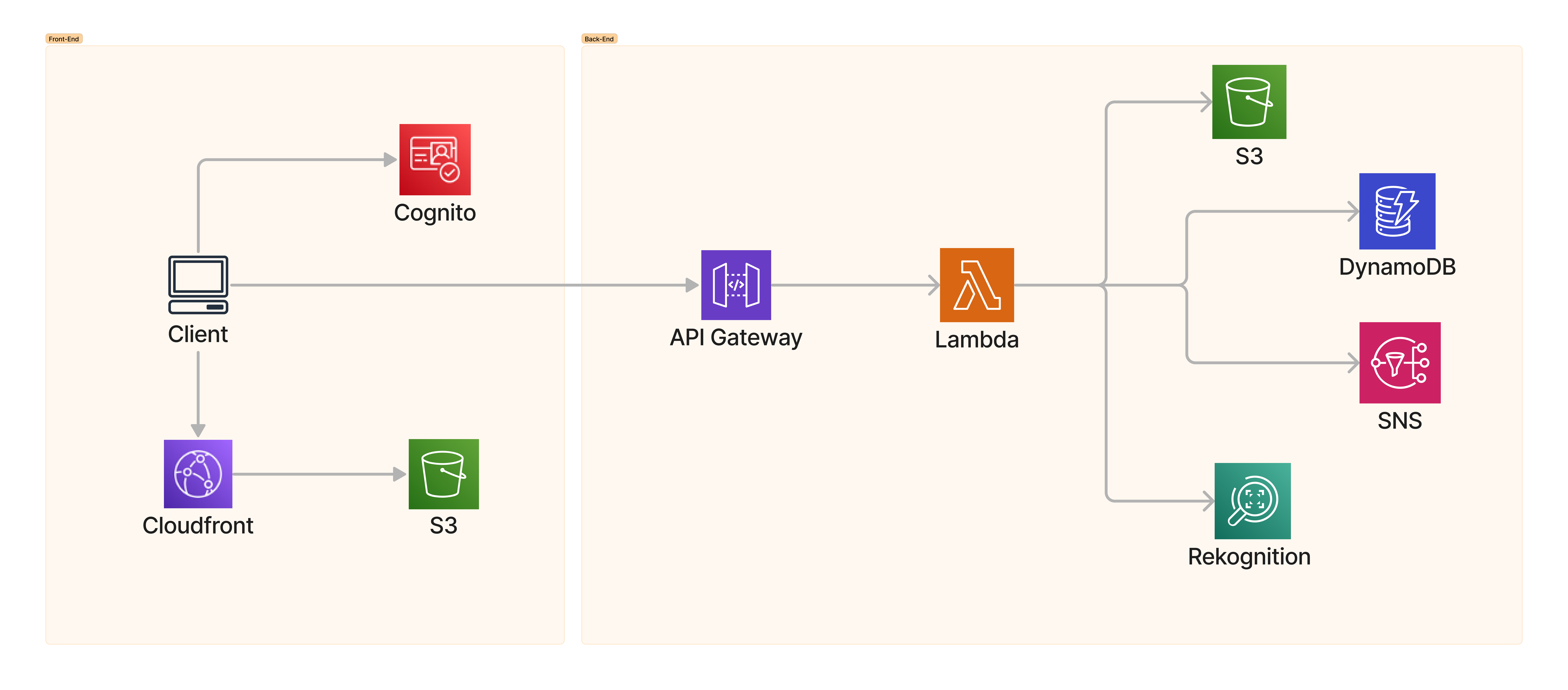
This spec is written for anyone implementing the business logic of the PAM app. This includes:
- The AWS Code Examples Cloud Sherpas who provide the common resources and a reference implementation of the Lambdas in Java.
- The AWS Code Examples MVPeeps who provide a number of implementations in other supported languages.
While developing this example, we have kept two other personas in mind:
- Dan - A hypothetical photographer who will use this app for long-term storage of his photographs, infrequently accessing them based on the labels assigned to each image.
- Customer - An AWS customer learning about the pieces of a fully functional serverless consumer app with Lambda backends, object storage, columnar key data, and managed user pools.
Refer to README.md for deployment instructions and DEVELOPMENT.md for instructions on modifying the AWS CDK script.
The frontend is a single React app that uses the Cloudscape Design System. With the React app, users can authenticate with an Amazon Cognito flow. All requests are then authn/authz to that token. The app is deployed to an Amazon S3 bucket and publicly exposed using an Amazon CloudFront distribution. The name is dynamically created during the AWS CDK deployment.
The static website will redirect to the Amazon Cognito hosted UI. The user can log in with their provided email and the
temporary password sent to them during deployment. When authenticated, all requests to the API will include the JWT id_token. The Amazon API Gateway endpoint URL will be embedded in the static site. Requests to the endpoint will include the access token in the Authorization header.
Users can use an upload button to select an image from their desktop. A PUT request is made
to the /upload endpoint. The API responds with a presigned Amazon S3 URL that the client uses to put the image into the storage bucket.
A GET request is made to /labels. The labels are displayed to the user who can select one or more labels. When clicking the download button, the selected labels are sent to the /download endpoint. This endpoint triggers a Lambda that prepares the download, which then sends the user an email notification with a link to download the zip.
The backend supporting this application consists of two types of infrastructure components:
- A common backend stack that is used by all deployments of the PAM app.
- Lambda functions that will be implemented in your AWS SDK of choice (e.g. the SDK for Python).
Common components include the S3 buckets, Amazon S3 lifecycles, DynamoDB tables, frontend and user resources, Lambda function skeletons, policies for AWS Identity and Access Management (IAM), and Amazon Simple Notification Service (Amazon SNS) topics. When following the BuildOn README, these resources will be created for the customer by running the AWS Cloud Development Kit (AWS CDK) script. The number of resources in this example makes it untenable to perform the actions in the console.
The resources in Common are deployed for all instances of the app, and use the same AWS CDK definitions. An implementer for the spec in a particular language should be familiar with the resources described, as they will be the resources that the Lambda function implementations interact with. Per-language implementers will create several Lambda function implementations, and will also create “best practice” AWS CDK layers for their language’s Lambda deployment.
All resources share a {NAME} marker (a concatenation of {PAM_NAME}-{PAM_LANG}), chosen at AWS CDK runtime.
Every resource is appended with a {RANDOM} unique ID. While the AWS CDK will truncate any generated IDs to avoid
name lengths (such as exceeding the DNS length of 64 characters), it should be kept short and concise for easy
legibility in the generated resource IDs. Customer must provide an {EMAIL} to use for account creation. This PII
will only be used for the Amazon Cognito user pool and SNS topic.
API Gateway provides HTTP API routes for the Lambda integrations LabelsFn, UploadFn, and PrepareDownloadFn. Each endpoint is configured with an Amazon Cognito authorizer. Parameters for all routes are provided in the body of the request in a JSON object. Each parameter is a top-level item in the request body JSON object.
| Method | Route | Parameters | Example response | Lambda |
|---|---|---|---|---|
| PUT | /upload | file_name: string | {"url": "presigned URL"} | UploadFn |
| GET | /labels | {"labels": {"maintain": {"count": 5}, "lake": {"count": 3}}} | LabelsFn | |
| POST | /download | labels: string[] | {} (event) | PrepareDownloadFn |
An Amazon Cognito user pool is created via the AWS CDK, using the email address provided during deployment. A temporary password will be sent to that email address.
PAM uses two buckets. {NAME}-pam-pambucketsstorage-bucket{RANDOM} (the Storage Bucket) and {NAME}-pam-pambucketsworking-bucket{RANDOM} (the Working Bucket) provide the long-term Amazon S3 Intelligent-Tiering storage and ephemeral manifest and zip download storage, respectively. The AWS CDK lowercases both {NAME} and {RANDOM} to create
a valid bucket name.
The Storage Bucket has a notification configuration when objects are PUT to call the DetectLabels Lambda. The Working Bucket has a lifecycle configuration to delete objects after 24 hours.
| Bucket | Policies | Use |
|---|---|---|
{NAME}-pam-pambucketsstorage-bucket{RANDOM} |
DetectLabels on jpeg images | All the images that are being stored in the application. |
{NAME}-pam-pambucketsworking-bucket{RANDOM} |
Delete after 1 day | Working files with a short lifetime, that are not intended to be stored long-term. |
This stack consists of a single DynamoDB table containing the labels detected by Amazon Rekognition. This table has a simple primary key with an attribute Label of type S.
This table is technically named {NAME}-PAM-PamTablesLabelsTable{RANDOM} but will be referred to in this document as LabelsTable.
| Table | Key | Use |
|---|---|---|
{NAME}-PAM-PamTablesLabelsTable{RANDOM} |
Label: S | Track the detected labels and each label's image count and image list. |
There is no specific configuration necessary for the Amazon Rekognition uses in this example.
AWS Identity and Access Management (IAM) roles are created for each function by using the AWS CDK script. Permissions are also assigned, providing each function’s role minimum access to the underlying resources. See each function for specific role permission needs.
Each language will implement these Lambda functions. These functions handle the logic of the application, and execute in response to a user’s action or lifecycle event. Input parameters for user actions will be passed from API Gateway in the request body as a JSON document string. The shape of these documents is described with each function’s specification in the following section. Lifecycle events have unique formats for the functions they call. User actions have response bodies. The final response returned will be a JSON object, with keys described in each function’s specification. Lifecycle event functions do not return data.
Note on code structure: To make testing easier, an implementation should have three parts. The logic should be a function which takes the specific arguments necessary, performs the work using the SDKs, and returns an object for the result. The Lambda function is a handler that parses and marshals event data to the logic and stringifies the return to a JSON document. A third middleware function, using the HTTP middleware server technology appropriate for the language, does the same as the handler but in a local environment for easy testing.
| Function | Trigger | Input example | Output example | Uses |
|---|---|---|---|---|
| Upload | APIG PUT /upload | {"file_name": "maintain01.jpg"} | {"url": ""} | StorageBucket |
| DetectLabels | S3 PutObject jpeg | StorageBucket, LabelsTable |
||
| LabelsFn | APIG GET /labels | {"labels": {"maintain": {"count": 5}, "lake": {"count": 3}}} | LabelsTable |
|
| PrepareDownload | APIG POST /download (event) | {"labels": ["Mountain", "Lake"]} | {} | LabelsTable, WorkingBucket |
TIP: The Java Lambdas were created during the building of this document. Refer to them for implementation insight.
- Create a presigned Amazon S3 URL in the Storage Bucket. The object key shall be the provided file name, prefixed with a UUIDv4 and a
/. The presigned URL will allow aPUTmethod operation withContent-Typeimage/jpeg. The expiration will live for 5 minutes (5 * 60 * 1000 ms = 300,000 ms). - Return a serialized JSON object with a single key, “url”, containing the value of the presigned URL.
This Lambda will be triggered by uploads to the Storage Bucket.
- Run Amazon Rekognition’s
detectLabelson each incoming object. - If Amazon Rekognition’s
detectLabelssucceeds, updateLabelsTable. For each Label key, add the image object key to the list in the Images column and increment the Count column. These must be atomic operations. If the enhanced DynamoDB client supports atomic counter fields, use them. Otherwise, the request can use update expressions to atomically update Count and Images.
UpdateExpression:
ADD Count :one, Images :im``gExpressionAttributeValues:":one": AttributeValue::N(1), ":img": AttributeValue::S({object_key})
- Load the
LabelandCountcolumns fromLabelsTable. - Return a JSON document with a single object. The top level object has one property key for each label. Each key has a value of an object with a single property
countwhose value is the numeric count of images matching that label.
- Retrieve the keys of all images for the provided labels from
LabelsTable. - Create a ZIP file, as appropriate for the language. Place all images into the ZIP and place the ZIP in the Working Bucket.
- Create a 24-hour presigned GET URL for the archive file.
- Send an SNS message including this presigned URL.
SNS topics are created using the AWS CDK. The PrepareDownloadFn Lambda publishes messages by calling the Amazon SNS service client’s publish().
WARNING: Presigned URLs are often longer than email client limits, and email clients may insert newlines or spaces for formatting that breaks the URL. This is a known limitation of using SNS, and the Code Examples team are looking for alternatives. However, SNS does not send rich html, and the design goals do not allow for PAM to handle PII directly.
Each implementation will include a README describing the language-specific details. While it should follow the cross service README template, the content is left to the language writer in the best style for their language.
Create a photo asset management application with the AWS SDK for <language> (<version>)
The Photo Asset Management (PAM) example app uses Amazon Rekognition to categorize images, which are stored with Amazon S3 Intelligent-Tiering for cost savings. Users can upload new images. Those images are analyzed with label detection and the labels are stored in an Amazon DynamoDB table. Users can later request a bundle of images matching those labels. When images are requested, they are retrieved from Amazon S3, zipped, and the user is sent a link to the zip.
- AWS Code Examples Cloud Sherpas created this design and spec, and provided the underlying AWS CDK resources and React frontend that customers deploy.
- AWS Code Examples MVPeeps created and documented reference implementations of the Lambda functions for each supported language.
- Customer is the AWS customer following the example readme and deploying the application.
- Labels Table is the DynamoDB table that stores the Amazon Rekognition-identified label, the count of items for that label, and the list of image keys matching that label.
- Photo Asset Management (PAM) is a complete serverless best practices cross-service example application.
{NAME}-sdk-code-examples-pamand{NAME}-SDKCodeExamplesPAMare common prefix identifiers for created resources.{NAME}is provided by the customer at application creation time.{NAME}must be 24 characters or shorter. - Storage Bucket is the bucket with Amazon S3 Intelligent-Tiering storage policies applied. It has the uploaded images only.
- User is the user who is using the deployed PAM application. Typically this will be the customer.
- Working Bucket is the bucket that keeps ephemeral working data that is deleted after 24 hours.
Lambda Function (Upload):
s3:PutObjecton Storage Bucket.
Lambda Function (DetectLabels):
dyanmodb:PutItemanddynamodb:UpdateItemonLabelsTable.rekognition:DetectLabelson*.s3:ReadObjecton Storage bucket.
Lambda Function (LabelsFn):
dynamodb:ReadItemonLabelsTable.
Lambda Function (PrepareDownload):
dynamodb:ReadItemon LabelsTable.s3:ReadItemonStorageBucket.s3:ReadItemands3:PutItemonWorkingBucket.sns:Subscribeon*.sns:Publishonarn:aws:sns:{REGION}:{ACCOUNT_ID}/{NAME}-PAM-*.
- Storage bucket [OBJECT_CREATED] - When the user uploads a .jpg or .jpeg to the presigned URL in the storage bucket, the
DetectLabelsFnfunction is invoked.