
Brackets-Git is an extension for Brackets editor - it provides Git integration for Brackets. It's tested and works on any platform supported by Brackets (Windows, Mac OS X, GNU/Linux).
To make Brackets-Git work you'll need Git installed in your system:
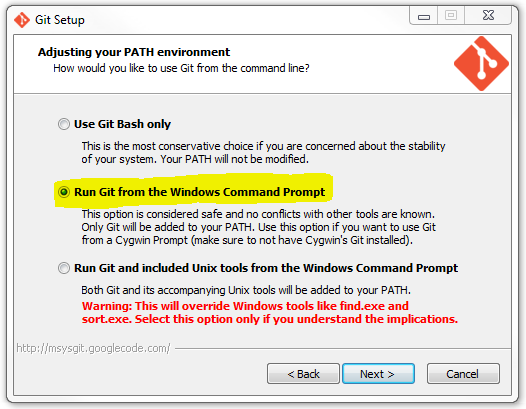
- Windows: Git for Windows is recommended with these settings.
- Mac OS X: Git for Mac is recommended.
- GNU/Linux: Install the package
git:-
Debian/Ubuntu using this guide:
sudo add-apt-repository ppa:git-core/ppa sudo apt-get update sudo apt-get install git -
RedHat/CentOS/Fedora:
sudo yum install git
-
To install latest release of Brackets-Git use the built-in Brackets Extension Manager which downloads the extension from the extension registry.
Extension can be configured by opening the Git Panel and clicking the  button.
Alternatively you can use
button.
Alternatively you can use File > Git Settings... in the Brackets menu.
You can find some samples of features here.
Currently Brackets-Git supports these features (this list may be incomplete as we add new features regularly):
init/clone/push/pullcreate/delete/mergebranchesselect/define/deleteremotescheckout/resetcommits- show commits history
- manage different Git settings
- support for Git-FTP (installation instructions)
A comprehensive list of Brackets-Git features is available reading the CHANGELOG.md.
Most of the features available are configurable and it's possible to enable and disable them selectively.
If you can't find the feature you were looking for, feel free to open an issue with your idea(s).
Push/Pull from and to password protected repositories is partially supported, currently it works only with http / https repositories.
The Git Credential Manager for Windows (GCM) is recommended to manage password protected repositories, Brackets-Git will eventually provide better support for them. You'll need to push manually the first time to setup your username/password into the credentials helper.
Instead of typing in your username and password each time you can use SSH connection. To enable it, you should do a one-time setup.
The following manual will help you set up SSH on any operating system: help.github.com/articles/generating-ssh-keys/.
Alternatively you can follow these tips.

Main panel of Brackets Git

History panel of Brackets Git

Details view for a specific commit

Commit dialog

Settings dialog
Please see CONTRIBUTING.md