
Offload the labour. Steer the science.




Website • Quick Start • Pipeline • Agents • CLI
ARK orchestrates 8 specialized AI agents to turn a research idea into a paper — literature search, Slurm experiments, LaTeX drafting, figure generation, and iterative peer review — while you stay in control via CLI, Web Portal, or Telegram.
Give it an idea and a venue. ARK handles the rest.
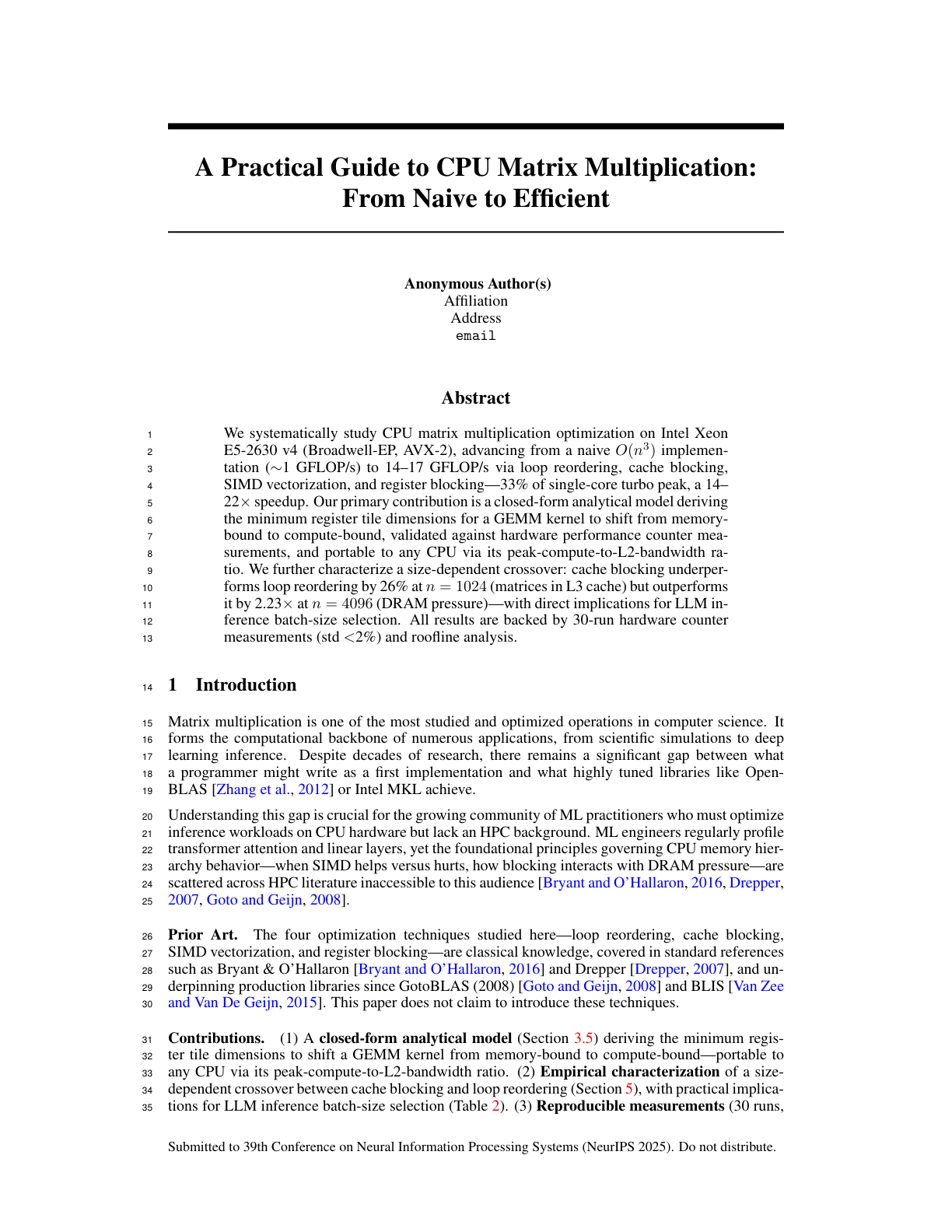
CPU Matrix Multiplication: From Naive to Efficient
NeurIPS format • 6 pages • 14 iterations
ARK runs three phases in sequence. The Review phase loops until the paper reaches the target score.
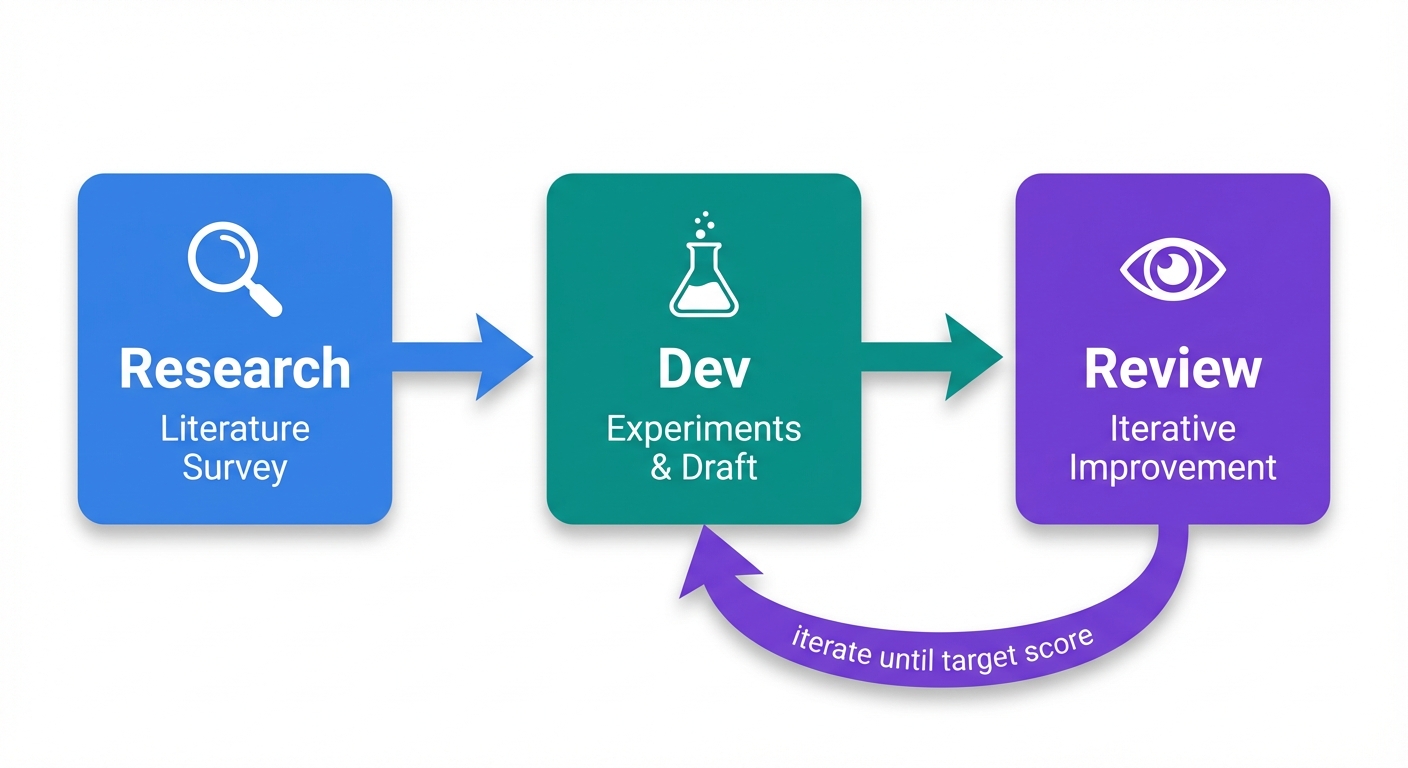
| Phase | What Happens |
|---|---|
| Research | 4-step pipeline: Deep Research → Initializer (bootstrap env & citations) → Planner → Experimenter |
| Dev | Iterative experiment cycle: plan → run on Slurm → analyze → write initial draft |
| Review | Compile → Review → Plan → Execute → Validate, repeating until score ≥ threshold |
Each iteration of the Review phase runs 5 steps:
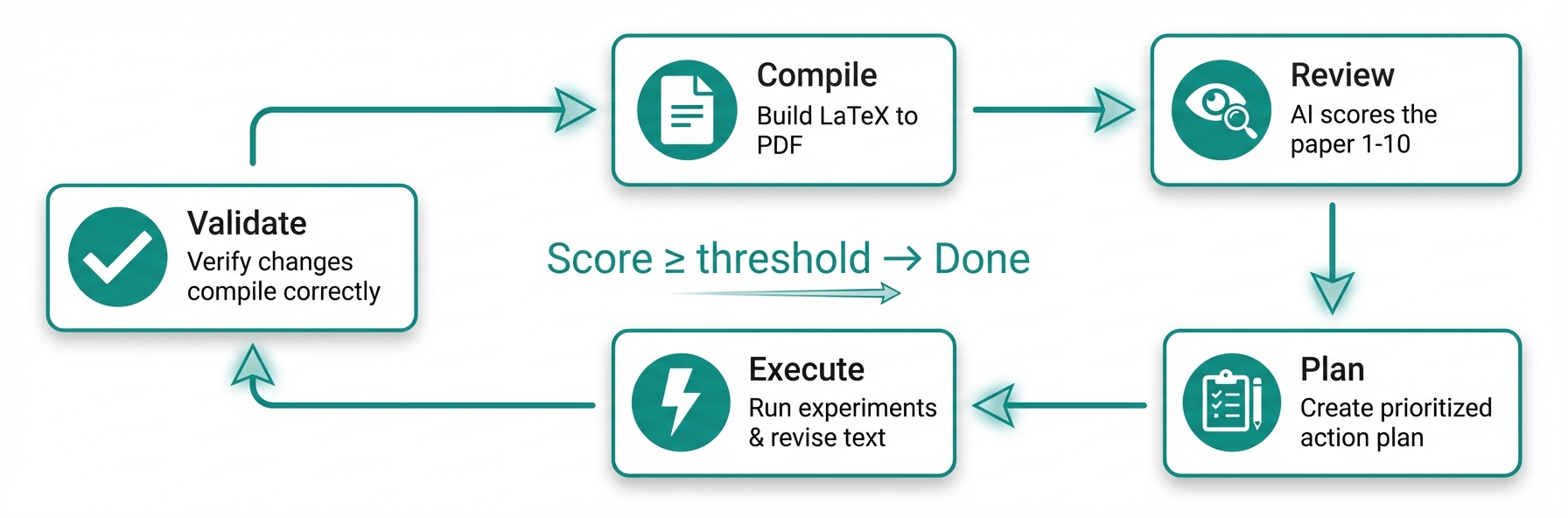
| Step | Description |
|---|---|
| Compile | LaTeX → PDF, page count, page images |
| Review | AI reviewer scores 1–10, lists Major & Minor issues |
| Plan | Planner creates a prioritized action plan |
| Execute | Researcher + Experimenter run in parallel; Writer revises LaTeX |
| Validate | Verify changes compile; recompile PDF |
The loop repeats until the score reaches the acceptance threshold — or you intervene via Telegram.
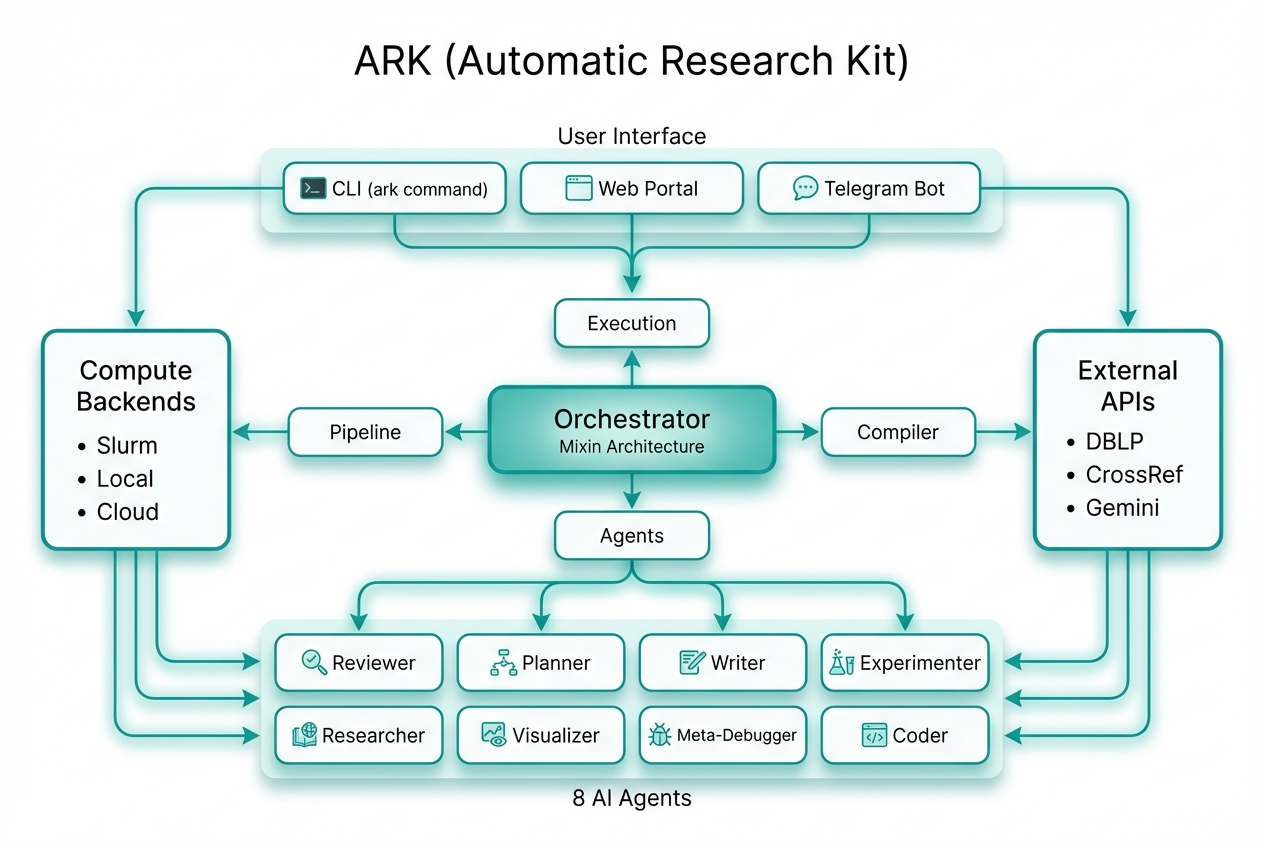
| Agent | Role |
|---|---|
| Reviewer | Scores the paper against venue standards, generates improvement tasks |
| Planner | Turns review feedback into a prioritized action plan |
| Writer | Drafts and refines LaTeX sections with DBLP-verified references |
| Experimenter | Designs experiments, submits Slurm jobs, analyzes results |
| Researcher | Deep literature survey via academic APIs (DBLP, CrossRef, Semantic Scholar) |
| Visualizer | Generates figures with Nano Banana and venue-aware canvas geometry |
| Meta-Debugger | Detects stalls, diagnoses failures, triggers self-repair |
| Coder | Writes and debugs experiment code and analysis scripts |
| Other Tools | ARK | |
|---|---|---|
| Control | Fully autonomous — drifts from intent, no mid-run correction | Human-in-the-loop: pause at key decisions, steer via Telegram or web |
| Formatting | Broken layouts, LaTeX errors, manual cleanup | Hard-coded LaTeX + venue templates (NeurIPS, ACL, IEEE…) |
| Citations | LLMs fabricate plausible-looking references | Every citation verified against DBLP — no fake references |
| Figures | Default styles, wrong sizes, no page awareness | Nano Banana + venue-aware canvas, column widths, and fonts |
| Isolation | Shared env — projects interfere with each other | Per-project conda env, sandboxed HOME, full multi-tenant isolation |
| Integrity | LLMs simulate results instead of running real experiments | Anti-simulation prompts + builtin skills enforce real execution |
Each project runs in its own per-project conda environment, cloned from a base env at project creation. This ensures full multi-tenant isolation:
- Sandboxed Python — per-project
.env/directory with its own packages - Isolated HOME — each orchestrator runs with
HOMEset to the project directory - No cross-contamination —
PYTHONNOUSERSITE=1prevents leaking user-site packages - Automatic provisioning —
ark runand the Web Portal detect and use the project conda env; the pipeline bootstraps it if missing
# The conda env is created automatically on first run.
# ark run will detect and use it:
ark run myproject
# Conda env: /path/to/projects/myproject/.envARK ships with builtin skills — modular instruction sets that agents load at runtime to enforce best practices:
| Skill | Purpose |
|---|---|
| research-integrity | Anti-simulation prompts: agents must run real experiments, not fabricate outputs |
| human-intervention | Escalation protocol: agents pause and ask via Telegram before irreversible actions |
| env-isolation | Enforces per-project environment boundaries |
| figure-integrity | Validates figure content matches data; prevents placeholder or hallucinated plots |
| page-adjustment | Maintains page limits by adjusting content density, not deleting sections |
Skills live in skills/builtin/ and are auto-installed during pipeline bootstrap.
# Install
pip install -e .

# Create a project (interactive wizard)
ark new mma

# Run — ARK takes it from here
ark run mma

# Monitor in real time
ark monitor mma

# Check progress
ark status mma
The wizard walks you through: code directory, venue, research idea, authors, compute backend, figure generation, and Telegram setup.
ark new mma --from-pdf proposal.pdfARK parses the PDF with PyMuPDF + Claude Haiku, pre-fills the wizard, and kicks off from the extracted spec.
| Command | Description |
|---|---|
ark new <name> |
Create project via interactive wizard |
ark run <name> |
Launch the pipeline (auto-detects per-project conda env) |
ark status [name] |
Score, iteration, phase, cost |
ark monitor <name> |
Live dashboard: agent activity, score trend |
ark update <name> |
Inject a mid-run instruction |
ark stop <name> |
Gracefully stop |
ark restart <name> |
Stop + restart |
ark research <name> |
Run Gemini Deep Research standalone |
ark config <name> [key] [val] |
View or edit config |
ark clear <name> |
Reset state for a fresh start |
ark delete <name> |
Remove project entirely |
ark setup-bot |
Configure Telegram bot |
ark list |
List all projects with status |
ark webapp install |
Install web portal service |
ARK includes a web-based portal for managing projects, viewing scores, and steering agents. The portal shows live phase badges (Research / Dev / Review), per-project conda env status, and real-time cost tracking.
The web app is configured via webapp.env located in your ARK config directory (default: .ark/webapp.env in the project root). This file is created automatically on the first run of ark webapp.
- SMTP: Required for "Magic Link" login. Set
SMTP_HOST,SMTP_USER, andSMTP_PASSWORD. - Restrictions: Use
ALLOWED_EMAILS(specific users) orEMAIL_DOMAINS(entire organizations) to limit access. - Google OAuth: Optional. Set
GOOGLE_CLIENT_IDandGOOGLE_CLIENT_SECRET.
| Command | Description |
|---|---|
ark webapp |
Start the app in the foreground (useful for debugging). |
ark webapp release |
Tag the current code and deploy to the production worktree. |
ark webapp install [--dev] |
Install and start as a systemd user service. |
ark webapp status |
Show status of the systemd service. |
ark webapp restart |
Restart the webapp service. |
ark webapp logs [-f] |
View or tail service logs. |
Service Details (Prod vs. Dev)
| Prod | Dev | |
|---|---|---|
| Port | 9527 | 1027 |
| Service Name | ark-webapp |
ark-webapp-dev |
| Conda Env | ark-prod |
ark-dev |
| Code Source | ~/.ark/prod/ (pinned) |
Current repository (live) |
Direct orchestrator invocation
python -m ark.orchestrator --project mma --mode paper --max-iterations 20
python -m ark.orchestrator --project mma --mode devark setup-bot # one-time: paste BotFather token, auto-detect chat IDWhat you get:
- Rich notifications — formatted score changes, phase transitions, agent activity, and errors
- Send instructions — steer the current iteration in real time
- Request PDFs — latest compiled paper sent to chat
- Human intervention — agents escalate decisions to you before irreversible actions
- HPC-friendly — handles self-signed SSL certificates on enterprise/HPC networks
- Python 3.9+ with
pyyamlandPyMuPDF - Claude Code CLI installed and authenticated
- Claude Max subscription recommended — very token-intensive
- Optional: LaTeX (
pdflatex+bibtex), Slurm,google-genaifor AI figures
# Set up the conda base environment
conda env create -f environment.yml         # Linux (creates "ark-base")
# OR for macOS:
conda env create -f environment-macos.yml   # macOS (creates "ark-base")

pip install -e .                    # Core
pip install -e ".[research]" # + Gemini Deep Research & Nano BananaNeurIPS • ICML • ICLR • AAAI • ACL • IEEE • ACM SIGPLAN • ACM SIGCONF • LNCS • MLSys • USENIX — plus aliases for PLDI, ASPLOS, SOSP, EuroSys, OSDI, NSDI, INFOCOM, and more.
Built by SANDS Lab, KAUST