The basic skeleton of the project is created without any external dependencies. If you would like to create similar project to learn about Flutter widgets, you can reuse all the codes of the base branch. I hope it is useful to you and save you some efforts and times.
Note: While the code in the base branch still working fine, the Fluwix no longer using the code structure described below. Please refer to the lib/main.dart of the main branch for latest code structure and the blog post to find out the reason I adopted flutter_modular package.
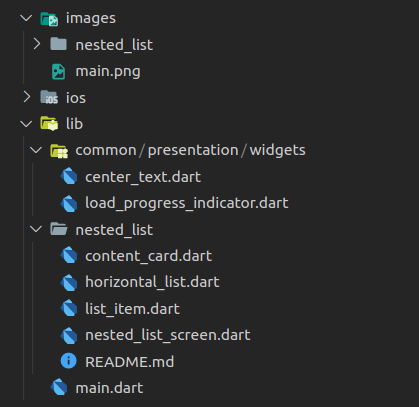
The project following certain naming conventions and directory stucture as per the following image and description:
-
The
common/presentation/widgetsdirectory stored the codes of reusable widgets of the project -
Each widget will be coded in separate branch and come with it's own
README.mdfile. The recommended naming convention is the directory name inlibandimagesdirectory is same with the branch name and the main file of the widget isbranch_name_screen. -
The
nested_listis a good example on the image above and please check out the branch.
In the lib\main.dart file:
- Add the name of new widget to the
nameslist:
    List<String> names = [
      'Nested List',
      'Tab Buttons',
      'Stock Chart',
      'New Widget', // example
];- Open the new widget's screen in
onTapevent of the list view,3is the position of new widget innameslist:
    onTap: () {
        switch (position) {
        case 0:
            _gotoScreen(context, NestedListScreen());
            break;
        case 3: // example
            _gotoScreen(context, NewWidgetScreen()); // example
            break; // example
        }
    },