| layout | documentation |
|---|---|
| title | ADC-T3000 - ZWave |
{% include base.html %}
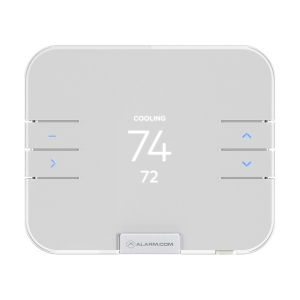
This describes the Z-Wave device ADC-T3000, manufactured by Building 36 Technologies with the thing type UID of building36_adct3000_00_000.
The device is in the category of HVAC, defining Air condition devices, Fans.
The ADC-T3000 supports routing. This allows the device to communicate using other routing enabled devices as intermediate routers. This device is unable to participate in the routing of data from other devices.
- Intelligently Connected with Alarm.com (Alarm.com account required)
- Remote Access and Control
- Custom Schedules
- Critical Temperature Alerts and Geo-Services Automation
- Can be paired with Alarm.com Temperature Sensor ADC-S2000-T-RA for enhanced climate control and improved energy savings (sold separately)
- Press the MENU button.
- Select SETTINGS.
- Select NETWORK.
- Select ADD.
- Thermostat will display "Network Add In Progress" and the 4-digit DSK pin. The pin can be used for S2 inclusion.
- Press the MENU button.
- Select SETTINGS.
- Select NETWORK.
- Select REMOVE.
- MENU (top left): Access options to change the mode, fan, settings, and other features.
- SELECT (bottom left): Select options in the MENU.
- UP (top right): Adjust set point up or navigate the MENU.
- DOWN (bottom right): Adjust set point down or navigate the MENU.
- HEAT: Will activate the heating system.
- COOL: Will activate the air conditioner.
- AUTO: Will select either the HEAT or COOL mode automatically.
- EMER: For use with heat pumps only. Will bypass the heat pump and enable auxiliary/emergency heat.
- OFF: The system will not heat or cool.
The following table summarises the channels available for the ADC-T3000 -:
| Channel Name | Channel ID | Channel Type | Category | Item Type |
|---|---|---|---|---|
| Sensor (relative humidity) | sensor_relhumidity | sensor_relhumidity | Humidity | Number |
| Sensor (voltage) | sensor_voltage | sensor_voltage | Number | |
| Sensor (temperature) | sensor_temperature | sensor_temperature | Temperature | Number:Temperature |
| Thermostat mode | thermostat_mode | thermostat_mode | Temperature | Number |
| Operating State | thermostat_state | thermostat_state | Temperature | Number |
| Setpoint (cooling) | thermostat_setpoint | thermostat_setpoint | Heating | Number:Temperature |
| Setpoint (heating) | thermostat_setpoint | thermostat_setpoint | Heating | Number:Temperature |
| Thermostat fan mode | thermostat_fanmode | thermostat_fanmode | ||
| Thermostat fan state | thermostat_fanstate | thermostat_fanstate | ||
| Alarm (power) | alarm_power | alarm_power | Energy | Switch |
| Alarm (system) | alarm_system | alarm_system | Switch | |
| Battery Level | battery-level | system.battery_level | Battery | Number |
| Clock Time Offset | time_offset | time_offset | Time | Number |
Indicates the current relative humidity.
The sensor_relhumidity channel is of type sensor_relhumidity and supports the Number item and is in the Humidity category. This is a read only channel so will only be updated following state changes from the device.
Indicates the current voltage.
The sensor_voltage channel is of type sensor_voltage and supports the Number item. This is a read only channel so will only be updated following state changes from the device.
Indicates the current temperature.
The sensor_temperature channel is of type sensor_temperature and supports the Number:Temperature item and is in the Temperature category.
Sets the thermostat.
The thermostat_mode channel is of type thermostat_mode and supports the Number item and is in the Temperature category.
The following state translation is provided for this channel to the Number item type -:
| Value | Label |
|---|---|
| 0 | Off |
| 1 | Heat |
| 2 | Cool |
| 3 | Auto |
| 4 | Aux Heat |
| 5 | Resume |
| 6 | Fan Only |
| 7 | Furnace |
| 8 | Dry Air |
| 9 | Moist Air |
| 10 | Auto Changeover |
| 11 | Heat Economy |
| 12 | Cool Economy |
| 13 | Away |
Sets the thermostat operating state.
The thermostat_state channel is of type thermostat_state and supports the Number item and is in the Temperature category.
The following state translation is provided for this channel to the Number item type -:
| Value | Label |
|---|---|
| 0 | Idle |
| 1 | Heating |
| 2 | Cooling |
| 3 | Fan Only |
| 4 | Pending Heat |
| 5 | Pending Cool |
| 6 | Vent / Economiser |
Sets the thermostat setpoint.
The thermostat_setpoint channel is of type thermostat_setpoint and supports the Number:Temperature item and is in the Heating category.
Sets the thermostat setpoint.
The thermostat_setpoint channel is of type thermostat_setpoint and supports the Number:Temperature item and is in the Heating category.
Channel type information on this channel is not found.
Channel type information on this channel is not found.
Indicates if a power alarm is triggered.
The alarm_power channel is of type alarm_power and supports the Switch item and is in the Energy category. This is a read only channel so will only be updated following state changes from the device.
The following state translation is provided for this channel to the Switch item type -:
| Value | Label |
|---|---|
| OFF | OK |
| ON | Alarm |
Indicates if a system alarm is triggered.
The alarm_system channel is of type alarm_system and supports the Switch item. This is a read only channel so will only be updated following state changes from the device.
The following state translation is provided for this channel to the Switch item type -:
| Value | Label |
|---|---|
| OFF | OK |
| ON | Alarm |
Represents the battery level as a percentage (0-100%). Bindings for things supporting battery level in a different format (e.g. 4 levels) should convert to a percentage to provide a consistent battery level reading.
The system.battery-level channel is of type system.battery-level and supports the Number item and is in the Battery category.
This channel provides the battery level as a percentage and also reflects the low battery warning state. If the battery state is in low battery warning state, this will read 0%.
Provides the current time difference for the devices time.
The time_offset channel is of type time_offset and supports the Number item and is in the Time category.
The following table provides a summary of the 6 configuration parameters available in the ADC-T3000. Detailed information on each parameter can be found in the sections below.
| Param | Name | Description |
|---|---|---|
| 1 | HVAC Type | 0=Normal, 1=Heat Pump |
| 2 | Number of Heat Stages / Auxiliary Heat Stages | |
| 3 | Number of Cool Stages / Heat Pump Stages | |
| 4 | Heat Fuel Type | 0=Fossil, 1=Electric |
| 5 | Calibration Temperature | -10°F to 10°F, 1°F increments |
| 6 | Swing | 0°F to 3°F, 0.5°F increments |
0=Normal, 1=Heat Pump
The following option values may be configured, in addition to values in the range 0 to 1 -:
| Value | Description |
|---|---|
| 0 | Normal |
| 1 | Heat Pump |
The manufacturer defined default value is 0 (Normal).
This parameter has the configuration ID config_1_1 and is of type INTEGER.
This is an advanced parameter and will therefore not show in the user interface without entering advanced mode. Values in the range 0 to 3 may be set.
The manufacturer defined default value is 2.
This parameter has the configuration ID config_2_1 and is of type INTEGER.
Values in the range 0 to 2 may be set.
The manufacturer defined default value is 2.
This parameter has the configuration ID config_3_1 and is of type INTEGER.
0=Fossil, 1=Electric
The following option values may be configured, in addition to values in the range 0 to 1 -:
| Value | Description |
|---|---|
| 0 | Fossil |
| 1 | Electric |
The manufacturer defined default value is 1 (Electric).
This parameter has the configuration ID config_4_1 and is of type INTEGER.
-10°F to 10°F, 1°F increments
Values in the range -10 to 10 may be set.
The manufacturer defined default value is 0.
This parameter has the configuration ID config_5_4 and is of type INTEGER.
0°F to 3°F, 0.5°F increments Swing determines how far from the setpoint the temperature is before the thermostat will turn heat/cooling on or off. Values in the range 0 to 6 may be set.
The manufacturer defined default value is 1.
This parameter has the configuration ID config_6_0 and is of type INTEGER.
Association groups allow the device to send unsolicited reports to the controller, or other devices in the network. Using association groups can allow you to eliminate polling, providing instant feedback of a device state change without unnecessary network traffic.
The ADC-T3000 supports 1 association group.
The Lifeline association group reports device status to a hub and is not designed to control other devices directly. When using the Lineline group with a hub, in most cases, only the lifeline group will need to be configured and normally the hub will perform this automatically during the device initialisation.
Association group 1 supports 4 nodes.
| Command Class | Comment |
|---|---|
| COMMAND_CLASS_NO_OPERATION_V1 | |
| COMMAND_CLASS_BASIC_V1 | |
| COMMAND_CLASS_SENSOR_MULTILEVEL_V10 | |
| COMMAND_CLASS_THERMOSTAT_MODE_V1 | |
| COMMAND_CLASS_THERMOSTAT_OPERATING_STATE_V1 | |
| COMMAND_CLASS_THERMOSTAT_SETPOINT_V1 | |
| COMMAND_CLASS_THERMOSTAT_FAN_MODE_V1 | |
| COMMAND_CLASS_THERMOSTAT_FAN_STATE_V1 | |
| COMMAND_CLASS_ASSOCIATION_GRP_INFO_V1 | |
| COMMAND_CLASS_DEVICE_RESET_LOCALLY_V1 | |
| COMMAND_CLASS_ZWAVEPLUS_INFO_V1 | |
| COMMAND_CLASS_CONFIGURATION_V1 | |
| COMMAND_CLASS_ALARM_V7 | |
| COMMAND_CLASS_MANUFACTURER_SPECIFIC_V1 | |
| COMMAND_CLASS_POWERLEVEL_V1 | |
| COMMAND_CLASS_FIRMWARE_UPDATE_MD_V1 | |
| COMMAND_CLASS_BATTERY_V1 | |
| COMMAND_CLASS_CLOCK_V1 | |
| COMMAND_CLASS_ASSOCIATION_V2 | |
| COMMAND_CLASS_VERSION_V2 |
Did you spot an error in the above definition or want to improve the content? You can contribute to the database here.