| title | How to Create API Docs That Developers Actually Understand? |
|---|---|
| seoTitle | How to Create API Documentation? |
| seoDescription | Learn to create clear API documentation for developers and teams, with best practices, avoiding common mistakes, and enhancing Developer Experience |
| datePublished | Wed Mar 19 2025 02:23:50 GMT+0000 (Coordinated Universal Time) |
| cuid | cm8fatfcy000509l44xnl2jg1 |
| slug | how-to-create-api-doc-that-developers-actually-understand |
| cover | https://cdn.hashnode.com/res/hashnode/image/upload/v1741872374892/fda92496-1c50-43a1-ae11-b064f17cf36c.png |
| ogImage | https://cdn.hashnode.com/res/hashnode/image/upload/v1742350937814/86867bcb-b3f7-48e0-a46b-250e23b516ea.png |
| tags | management, documentation, community, apis, best-practices, rest-api, product-management, openapi, devrel, developer-experience, technical-documentation, technical-writing-1, documentationbestpractices, apidocumentation, khushitrivedi |

API documentation isn’t just for developers—it serves multiple teams, including managers, team leads, and product professionals. In the case of Developers, straightforward API docs can help them quickly understand development and execution. Whereas, the team managers can benefit from the streamlined onboarding and collaboration it serves. Product teams can find good documentation to be an opportunity for lesser support overhead, and upgrading the Dev-Experience (DevEx).
Well, thinking practically, it would take hours to integrate an API with vague instructions, missing examples, and too much information dumping. Poor documentation can directly lead to confusion and a huge influx of support tickets.
This blog focuses on helping you understand what not to do for constructing a meaningful API Documentation.
Your clients might judge the product simply based on how clear and considerate your documentation appears. In that case, a suitably guided effort must be given for documenting, along with preparing the actual product.
-
Lack of clarity or examples – Devs rely on working examples and clear references to understand API behavior quickly. Without them, trial and error becomes the default approach, and nobody has the time and bandwidth for that!
-
Outdated info – Missing endpoints, blurry parameters, or old versioning for media, links, etc. are a huge turn-off.
-
Intricate Explanations or Minimal Docs – Too much jargon, without any practical context, is another red flag. Verbosity can alienate the developers, while oversimplified documentation fails to answer critical questions.
-
No error handling guidance – Debugging becomes a nightmare when APIs don’t provide clear error messages or expected responses.

Well, by being empathetic to your clients, you can literally save their time, help them adopt & develop faster, lessen support tickets, and reduce operational costs!

Conducting initial research on your organization's documentation structure is a crucial step before beginning the drafting process. Well, in the case of API References, the structure must be best aligned with how developers, teams, product professionals, and other stakeholders would interact with it.
Based on first-look-judgment (structure), the reader decides how long they will stay engaged with your API documentation!
To ensure your API documentation caters to developers, product teams, and managers, refer to the table below for a structured and effective approach:
| Elements | Use-Case |
|---|---|
| Description or By-Line | Start with a brief description of the API, including what the API does, its core functionality, and the intended audience. This section sets expectations and shows legitimacy. |
| Security & Authentication | Authentication verifies user identity. Your API docs should detail how users authenticate with the API, including supported authentication methods (like: API keys, OAuth, JWT, Basic Auth, etc.), tokens or headers for the API, steps, and sample requests. |
| Authorization | Once authenticated, users may have different levels of access (role-based access control, scope-based permissions, etc.)Your API Reference must mention these access mechanisms, and their sample requests/responses. |
| Endpoints & Methods | Each endpoint should be listed with: HTTP method, endpoint path, query parameters, response structure, status code, sample responses, and the last updated info |
| Error Handling | Include common error codes, potential issues, and troubleshooting guidance at the end of each reference. This helps reduce debugging time for developers and support teams. |
| Rate Limits & Quotas | Define API rate limits and usage quotas. This avoids unexpected throttling & helps product teams plan efficient API usage. |
| Best Practices | Give some product-specific best practices in your API docs, for seamless integration and to avoid unnecessary requests. |
| Code Examples | Demonstrate the API requests, response handling, and implementation with examples in programming languages like: Python, Ruby, PHP, Node, etc. |
| Localization (if any) | Supported languages, formatting, & fallback mechanisms for any unsupported locales. |
| Versioning & Deprecation Policies | Try to include the versioning strategy (v1, v2, date-based, etc.), deprecation timelines, and migration guidelines. |
| Use Cases | For product professionals, API references simplify capabilities & limitations. That’s very helpful in the case for product planning. |

-
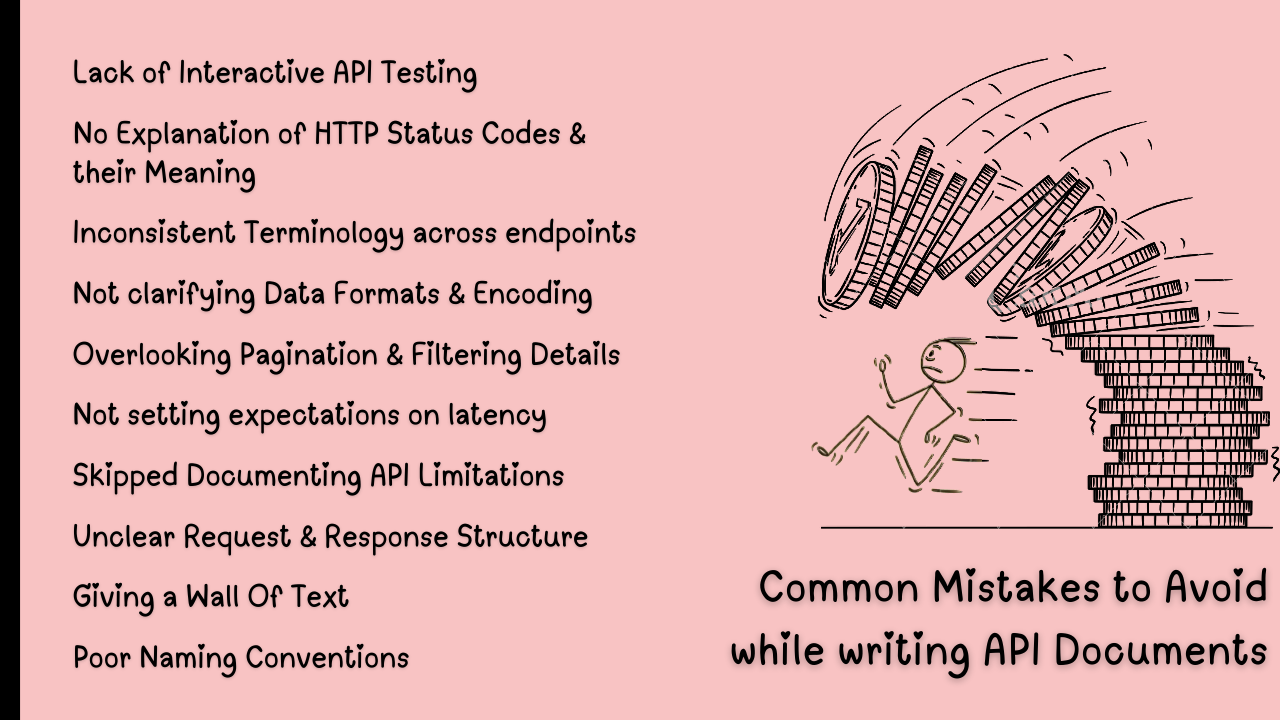
Using Inconsistent Terminology across endpoints:
For instance: using
user_idin one place andidin another. Make sure to proofread always! -
Giving a Wall Of Text:
instead of bullets, headers, code snippets, etc. -
Unclear Request & Response Structure:
missing out on thedata typesandrequiredfields in the docs is a pretty common mistake. -
Lack of Interactive API Testing:
Kindly use interactive playgrounds in your API Docs like:Swagger/OpenAPI sandboxorPostman collectionfor quick testing. -
Not clarifying Data Formats & Encoding:
whether the API supportsJSON,XML, or other formats. -
Overlooking Pagination & Filtering Details:
missing out on ‘how to paginate or filter the results‘ (limit,offset,cursor-based pagination). -
No Explanation of HTTP Status Codes & Their Meaning:
Another common error can also be using only generic400/500errors (ignoring422,409) and not listing about the HTTP methods (GET,POST,DELETE, etc.) -
Poor Naming Conventions:
the mistake could be mixing camelCase,snake_caseandkebab-caseacross parameters. Or, using unclear endpoint names (e.g:/getUserDatainstead of/users/{id}) -
Skipped Documenting API Limitations:
including max payload sizes, concurrency limits, etc. -
Not setting expectations on latency:
For instance:Average response time < 200ms& skipping performance considerations forbulk requests
API documentation isn’t just a reference—it’s a critical touchpoint that comes foremost considering the Developer Experience (DevEx). All you need is a good and reliable API Reference for rapid product adoption within your stakeholders and developer community :)
Thanks for giving it a read! 👍
I’m a Professional DevRel and an Open-Source Technical Writer. If you found this article valuable, follow my blogs for more such tech content.❤️