ddddocr rust version.
ocr_api_server rust version.
Binary version, CAPTCHA recognition, does not depend on opencv library, cross-platform operation.
a simple OCR API server, very easy to deploy.




An easy-to-use general-purpose verification code recognition rust library
·
Report a Bug
·
Suggest New Features
- Introduction
- Table of Contents
- Environment Support
- Installation steps
- User Documentation
- ocr_api_server example
- Difficult and complicated cases
| System | CPU | GPU | Remarks |
|---|---|---|---|
| Windows 64-bit | √ | ? | Some versions of Windows require installing vc runtime library |
| Windows 32-bit | √ | ? | Static linking is not supported. Some versions of Windows require installing vc runtime library |
| Linux 64 / ARM64 | √ | ? | May need to upgrade the glibc version, upgrade glibc version |
| Linux 64 / MUSL | √ | ? | No glibc required, statically linked |
| Linux 32 | × | ? | |
| Macos X64 | √ | ? | M1/M2/M3 ... Chip reference #67 |
lib.rs implements ddddocr.
main.rs implements ocr_api_server.
model directory is the model and character set.
Depend on this library ddddocr = {git = "https://github.com/86maid/ddddocr.git", branch = "master"}
Enable cuda feature ddddocr = { git = "https://github.com/86maid/ddddocr.git", branch = "master", features = ["cuda"] }
Supports static and dynamic linking, uses static linking by default, and will automatically download the link library during construction. Please set up the proxy. The cuda feature does not support static linking (it will download the dynamic link library itself).
If you have more questions, please jump to the Troubleshooting section.
If you don't want to build from source code, here is a compiled binary version.
You can also use the configured Github Action for building.
Mainly used to recognize single-line text, which occupies the main part of the image, such as common alphanumeric verification codes. This project can handle Chinese, English (with random case or by setting the range to specify case), numbers, and certain special characters.
let image = std::fs::read("target.png").unwrap();
let mut ocr = ddddocr::ddddocr_classification().unwrap();
let res = ocr.classification(image).unwrap();
println!("{:?}", res);let image = std::fs::read("target.png").unwrap();
let mut ocr = ddddocr::ddddocr_classification_old().unwrap();
let res = ocr.classification(image).unwrap();
println!("{:?}", res);classification_with_png_fix(image, true);
Supports the following preset colors: red, blue, green, yellow, orange, purple, cyan, black, white, gray.
let ddddocr = ddddocr_classification().unwrap();

// Keep only green
println!(
    "{}",
    ddddocr
    .classification_with_filter(include_bytes!("../image/4.png"), "green")
    .unwrap()
);

// Only keep red and green
println!(
    "{}",
    ddddocr
    .classification_with_filter(include_bytes!("../image/4.png"), ["red", "green"])
    .unwrap()
);

// HSV range, each element is a (min_hsv, max_hsv) tuple.
println!(
    "{}",
    ddddocr
    .classification_with_filter(
        include_bytes!("../image/4.png"),
        [((40, 50, 50), (80, 255, 255))]
    )
    .unwrap()
);


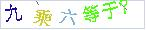
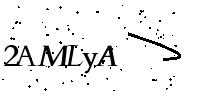



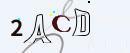



let image = std::fs::read("target.png").unwrap();
let mut det = ddddocr::ddddocr_detection().unwrap();
let res = det.detection(image).unwrap();
println!("{:?}", res);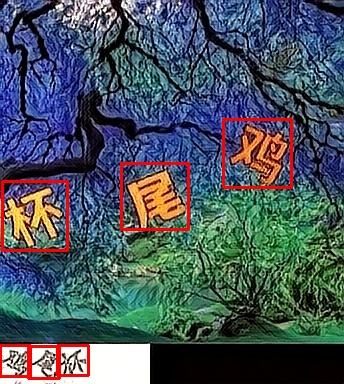
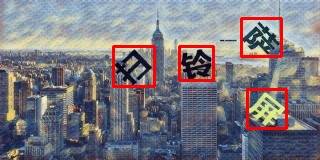
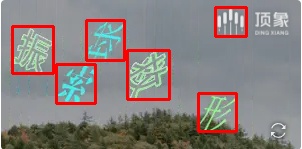
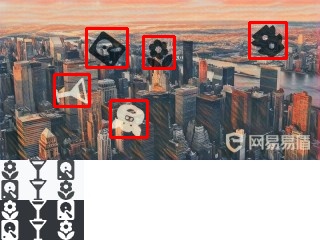
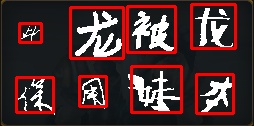
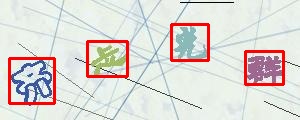
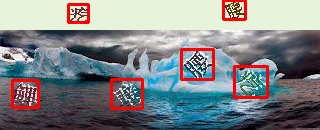
The above are just the click verification code images I can currently find, and I have done a simple test.
The algorithm is not implemented with a deep neural network.
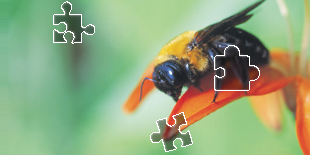
The small slider is a separate PNG image with a transparent background, as shown below:

Then the background has a small slider slot, as shown below:
let target_bytes = std::fs::read("target.png").unwrap();
let background_bytes = std::fs::read("background.png").unwrap();
let res = ddddocr::slide_match(target_bytes, background_bytes).unwrap();
println!("{:?}", res);
If the small image does not have too much background, you can use simple_slide_match, usually in jpg or bmp format.
let target_bytes = std::fs::read("target.png").unwrap();
let background_bytes = std::fs::read("background.png").unwrap();
let res = ddddocr::simple_slide_match(target_bytes, background_bytes).unwrap();
println!("{:?}", res);One image is the original image with a pit, as shown below:

One image is the original image, as shown below:

let target_bytes = std::fs::read("target.png").unwrap();
let background_bytes = std::fs::read("background.png").unwrap();
let res = ddddocr::slide_comparison(target_bytes, background_bytes).unwrap();
println!("{:?}", res);In order to provide more flexible control and range limitation of OCR results, the project supports range limitation of OCR results.
You can return the probability of the full character table by calling classification_probability.
Of course, you can also limit the returned results by setting the output character range through set_ranges.
| Parameter Value | Meaning |
|---|---|
| 0 | Pure integer 0-9 |
| 1 | Pure lowercase letters a-z |
| 2 | Pure uppercase letters A-Z |
| 3 | Lowercase letters a-z + Uppercase letters A-Z |
| 4 | Lowercase letters a-z + Integers 0-9 |
| 5 | Uppercase letters A-Z + Integers 0-9 |
| 6 | Lowercase letters a-z + Uppercase letters A-Z + Integers 0-9 |
| 7 | Default character library - Lowercase letters a-z - Uppercase letters A-Z - Integers 0-9 |
If the value is of type string, please pass in a piece of text that does not contain spaces, where each character is a candidate word, for example: "0123456789+-x/="
let image = std::fs::read("image.png").unwrap();
let mut ocr = ddddocr::ddddocr_classification().unwrap();

// The number 3 corresponds to the enumeration CharsetRange::LowercaseUppercase, no need to write the enumeration
// ocr.set_ranges(3);

// Set the global character set
ocr.set_ranges("0123456789+-x/=");

// Or, the character set for single recognition
// ocr.classification_probability_with_ranges(image, "0123456789+-x/=");

let result = ocr.classification_probability(image).unwrap();

println!("Recognition result: {}", result.get_text());
println!("Recognition confidence: {}", result.get_confidence());

// Oh, it seems there's a bit too much data, be careful of freezing!
println!("Probability: {}", result.json());Supports importing custom models trained with dddd_trainer.
use ddddocr::*;

let mut ocr = Ddddocr::with_model_charset(
"myproject_0.984375_139_13000_2022-02-26-15-34-13.onnx",
"charsets.json",
)
.unwrap();
let image_bytes = std::fs::read("888e28774f815b01e871d474e5c84ff2.jpg").unwrap();
let res = ocr.classification(&image_bytes).unwrap();
println!("{:?}", res);Usage: ddddocr.exe [OPTIONS]
Options:
--address <ADDRESS>
Listening address. [default: 0.0.0.0:8000]
--mcp
mcp protocol support, mutually exclusive with only_mcp.
--only-mcp
Only enable mcp protocol, do not enable normal routing, mutually exclusive with mcp.
--ocr
Enable content recognition, mutually exclusive with old.
--old
Enable the old version of model content recognition, which is mutually exclusive with OCR.
--det
Enable object detection.
--slide
Enable slider and pit recognition.
--ocr-charset-range <OCR_CHARSET_RANGE>
Global default character set, used for probability recognition. If the API does not provide a character set, this parameter is used. When the value is 0~7, it means selecting the built-in character set. Other values indicate a custom character set, such as "0123456789+-x/=". If not set, the complete character set is used without restrictions.
--ocr-path <OCR_PATH>
Content recognition model and character set path. If you have enabled the inline-model option of features (enabled by default), you don't need to care about this option unless you want to use a custom model. The model model/common.onnx and the character set model/common.json must have the same name. [default: model/common.onnx]
--det-path <DET_PATH>
Target detection model path. If you have enabled the `inline-model` option for features (enabled by default), you don't need to worry about this option unless you want to use a custom model. [default: model/common_det.onnx]
--acme <ACME>
Enter your domain name to automatically obtain SSL certificates, i.e., HTTPS support.
-h, --help
Print help# Start all functions
ddddocr.exe --address 0.0.0.0:8000 --ocr --det --slide --mcp
# View all options
ddddocr.exe --help| Endpoint | Method | Description |
|---|---|---|
/ocr |
POST | Perform OCR recognition |
/det |
POST | Perform object detection |
/slide-match |
POST | Slider matching algorithm |
/slide-comparison |
POST | Slider comparison algorithm |
/status |
GET | Get current service status |
/docs |
GET | Swagger UI documentation |
--> 200 GET /status

curl -X GET "http://127.0.0.1:8000/status"

{"code":200,"msg":"success","data":{"service_status":"running","enabled_features":["ocr","det","slide"]}}

--> 200 POST /ocr

curl -X POST "http://127.0.0.1:8000/ocr"
-H "Content-Type: application/json"
-d '{"image": "base64 image"}'

{"code":200,"msg":"success","data":{"text":"What is nine times six?","probability":null}}

--> 200 POST /det

curl -X POST "http://127.0.0.1:8000/det"
-H "Content-Type: application/json"
-d '{"image": "base64 image"}'

{"code":200,"msg":"success","data":{"bboxes":[[80,3,98,21],[56,6,76,25],[31,7,51,26],[2,2,21,22],[100,0,127,18]]}}

--> 200 POST /slide-match

curl -X POST "http://127.0.0.1:8000/slide-match"
-H "Content-Type: application/json"
-d '{"target_image": "base64 image", "background_image": "base64 image", "simple_target": true}'

{"code":200,"msg":"success","data":{"target":[215,45,261,91],"target_x":0,"target_y":45}}

--> 200 POST /slide-comparison

curl -X POST "http://127.0.0.1:8000/slide-comparison"
-H "Content-Type: application/json"
-d '{"target_image": "base64 image", "background_image": "base64 image"}'

{"code":200,"msg":"success","data":{"x":144,"y":76}}This project supports the MCP (Model Context Protocol), enabling AI Agents to directly invoke the ddddocr service.
Version: 2025-11-25
Endpoint: POST /mcp
Methods: initialize tools/list tools/call
{
    "jsonrpc": "2.0",
    "id": 0,
    "method": "tools/call",
    "params": {
        "name": "ocr",
        "arguments": {"image": "image_b64", "color_filter": "green"},
    },
}{
"jsonrpc": "2.0",
"id": 0,
"result": {
"content": [
{
"type": "text",
"text": "{\"probability\":null,\"text\":\"Equals?\"}"
}
],
"isError": false
}
}It is strongly recommended to use Github Action for building.
Regarding the issue of using cuda.
Both cuda and cuDNN need to be installed.
CUDA 12 builds require cuDNN 9.x.
CUDA 11 builds require cuDNN 8.x.
It is uncertain whether cuda 10 is effective.
Static linking is used by default, and the link library will be automatically downloaded during construction. Please set up the proxy. The cuda feature does not support static linking (it will download the dynamic link library itself).
If you want to specify the path of the static link library, you can set the environment variable ORT_LIB_LOCATION. After setting, the link library will not be downloaded automatically.
For example, if the library path is onnxruntime\build\Windows\Release\Release\onnxruntime.lib, then ORT_LIB_LOCATION is set to onnxruntime\build\Windows\Release.
The download-binaries feature is enabled by default to automatically download the link library.
Most of the download failures are network problems. After enabling the proxy, remember to restart vscode and restart the terminal so that the proxy can use the https_proxy environment variable.
The automatically downloaded link library is stored in C:\Users\<username>\AppData\ort.pyke.io.
Enable dynamic linking feature ddddocr = { git = "https://github.com/86maid/ddddocr.git", branch = "master", features = ["load-dynamic"] }
After enabling the load-dynamic feature, you can use Ddddocr::set_onnxruntime_path to specify the path of the onnxruntime dynamic link library.
After enabling the load-dynamic feature, the onnxruntime link library will not be automatically downloaded during construction.
Please manually download the onnxruntime link library and place it in the program's running directory (or system API directory), so you don't need to call Ddddocr::set_onnxruntime_path again.
Windows static linking failed, please install vs2022.
Linux musl should be compiled with docker.
Linux x86-64 static linking failed, please install gcc11 and g++11, ubuntu ≥ 20.04.
Linux arm64 static linking failed, glibc ≥ 2.35 is required (Ubuntu ≥ 22.04).
macOS static linking failed, macOS ≥ 10.15 is required.
cuda may painc (exit code: 0xc000007b) when executing cargo test. This is because the automatically generated dynamic link library is in the target/debug directory and needs to be manually copied to the target/debug/deps directory (cuda does not currently support static linking).
Dynamic linking requires version 1.18.x of onnxruntime.
For more complex issues, please visit ort.pyke.io.