Conversation


|
Hey @CarlosViniMSouza the Readme.md file is not necessary in the PR, just the changes in data.json is enough, the Readme will be updated by GitHub actions |

 schmelto
left a comment
schmelto
left a comment
schmelto
left a comment
There was a problem hiding this comment.
Could you remove the changes in the readme md like @starlightknown said?
data.json
Outdated
| { | ||
| "name": "Carlos Souza", | ||
| "githubUsername": "CarlosViniMSouza", | ||
| "imageUrl": "https://raw.githubusercontent.com/CarlosViniMSouza/CarlosViniMSouza/main/images/readme_branco.png", |
There was a problem hiding this comment.
| "imageUrl": "https://raw.githubusercontent.com/CarlosViniMSouza/CarlosViniMSouza/main/images/readme_branco.png", | |
| "imageUrl": "https://raw.githubusercontent.com/CarlosViniMSouza/CarlosViniMSouza/main/images/readme_branco.png", |
Please don't use the picture uploaded in your Readme here. Just copy paste the raw image in the issue. This will create a github image link and use this link for adding your picture here. Hope this was understandable 😅
There was a problem hiding this comment.
No, i don't understand, sorry! 😅

|
@CarlosViniMSouza I've added And one other thing you don't have to close an old pr of there are changes in the original repo. Just pull the latest changes of the origin, probably resolve some merge conflicts and you are free to go 🚀 |

|
OK |
|
I removed my profile from README.md |

 starlightknown
left a comment
starlightknown
left a comment
starlightknown
left a comment
There was a problem hiding this comment.
the image link is still the same I think, please do the requested changes
|
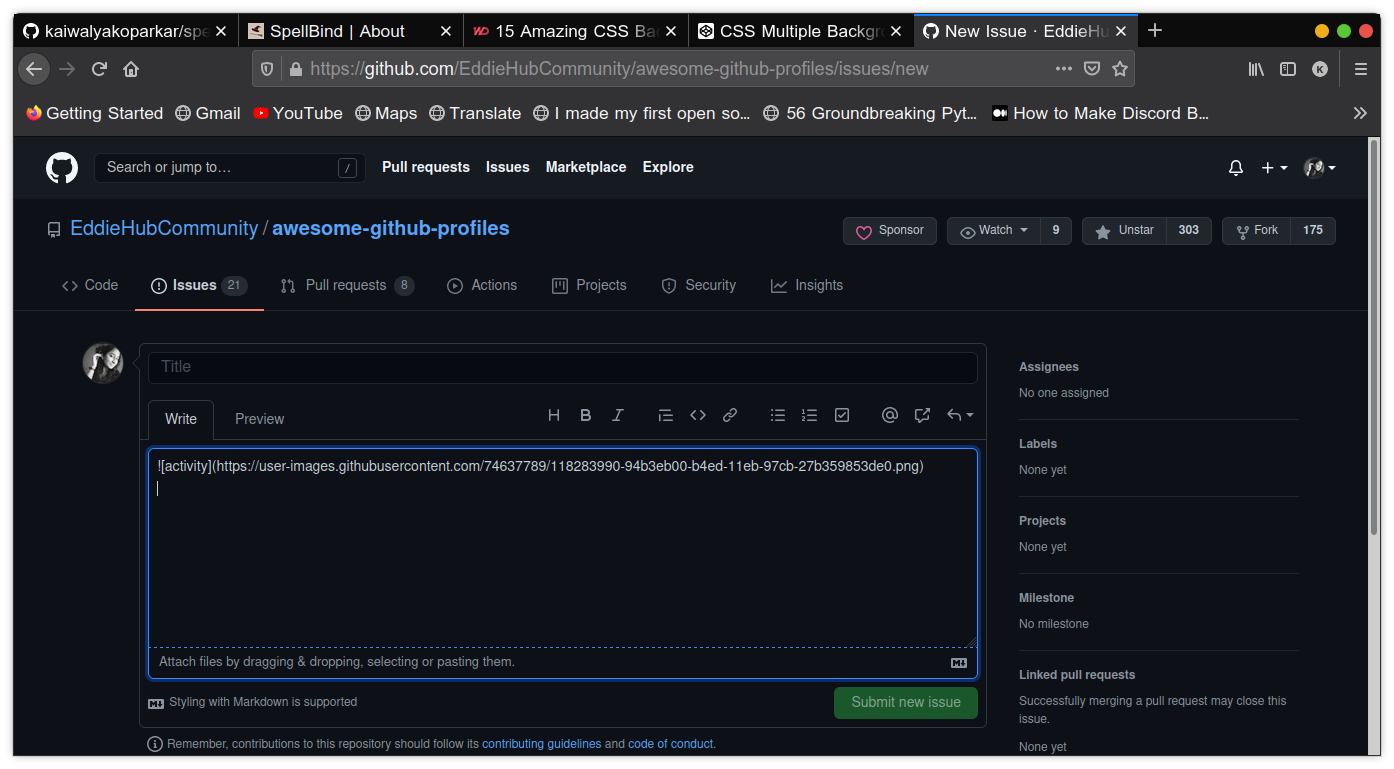
I'll be clear here @CarlosViniMSouza , so when you opened the issue and uploaded the image there you might have seen some url like this in the picture right? you have to copy that url and paste it in this file. see this example |
|
@starlightknown, my problem is that i don't know how to generate this link! |
you don't have to generate it, it generates automatically. could you open an issue and upload a picture and check? send a screenshot here when you upload so that I can explain |

Ok! I will try to explain what @starlightknown is trying to tell. Open the issue and drag and drop the image into the issue section (Where you type the content of the issue). It will upload and look like a link shown by @starlightknown. Hope that helped 😃 |
|
@starlightknown I figured out how to generate this image! I apologize for the inconvenience!😅 ~ I will correct the url-image part of my PR |
great, no worries. we are here to help :) |
|
I should only have done the following: Take screenshot of the screen, open the issue, and in the issue field, do Crtl + V !! 🖖 |
No worries. Hubbers are always ready for help |


|
Thanks @starlightknown and @kaiwalyakoparkar for the great collaboration 🚀 |
|
Guys, could you tell me what 'LGTM' means? (I don't know many English acronyms! 🧐) |
Nothing much it means "Looks good to me" |
|
LGTM - looks good to me |
|
Thanks for information! ✌️🙂 |
4 participants


I would like to add my profile (I had not seen that the original project had inserted a new user, so I had to redo my request).
Resolve #501