

Hey all! Things are changing with my plugins are more and more people start to use them and report issues. In order to make it easier for me to manage I'm splitting bugs and features into different areas. For feature requests please head over to https://features.iamparadox.dev/ where you'll be able to signin with GitHub and make a feature request. For bugs please report them on the relevant GitHub repo and they will be added to the project board when I've seen them. I've found myself struggling to know when issues are made and such recently so I'm also planning to create a system that will monitor a particular view for new issues that come up and send me a notification which should hopefully allow me to keep more up to date and act faster on various issues.
As with a lot of devs, I am very momentum based in my personal life coding and there are often times when these projects may appear dormant, I assure you now that I don't plan to let these projects go stale for a long time, there just might be times where there isn't an update or response for a couple weeks, but I'll try to keep that better than it has been. With all new releases to Jellyfin I will be updating as soon as possible, I have already made a start on 10.11.0 and will release an update to my plugins hopefully not long after that version is officially released!
Home Screen Sections (HSS) is a Jellyfin plugin which allows users to update their web client's home screen to be a bit more dynamic and more "Netflixy".
A lot of the sections included are the base sections that would appear in a vanilla instance of Jellyfin. This has been done because using HSS hasn't been integrated to work side by side with the vanilla home screen and instead wholesale replaces it. Since a lot of the sections are useful and contain everything you'd want in a home screen they've been included for convenience.
NOTE: Its worth noting that the sections that have been created are one's that I myself use for my own instance, if there is a section that's missing/you'd like to request, you can open a feature request on my features dashboard: https://features.iamparadox.dev/ or implement it yourself and open a PR to have it merged or create a plugin that is integrated with this one (see below)!
These vanilla sections are listed here:
- My Media
- Same as vanilla Jellyfin
- Continue Watching
- Same as vanilla Jellyfin
- Next Up
- Same as vanilla Jellyfin
- Recently Added Media
- Mostly the same as vanilla Jellyfin, current exception is that all libraries appear in 1 section rather than unique ones per library. This vanilla behaviour is being worked on and will soon be supported.
- Live TV
- Mostly the same as vanilla Jellyfin. Current State is untested since updating to 10.10.3 so may find that there are issues
The sections that are new for this plugin (and most likely the reason you would use this plugin in the first place) are outlined here:
-
Latest Movies/TV Shows
- These are movies/shows that have recently aired (or released) rather than when they were added to your library.
-
Because You Watched
- Very similar to Netflix's "because you watched" section
-
Watch Again
- Again similar to Netflix's feature of the same name, this will show Movies in a Collection and TV Shows that have been watched to their completion and will provide the user an option to watch the show/movie collection again. The listed entry will be the first movie to be released in that collection (done by Premiere Date) or the first episode in the series.
-
Genre
- Selects a weighted random set of genres based on the users viewing history and displays movies within that genre.
-
Discover
- The discover sections are integrated with Jellyseerr to bring the Discover Movies, Discover Shows and Trending sections of Jellyseerr into Jellyfin. They will only show media that isn't available in your library and have a direct request button right on the card for convenient requesting.
-
My Requests
- Another Jellyseerr integrated section that allows the user to see all their requested media in a single row.
-
Upcoming
- The upcoming sections are integrated into the *arrs to bring their calendars as sections in Jellyfin.
Expand for screenshot of what the home screen can turn into.
Please note: Images have been blurred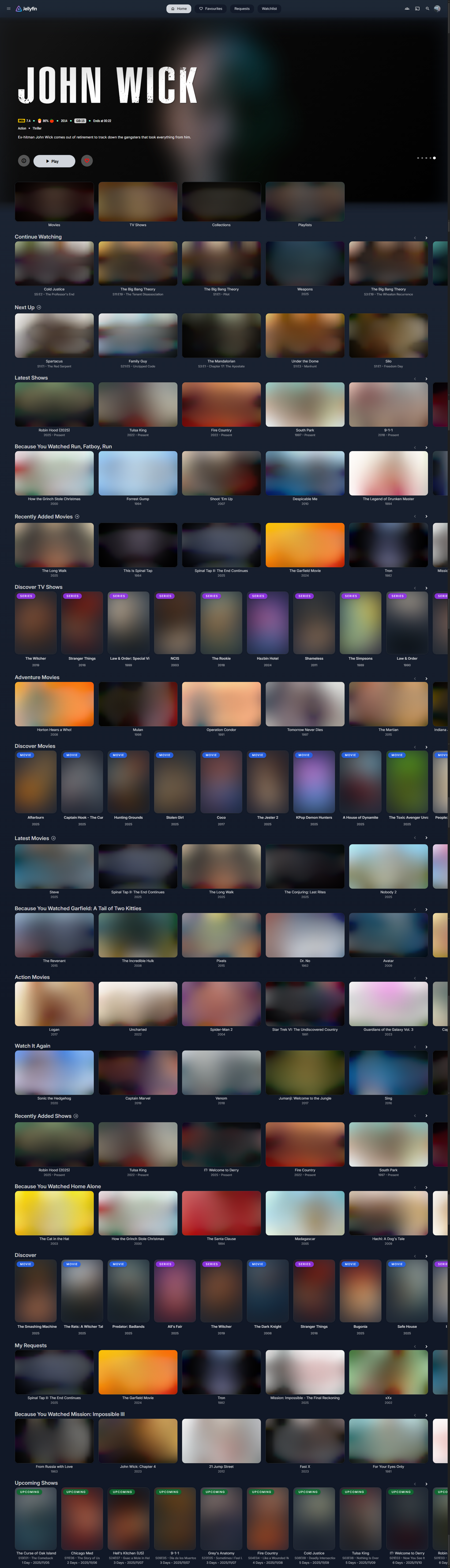
- This plugin is based on at least Jellyfin Version
10.10.7, with 10.11.x also officially supported. - The following plugins are required to also be installed, please following their installation guides, always install the latest versions for the most stable experience:
- Add
https://www.iamparadox.dev/jellyfin/plugins/manifest.jsonto your plugin repositories. - Install
Home Screen Sectionsfrom the Catalogue. - Restart Jellyfin.
- On the user's homepage, open the hamburger menu and you should see a link for settings to "Modular Home". Click this.
- At the top there is a button to enable support and it will retrieve all sections that are available on your instance. Select all that apply.
- Save the settings. Please note currently the user is not provided any feedback when the settings are saved.
- Force refresh your webpage (or app) and you should see your new sections instead of the original ones.
If you find an issue with any of the sections or usage of the plugin, please open an issue on GitHub.
I've updated Jellyfin to latest version but I can't see the plugin available in the catalogue
The likelihood is the plugin hasn't been updated for that version of Jellyfin and the plugins are strictly 1 version compatible. Please wait until an update has been pushed. If you can see the version number in the release assets then please make an issue, but if its not in the assets, please wait. I know Jellyfin has updated, I'll update when I can.
I've installed the plugins and don't get any options or changes. How do I fix?
This is common, particularly on a fresh install. The first thing you should try is the following
- Launch your browsers developer tools

- Open the Network tab across the top bar
- Check the Disable cache checkbox
- Refresh the page while the dev tools are still open

How can I tell if its worked?
The easiest way to confirm whether the user is using the modular home settings is to check whether the movie posters are portrait or landscape. Due to how the cards are delivered from the backend all cards are forced to be landscape
If you would like to help translate this plugin into your language, follow the below steps:
The plugin is setup to support language codes and language + region codes. Please use the ISO 639-1 language codes for file names. If you're including region code as well please format as en-GB where region codes are from ISO 3166.
If you need to add a genre to the translation list, please add it at the bottom of the language file (below the line break) with the below rules:
- Please add the English name to en.json
- Please use the English name for the key
- Please ensure the key has no spaces or dashes
- The key should be in the format
GenreName(e.g.SciFiorGameShowinstead ofSci-FiorGame Show)
- The key should be in the format
- If you are adding a full translation for
<Genre> Moviesplease add the key in the format<Genre>Movies(without the angle brackets) to the very bottom of the file.- See
de.jsonfor an example with "ComedyMovies"
- See
Note
The initial translations were generated using AI and may not be perfect. If you find any issues with the translations, please feel free to open a PR to resolve them; I am unfortunately very monolingual, so I won't be able to spot any issues myself.
- Fork this repository
- Add/Edit the translation file in
src/Jellyfin.Plugin.HomeScreenSections/_Localization - Create a pull request
You're more than welcome to contribute to this plugin in any way that betters it, whether that's new sections or bug/performance fixes! I only ask that you follow the same code style as myself. A few points to note:
- Please don't commit with any whitespace changes, might be worth turning off auto-linters
- Please don't use
varunless you have to due to differing namespaces between JF versions (honestly, I'm not going to gripe for the odd one, but it's good to try at least) - Please at least check the plugin compiles with 10.10.7 and the latest version of JF
- Please put braces on new lines and use them even for 1 line statements
After following these guidelines, please create a pull request and I'll review it as soon as I can. For more complex changes, I may ask you to rebase to the experimental branch to give it extra testing before it gets merged across.
This is great an' all but I want a section that doesn't exist here. Can I make one?
Yep! Home Screen Sections exposes a static interface which can be used to register sections.
Due to issues with Jellyfin's plugins being loaded into different load contexts this cannot be referenced directly. Instead you can use reflection to invoke the plugin directly to register your section.
- Prepare your payload
{
    "id": "00000000-0000-0000-0000-000000000000", // Guid
    "displayText": "", // What text should be displayed by default for your section
    "limit": 1, // The number of times this section can appear up to
    "route": "", // The route that should be linked on the section header, if applicable
    "additionalData": "", // Any accompanying data you want sent to your results handler
	"resultsAssembly": GetType().Assembly.FullName, // Example value is a string from C# that should be resolved before adding to json
	"resultsClass": "", // The name of the class that should be invoked from the above assembly
	"resultsMethod": "" // The name of the function that should be invoked from the above class
}- Send your payload to the home screen sections assembly
Assembly? homeScreenSectionsAssembly =
	AssemblyLoadContext.All.SelectMany(x => x.Assemblies).FirstOrDefault(x =>
		x.FullName?.Contains(".HomeScreenSections") ?? false);

if (homeScreenSectionsAssembly != null)
{
	Type? pluginInterfaceType = homeScreenSectionsAssembly.GetType("Jellyfin.Plugin.HomeScreenSections.PluginInterface");

	if (pluginInterfaceType != null)
	{
		pluginInterfaceType.GetMethod("RegisterSection")?.Invoke(null, new object?[] { payload });
	}
}
When your section results method is invoked you will receive an object representing the following json format (it will try to serialize it to the type you specify in the signature)
{
  "UserId": "", // The GUID of the user that is requesting the section
  "AdditionalData": "" // The additional data you sent in the registration
}
You must make sure that your section results method returns a QueryResult<BaseItemDto>.