


This is a module that exposes the Javascript environment to New Relic. It is important to note that the Native New Relic SDK already collects Crashes, HTTP traffic, and other information because React-Native already uses the respective native components. This Module is an add on to the New Relic Native SDKs.
- There is a working React Native application to monitor or at least a React-Native project setup.
- A Mac is required for use the Xcode IDE
- Access to a New Relic Account with either a trial or full license
- Contact New Relic to have React Native Dashboards Added
Capture JavaScript errors Capture Interactions and the sequence they were created. Pass user information to New Relic to track user sessions.
- inError is JavaScript exception
- userId and screen are text
nrlog(inError)
nrerror(inError)
nrwarning(inError)
nrcritical(inError)
nraddUserId(userId)
nrinteraction(screen)
nrRecordMetric('mycustomeventtable',sampledata) sampledata is a Json
There are three major areas that need to be addressed as part of the installation.
- Install the New Relic Native Android SDK: Link to Doc
-
Please merge the gradle files not replace.
-
Put newrelic.ApplicationToken in the MainApplication not the MainActivity.
After pasteing the NewRelic Code
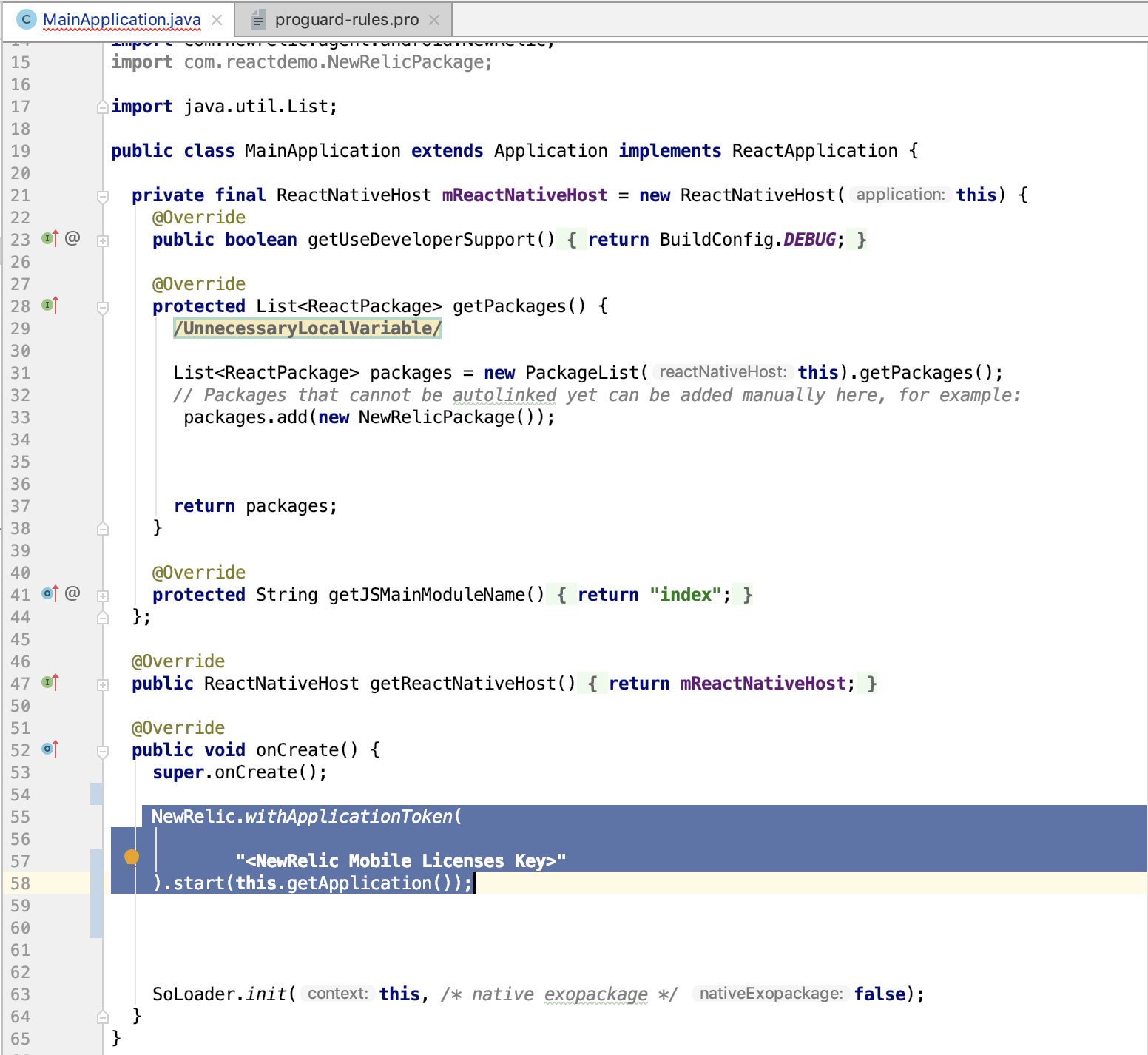
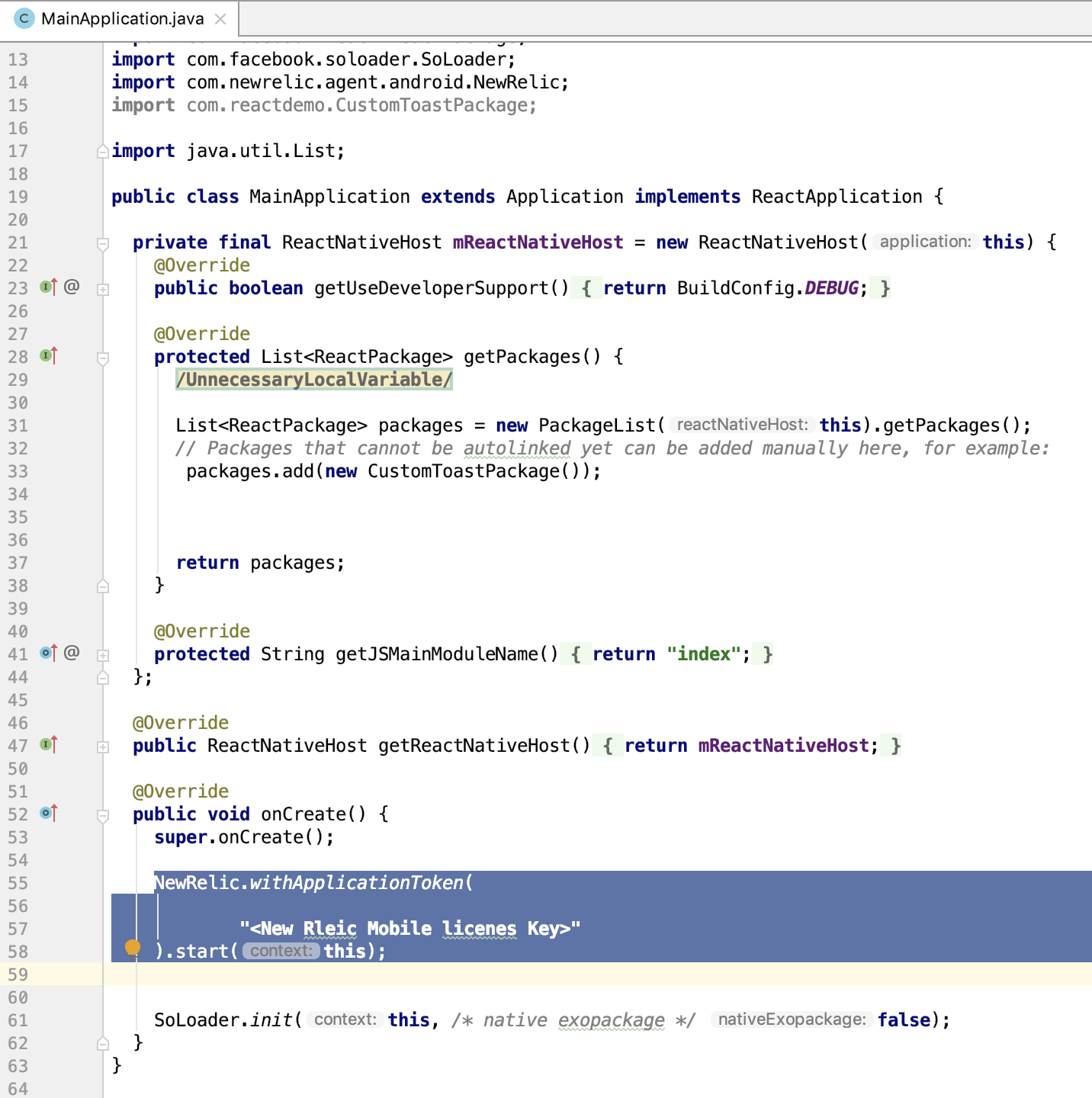
- Remove .getapplication() from the newrelic.ApplicationToken line and leave this;
Should look like this after edit
-
Please add: import com.rnnewrelic.NewRelicPackage;
-
Update:
List<ReactPackage> packages = new PackageList(this).getPackages();
          // Packages that cannot be autolinked yet can be added manually here, for example:
          // packages.add(new MyReactNativePackage());
		  //Add this line for New Rleic
            packages.add(new NewRelicPackage());
          return packages;
- To add New Relic to the Package Manager

- Install the New Relic Native IOS SDK: Link to Doc
-
Point to Note React uses Objective C so use that install process to add SDK
-
Xcode may fail when running pod install. If it does use sudo xcode-select --switch /Applications/Xcode.app then install pod again then install pod again. This points to a differnt location for commandline tools.
- Add the code from the github.
-
Unzip, clone, or copy the files to local system Please review the directory structure.
-
Copy NewRelicRN.js and NewRelicAgentRN.js to the project root
-
Go to the ios folder and copy the rnnewrelic folder to the root of the IOS app
- May need to open the XCode and right click in the project
- Use Add files to add the Objective C files to the project.
-
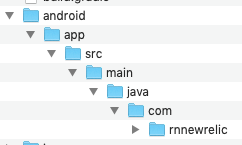
Go to the Android folder and copy the rnnewrelic folder to the same Android location see Image Below
import {createStackNavigator, createAppContainer} from 'react-navigation';
import React, { Component } from 'react';
import { Text, TextInput,View, Button,ActivityIndicator,FlatList } from 'react-native';
// Include this line below to access the New Relic Function
import {nrlog,nrerror,nrwarning,nrcritical,addUserId,nrInit,nrinteraction,nraddUserId} from './NewRelicRN.js'

class ErrorBoundary extends React.Component {
  constructor(props) {
    super(props);
    this.state = {
      error: null,
      errorInfo: null
    };
  }

  componentDidCatch(error, errorInfo) {
    // Catch errors in any child components and re-renders with an error message
    this.setState({
      error: error,
      errorInfo: errorInfo
    });
	// New Relic can be added to the ErrorBoundary
    nrlog(error);
  }

  render() {
    if (this.state.error) {
      // Fallback UI if an error occurs
      return (
        <div>
          <h2>{"Oh-no! Something went wrong"}</h2>
          <p className="red">
            {this.state.error && this.state.error.toString()}
          </p>
          <div>{"Component Stack Error Details: "}</div>
          <p className="red">{this.state.errorInfo.componentStack}</p>
        </div>
      );
    }
    // component normally just renders children
    return this.props.children;
  }
}


class HomeScreen extends React.Component {
  static navigationOptions = {
    title: 'Welcome',
  };

  render() {
  // New Relic can add an interaction line to see what screens are dislayed
    nrinteraction("Welcome");
  // Create Custom event tables in New Relic Insights
    var sampledata = {
                'cityName': 'Philadelphia',
                'zipCode': 19134,
                'username': 'bob',
                'alive': true
              };
    nrRecordMetric('mycustom',sampledata);

    const {navigate} = this.props.navigation;
    return (
      <Button
        title="Go to Good HTTP/s Call Interaction"
        onPress={() => navigate('Gdata', {name: 'Jane'})}
      />

    );
  }
}

class DataScreen extends React.Component {
  static navigationOptions = {
    title: 'Results',
  };

  constructor(props){
        super(props);
        this.state ={ isLoading: true}
      }

      componentDidMount(){
      return fetch('https://facebook.github.io/react-native/movies.json')
        .then((response) => response.json())
        .then((responseJson) => {

          this.setState({
            isLoading: false,
            dataSource: responseJson.movies,
          }, function(){

          });

        })
        .catch((error) =>{
		// logging function can be added here as well

           console.error(error);
		   nrlog(error);
        });
    }


    render() {
	// New Relic can add the user to collect what sessions are related to the user
      nraddUserId("bob");

	   // New Relic can add an interaction line to see what screens are dislayed
      nrinteraction("Results");
      if(this.state.isLoading){
        return(
          <View style={{flex: 1, padding: 20}}>
            <ActivityIndicator/>
          </View>
        )
      }

      return (

        <View style={{ flex: 1, alignItems: "center", justifyContent: "center" }}>
          <Text>Data Screen</Text>
          <Button onPress={() => this.props.navigation.navigate('Bdata')} title="Bad HTTP error"/>
          <Button onPress={() => this.props.navigation.navigate('Home')} title="HOME"/>
          <Button onPress={() => console.log(b)} title="Error"/>

          <FlatList
            data={this.state.dataSource}
            renderItem={({item}) => <Text>{item.title}, {item.releaseYear}</Text>}
            keyExtractor={({id}, index) => id}
          />
        </View>
      );
    }
}
class BadDataScreen extends React.Component {
  static navigationOptions = {
    title: 'Dataset',
  };
      constructor(props){
        super(props);
        this.state ={ isLoading: true}
      }

      componentDidMount(){
      return fetch('https://facebook.github.io/react-native/moviessssssssss.json')
        .then((response) => response.json())
        .then((responseJson) => {

          this.setState({
            isLoading: false,
            dataSource: responseJson.movies,
          }, function(){

          });

        })
        .catch((error) =>{
          console.error(error);
		  // logging function can be added here as well
          nrlog(error);
        });
    }

    render() {
      nrinteraction("Dataset");
      if(this.state.isLoading){
        return(
          <View style={{flex: 1, padding: 20}}>

            <ActivityIndicator/>
          </View>
        )
      }

      return (

        <View style={{ flex: 1, alignItems: "center", justifyContent: "center" }}>
          <Text>Data Screen</Text>
          <Button onPress={() => this.props.navigation.navigate('Bdata')} title="Bad HTTP error"/>
          <FlatList
            data={this.state.dataSource}
            renderItem={({item}) => <Text>{item.title}, {item.releaseYear}</Text>}
            keyExtractor={({id}, index) => id}
          />
        </View>
      );
    }
}


const MainNavigator = createStackNavigator({
  Home: {screen: HomeScreen},
  Gdata: {screen:DataScreen},
  Bdata: {screen:BadDataScreen}
});

const App = createAppContainer(MainNavigator);

export default App;