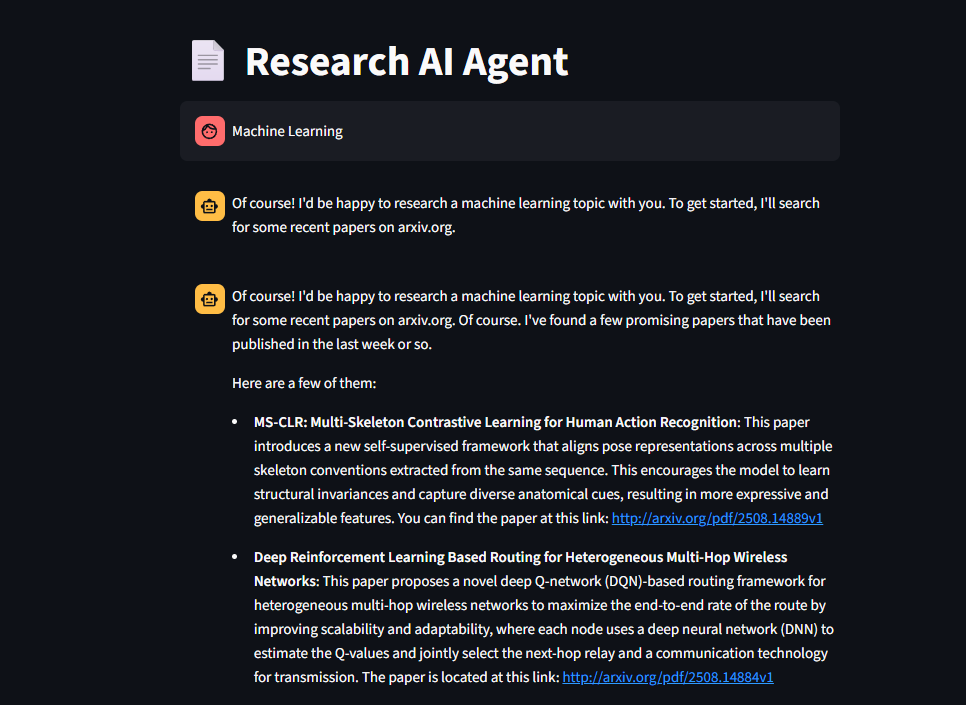




An intelligent AI-powered research assistant that helps researchers discover, analyze, and generate academic papers efficiently. Built with modern AI technologies including Google's Gemini 2.5 Pro, LangChain, and LangGraph, this tool streamlines the entire research workflow from literature discovery to paper generation.
- arXiv Integration: Automated search across arXiv's vast repository
- Smart Filtering: Find relevant papers based on research topics
- Citation Tracking: Automatic reference management with PDF links
- PDF Processing: Extract and analyze research papers automatically
- Key Insight Extraction: Identify main findings and methodologies
- Future Work Analysis: Discover promising research directions
- LaTeX Generation: Create properly formatted academic papers
- Mathematical Equations: Support for complex mathematical notation
- Structured Output: Generate complete research papers with proper sections
- Streamlit UI: Modern, responsive web interface
- Real-time Streaming: Watch AI responses as they're generated
- Conversation Memory: Maintain context throughout research sessions
This project leverages a sophisticated AI workflow built with:
- LangGraph: Orchestrates the research workflow with state management
- Google Gemini 2.5 Pro: Powers the AI reasoning and content generation
- LangChain: Provides the framework for AI tool integration
- Streamlit: Delivers the user-friendly web interface
Try the application online: https://ai-research-paper-8z9u.onrender.com
- Python 3.13 or higher
- Google API key for Gemini 2.5 Pro
- Git
-
Clone the repository
git clone https://github.com/yourusername/ai-research-paper.git cd ai-research-paper -
Install dependencies
pip install -r requirements.txt
-
Set up environment variables Create a
.envfile in the root directory:GOOGLE_API_KEY="your_google_api_key_here"
-
Run the application
streamlit run frontend.py
-
Access the application Open your browser and navigate to: http://localhost:8501
- Enter your research topic in the chat interface
- The AI will help you explore and refine your research direction
- The assistant searches arXiv for recent papers in your field
- Review summaries and select papers of interest
- Upload or reference papers for detailed analysis
- Extract key insights and identify research gaps
- Based on analysis, the AI suggests novel research directions
- Generate complete research papers with proper academic formatting
ai-research-paper/
├── frontend.py              # Streamlit web interface
├── ai_researcher_2.py       # Main AI workflow and LangGraph setup
├── arxiv_tool.py           # arXiv API integration
├── read_pdf.py             # PDF processing and analysis
├── write_pdf.py            # LaTeX generation and PDF rendering
├── requirements.txt        # Python dependencies
├── pyproject.toml         # Project configuration
├── render.yaml            # Render.com deployment config
├── .streamlit/            # Streamlit configuration
│   └── config.toml
└── output/                # Generated papers and outputs
| Variable | Description | Required |
|---|---|---|
GOOGLE_API_KEY |
Google Gemini API key | Yes |
The application is configured for optimal performance with:
- Headless mode for deployment
- CORS disabled for web access
- Memory optimization settings
This project is configured for easy deployment on Render.com:
- Connect your repository to Render.com
- Create a new Web Service
- Use the provided
render.yamlconfiguration - Set environment variables in Render dashboard
- Deploy automatically on every push
For local development, ensure you have:
- Python 3.13+ installed
- Virtual environment activated
- All dependencies installed
- Environment variables configured
We welcome contributions! Please follow these steps:
- Fork the repository
- Create a feature branch (
git checkout -b feature/amazing-feature) - Commit your changes (
git commit -m 'Add amazing feature') - Push to the branch (
git push origin feature/amazing-feature) - Open a Pull Request
This project is licensed under the MIT License - see the LICENSE file for details.
- Google Gemini Team for providing the powerful AI model
- LangChain Community for the excellent AI framework
- Streamlit Team for the intuitive web framework
- arXiv for providing access to research papers
If you encounter any issues or have questions:
- 📧 Email: your-email@example.com
- 🐛 Issues: GitHub Issues
- 📖 Documentation: Wiki
Made with ❤️ by the AI Research Team
⭐ Star this repository if you find it helpful!