


📍 A Google Maps location picker component for Filament 4 with search, draggable marker, and reverse geocoding support.
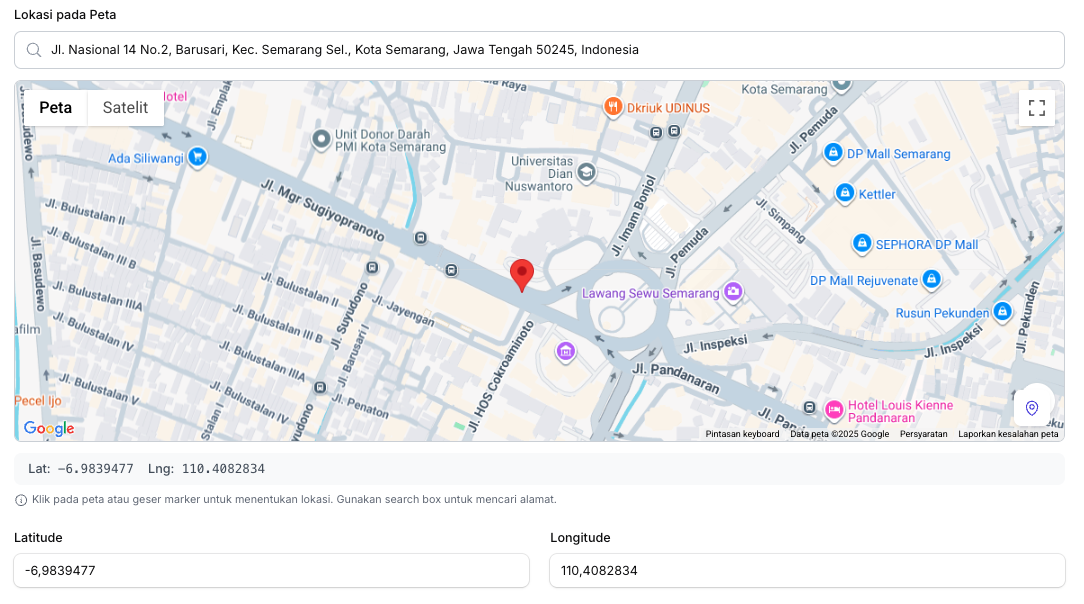
- 🔍 Search location - Using Google Places Autocomplete
- 📍 Click to set marker - Click anywhere on the map to place a marker
- ✋ Draggable marker - Drag the marker to fine-tune the location
- 📱 Current location - Get user's current device location
- 🏠 Reverse geocoding - Auto-fill address fields from coordinates
- 🌙 Dark mode support - Fully compatible with Filament's dark mode
- ⚙️ Fully configurable - Customize height, zoom, default location, and more
- PHP 8.1+
- Laravel 10+ / 11+ / 12+
- Filament 4.0+
- Google Maps API Key with the following APIs enabled:
- Maps JavaScript API
- Places API
- Geocoding API
Install the package via Composer:
composer require fahiem/filament-pinpointAdd your Google Maps API key to your .env file:
GOOGLE_MAPS_API_KEY=your_api_key_herephp artisan vendor:publish --tag="filament-pinpoint-config"This will publish the config file to config/filament-pinpoint.php:
return [
    'api_key' => env('GOOGLE_MAPS_API_KEY'),

    'default' => [
        'lat' => env('GOOGLE_MAPS_DEFAULT_LAT', -0.5050),
        'lng' => env('GOOGLE_MAPS_DEFAULT_LNG', 117.1500),
        'zoom' => env('GOOGLE_MAPS_DEFAULT_ZOOM', 13),
        'height' => 400,
    ],
];use Fahiem\FilamentPinpoint\Pinpoint;
public static function form(Form $form): Form
{
return $form
->schema([
Pinpoint::make('location')
->label('Location')
->latField('lat')
->lngField('lng'),
TextInput::make('lat')
->label('Latitude')
->readOnly(),
TextInput::make('lng')
->label('Longitude')
->readOnly(),
]);
}use Fahiem\FilamentPinpoint\Pinpoint;
Pinpoint::make('location')
->label('Business Location')
->defaultLocation(-6.200000, 106.816666) // Jakarta
->defaultZoom(15)
->height(400)
->draggable()
->searchable()
->latField('lat')
->lngField('lng')
->addressField('address') // Auto-fill address field
->provinceField('province') // Auto-fill province field
->cityField('city') // Auto-fill city/county field
->districtField('district') // Auto-fill district field
->villageField('village') // Auto-fill village/district field
->postalCodeField('postal_code') // Auto-fill postal/zip code field
->columnSpanFull()Pinpoint::make('location')
->draggable(false) // Disable marker dragging
->searchable(false) // Hide search box| Method | Description | Default |
|---|---|---|
defaultLocation(float $lat, float $lng) |
Set default center location | -0.5050, 117.1500 |
defaultZoom(int $zoom) |
Set default zoom level | 13 |
height(int $height) |
Set map height in pixels | 400 |
latField(string $field) |
Field name for latitude | 'lat' |
lngField(string $field) |
Field name for longitude | 'lng' |
addressField(string $field) |
Field name for auto-fill address | null |
provinceField(string $field) |
Field name for auto-fill province | null |
cityField(string $field) |
Field name for auto-fill city/county | null |
districtField(string $field) |
Field name for auto-fill district | null |
villageField(string $field) |
Field name for auto-fill village/sub-district | null |
postalCodeField(string $field) |
Field name for auto-fill postal/zip code | null |
draggable(bool $draggable) |
Enable/disable marker dragging | true |
searchable(bool $searchable) |
Enable/disable search box | true |
- Go to Google Cloud Console
- Create a new project or select an existing one
- Enable the following APIs:
- Maps JavaScript API
- Places API
- Geocoding API
- Go to Credentials and create an API key
- (Recommended) Restrict your API key to specific domains
Make sure your table has columns for latitude and longitude:
Schema::create('locations', function (Blueprint $table) {
    $table->id();
    $table->string('name');
    $table->decimal('lat', 10, 7)->nullable();
    $table->decimal('lng', 10, 7)->nullable();
    $table->text('address')->nullable();
    $table->string('province')->nullable();
    $table->string('city')->nullable();
    $table->string('district')->nullable();
    $table->string('village')->nullable();
    $table->string('postal_code')->nullable();
    $table->timestamps();
});Please see CHANGELOG for more information on what has changed recently.
Please see CONTRIBUTING for details.
If you discover any security-related issues, please email amfahiem010502@gmail.com instead of using the issue tracker.
The MIT License (MIT). Please see License File for more information.