Describe the bug
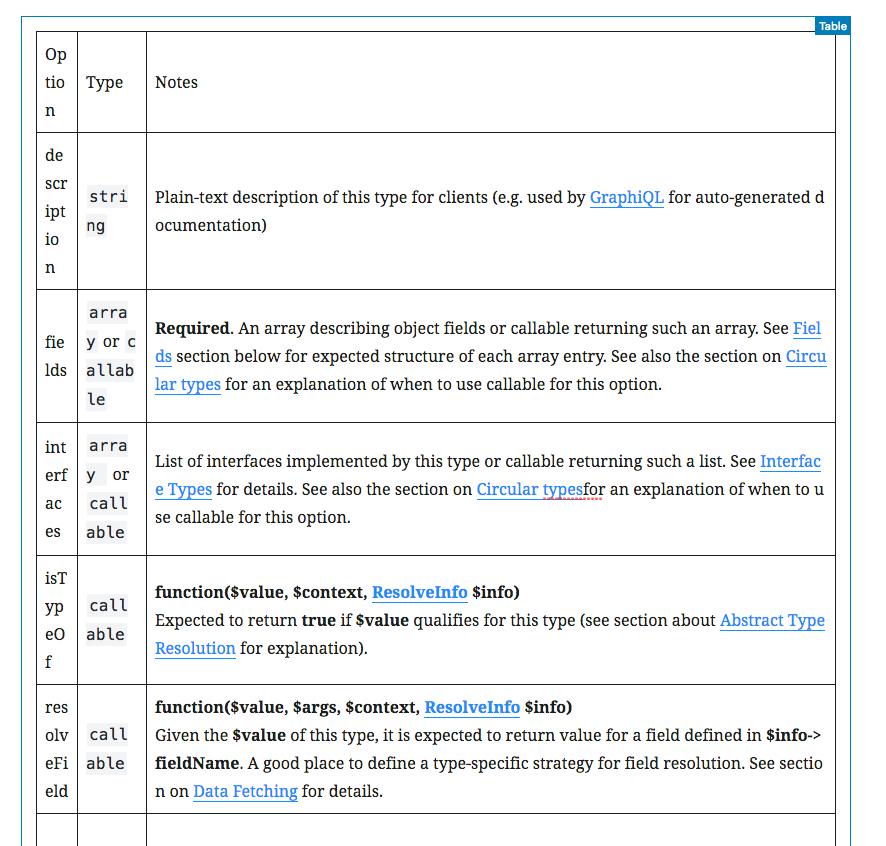
Hi there, I was trying to add a table of data with three columns. The first two columns contain just a word or two, and the third column contains a full sentence or two, this has caused the first two columns to collapse to the point where they just have two or three letters stacked on top of each other.
Things look OK on the front end of the site, but it's borderline un-usable on the backend. (see screenshot below)
The only way to fix this is to switch to "fixed width" but then you can't adjust the width of the columns. Seems like that feature is being worked on in #9801
To Reproduce
Steps to reproduce the behavior:
- Create a new post
- Create a new Table block with three columns and a few rows
- Just put a few characters in the first two columns, and then put a few sentences in the third column
Expected behavior
I expect the columns with only a few characters to collapse to a certain point, the characters shouldn't start stacking on top one another.
Screenshots
Desktop (please complete the following information):
- OS: OSX 10.13.5
- Browser: Chrome 70.0.3538.67
- Plugin Version: 4.1.1
- WordPress Version: 4.9.8

Describe the bug
Hi there, I was trying to add a table of data with three columns. The first two columns contain just a word or two, and the third column contains a full sentence or two, this has caused the first two columns to collapse to the point where they just have two or three letters stacked on top of each other.
Things look OK on the front end of the site, but it's borderline un-usable on the backend. (see screenshot below)
The only way to fix this is to switch to "fixed width" but then you can't adjust the width of the columns. Seems like that feature is being worked on in #9801
To Reproduce
Steps to reproduce the behavior:
Expected behavior
I expect the columns with only a few characters to collapse to a certain point, the characters shouldn't start stacking on top one another.
Screenshots

Desktop (please complete the following information):