Describe the bug
AEM SPA is not working with Angular 11.
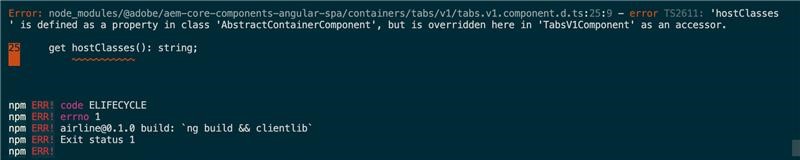
The project structure code had been set up using archetype 27 (angular as a front end). It comes up with the default angular version of 7. There is a requirement in our project to upgrade to angular 11. However, there is a build error(please refer to the screenshot section for the error detail) after the upgrade.
Package version
These are the AEM SPA angular npm version used for angular 11
@adobe/aem-angular-editable-components": "^1.2.1",
@adobe/aem-core-components-angular-base": "^1.0.16",
@adobe/aem-core-components-angular-spa": "^1.0.8",
@adobe/aem-spa-component-mapping": "^1.1.1",
@adobe/aem-spa-page-model-manager": "^1.3.12"
Angular version: 11.2.14
Typescript version: 4.1.3 (This is a minimum version for angular 11).
To Reproduce
Steps to reproduce the behavior:
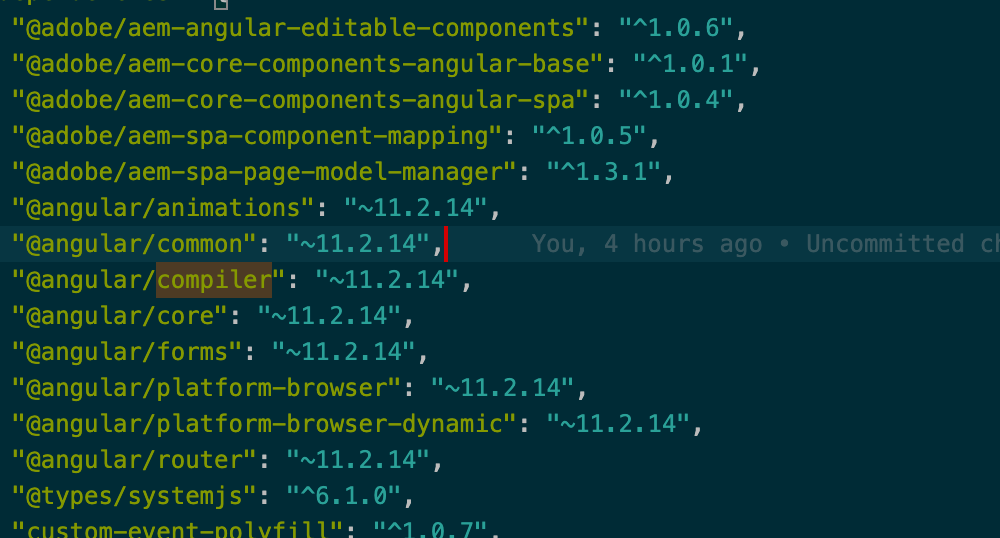
- Change the version (please refer to the screenshot )in the package.json of ui.frontend(angular project)
Expected behavior
The expected behaviour would be the successful build without any error
Screenshots
Additional context
Add any other context about the problem here.

Describe the bug
AEM SPA is not working with Angular 11.
The project structure code had been set up using archetype 27 (angular as a front end). It comes up with the default angular version of 7. There is a requirement in our project to upgrade to angular 11. However, there is a build error(please refer to the screenshot section for the error detail) after the upgrade.
Package version
These are the AEM SPA angular npm version used for angular 11
@adobe/aem-angular-editable-components": "^1.2.1",
@adobe/aem-core-components-angular-base": "^1.0.16",
@adobe/aem-core-components-angular-spa": "^1.0.8",
@adobe/aem-spa-component-mapping": "^1.1.1",
@adobe/aem-spa-page-model-manager": "^1.3.12"
Angular version: 11.2.14
Typescript version: 4.1.3 (This is a minimum version for angular 11).
To Reproduce
Steps to reproduce the behavior:
Expected behavior
The expected behaviour would be the successful build without any error
Screenshots

Additional context
Add any other context about the problem here.