Docker intergration#339
Conversation


… along with any configuration files it requires (apache/supervisor), and scripts to help users build and deploy their docker container.

I just need to take care of storing state in volumes now.
…file from the template on first deployment

|
Looking at the travis output, it looks like the test against 5.6 passed but 7.0 failed? This is wierd because I haven't changed any of the main code, literally just added a folder called docker that the application doesn't use. |

|
Have you looked at this existing Polr Docker file by another user? https://hub.docker.com/r/ansgar78/polr/ |
|
Have you tested this Dockerfile? Does it work correctly? |
|
Firstly on testing. I have ran the build and deployment as demonstrated in that video I linked. I was able to perform the setup, login, as well as create public and private links which worked for me. I was also able to kill and remove the container before re-deploying without losing any state (the links I had put in). If there are further tests you wish me to perform, I would be happy to. I did see that dockerfile you sent me, but I thought this pull request was necessary, primarily for the fact that I believe docker integration should be within the projects themselves rather than outside it. This way there is an "officially supported" way to deploy the service that can be tested against by the maintainers (all on the same page sort of thing). If a user chooses to run a different setup that doesn't work, that's on them. I don't actually care what the environment is (you can use alpine, ubuntu, php5 or 7 etc), just that there is one that is officially supported/maintained by the developers of the project and it will be updated as necessary with the project. For example, if the project decided to use a feature available only in php 7 (such as specifying return types), then all they have to do is make sure the dockerfile uses php7. Then when someone builds/pulls the latest image, their system will automatically use the correct environment. The last build of the linked dockerhub image was 9 months ago. Also, one cannot use that dockerfile as it would not work in this project. It has the following line:
I could not see the conf folder with an nginx.conf file in it. Perhaps I missed it but I suspect that the project had this 9 months ago (reinforcing my previous point for the need for the docker build code to be kept within the project), or the developer of this image is using some added code for their build that others don't have access to if they wished to build their own image with the same dockerfile. Finally, I wish to reinforce that although my submitted pull request uses Ubuntu 16.04 with php 7, and apache, I would be more than happy if someone was to change this to alpine with php 5 and nginx. All I care about is that it is maintained within the project, and I suspect the contributors to this project will have an easier time updating a Dockerfile based on Ubuntu than alpine simply due to the widespread previous experience/usage of ubuntu in normal non-container based usage, and widespread tutorials on getting things set up in Ubuntu. |
|
Is there something about the implementation I need to change, such as using nginx instead of apache, alpine instead of ubuntu, or perhaps the project just does not wish for docker integration? |
|
Neither! We're all rather busy with our daily lives and can't always review pull requests or comments immediately. I'll let you know once I get the time to look through the PR and test it locally. Thank you for your contribution! |

| @@ -0,0 +1,14 @@ | |||
| # Configure apache | |||
| <VirtualHost *:80> | |||
| ServerName example.com | |||

There was a problem hiding this comment.
Does this ServerName directive need to be changed at all? Would someone need to edit this file in order to properly deploy the image?
If someone wants to deploy this imagine to serve a website listening on "somesite.com", what modifications would they need to make to make it work?
There was a problem hiding this comment.
Hey, it shouldn't need to be changed, but actually thinking about it, it would be better if the ServerName line didn't exist at all. Since this is the only site in the container, and not a shared hosting container, it doesn't apply at all.
|
I left a comment on one of the files. Additionally, if we were to merge this into our repository, we would need to provide proper documentation for its use on the docs website, which is within the "docs" folder of this repo. I can wrote the documentation if you can answer the question I left as a comment. Cachet's documentation on Docker could be useful in crafting our own. |
|
With regards to documentation with deploying with docker, it should be fairly simple and I would be happy to re-submit the pull request with an updated README, but I get the feeling you would do a better job than I, with updating the docs area. The hardest part is that because it doesn't (yet) use a MySQL container and a compose file, the user needs to deploy a MySQL database somewhere (usually on the same host), and comment out the bind-address statement so the mysql database doesn't just listen to localhost. They then just need to log into it and create a database with any name. E.g Other than than that, they just need to run the build and deploy scripts in the docker folder: The deployment script doesn't just call docker run with the appropriate port, it also makes sure to set up a folder structure for the volume which state is to be kept in if it doesn't exist. Then just feed in the database details, such as the host (which can't be |
| # Install the necessary packages. | ||
| RUN apt-get install -y \ | ||
| supervisor apache2 git php7.0 libapache2-mod-php7.0 php7.0-cli \ | ||
| php7.0-mysqlnd php7.0-xml php7.0-mbstring php7.0-curl php7.0-zip |
There was a problem hiding this comment.
Why do we need php7.0-mysqlnd here? Laravel uses the PDO driver, and mysqlnd shouldn't be used.
There was a problem hiding this comment.
2 things:
- you are correct that
php7.0-mysqlndis a mistake as there is nophp7.0-mysqlndpackage in Ubuntu 16.04. There was a "native"php5-mysqlndpackage in Ubuntu 14.04 but for php 7 in ubuntu 16.04 it just uses the native driver anyways, and its now just calledphp7.0-mysql. The native driver added the support for things like async queries that php5-mysql didn't have. - I'm no PDO expert (I prefer to just use pure mysqli), but I'm pretty sure that you still need to install the php7.0-mysql package in order to use PDO with a MySQL backend. This is because PDO is more like an API to make it so that you can program in a backend agnostic way. It still needs the actual mysql package installed which it will make use of, if you want to use PDO with a MySQL backend. If one wanted to just use an sqlite database backend, then perhaps you wouldn't need this package (haven't tested), but I am guessing that a lot of users would want to tie it to a mysql database.
I tested just now with and without the php7.0-mysql package installed and only successfully ran the setup when I had added the php7.0-mysql package to the dockerfile. I have since pushed this change into this pull request. I don't know how this slipped through and can only guess that I added the nd stupidly after my initial testing.
There was a problem hiding this comment.
Ah it looks like ubuntu16.04 was clever enough to fix my mistake when I said to install php7.0-mysqlnd and that's why it worked before I submitted. At least now we have the correct package name, and know why it's there:

| RUN mv composer.phar /usr/bin/composer | ||
| RUN chmod +x /usr/bin/composer | ||
| WORKDIR /var/www/polr | ||
| RUN composer install |
There was a problem hiding this comment.
composer warns against running as root: https://getcomposer.org/doc/faqs/how-to-install-untrusted-packages-safely.md
Is there a way we can avoid this?
There was a problem hiding this comment.
Yes, I didn't like this at the time either, but had decided it was the best option available to me. In my own projects, I make sure to keep use .gitignore to keep vendor out of the dev branches as well, but I leave it in with the official releases to solve this problem. However I understand that this manual process is non-automated and tedious, and could have potential licensing issues (are all the packages "free" to distribute). I figure that it is normal to expect developers to perform a composer update/install when using master or branches, but "average joe" who is not a developer who just want to deploy a release of this tool to a raw docker server that doesn't have anything installed, shouldn't be forced to perform the extra steps of installing and using composer to pull additional files. I figured that since this is a virtual container environment, running composer as root inside it was "acceptable". This will not result in those scripts having access to anything on the host's computer.
There is the additional choice of having the build.sh script install composer, and perform the composer install command, before performing the docker build.
Let me know your thoughts and I'll be happy to make the change.
|
I tried building your image on my laptop (Fedora 25 with SELinux enforcing), but I'm encountering many SELinux problems. If we want to use an external directory to store files, we should probably set proper SELinux contexts on the folders. Here's an example of one of the SELinux denials I'm encountering: |
|
@cydrobolt I'm afraid that I'm out of my depth here (with SELinux) as I haven't used CentOS in years (ubuntu/debian based which doesn't have it), and back then the solution was always to dsiable selinux which is pretty poor. Would having the volumes where the state are stored being elsewhere on the system resolve the issues selinux is having and be an easier fix? I will look into installing a fedora VM and how to set SELinux contexts. |

|
@programster Thanks for your work on this one! I've put up a dockerhub repo based on your latest docker branch, and wrote a little doc on how to deploy it quickly (none of the other images on DockerHub seem to work out of the box on Ubuntu 16.04). The docker-compose file isn't configured to build the project yet, though. If I do that I'll submit a PR to your docker branch. I'll also probably want to work with Polr so we can use environment variables or secrets for configuring the db. For now, there's a lightweight docker-compose file on the DockerHub page that will allow you to rapidly deploy both Polr and a MySQL instance linked together. Hopefully this will make it even easier for people to get some Polr goodness going on. I dropped that docker-compose file in my rancher cluster, and Polr was live and ready to go in about 15 seconds: The docker-compose.yml:version: '2'
services:
polr:
image: james9074/polr:latest
volumes:
- /data/polr/web:/data
links:
- db:db
ports:
- 80:80/tcp
db:
image: mysql
environment:
MYSQL_DATABASE: polr
MYSQL_PASSWORD: some-polr-password
MYSQL_ROOT_PASSWORD: some-super-secure-pw
MYSQL_USER: polr
volumes:
- /data/polr/db:/var/lib/mysql |

|
@James9074 thats awesome. I deliberately didn't touch the database side for now but using another container for the database and using a compose file to link them definitely feels like the right way to go. I'm just trying to tackle the application layer and pushing the image for now. Agree with environment varaibles and secrets. I haven't looked at rancher in over a year I believe. Blown away by the "See Rancher in Action" demo video. That looks like something super useful. |
|
@programster Oh yeah, I've replaced ansible, puppet, chef, even vagrant almost everywhere both at home and at work with Rancher (or dcos/mesos). It's allowing me to orchestrate, manage, and scale like 15 production apps by myself. This dockerfile has the env stuff set up, but it's not complete and it doesn't seem to work out of the box. It makes sense though as a good starting point though. |
|
@programster perhaps this will help? http://www.projectatomic.io/blog/2015/06/using-volumes-with-docker-can-cause-problems-with-selinux/ It looks like |

| cat /var/www/polr/.env.setup > /data/env | ||
| fi | ||
|
|
||
| ln -s /data/env .env |

There was a problem hiding this comment.
@programster Given we can use actual ENVs on docker definitions, wouldn't a bare touch on the required .env be enough instead of somehow committing it on the code or at build time?

|
Just stopping by to say thanks for the docker build you guys have so far. works well. |


|
What are your thoughts on getting this merged? |
|
Hey guys, wow I completely forgot about this merge request I made ages ago. This easter weekend would be a great time for me to take @fagiani comments into account, and update the code from upstream and re-submit the pull request. I'll also take into account the PR quality review comments. Does that sound like a plan? |
|
That sounds awesome! Thanks so much :) |

|
+1 for the docker integration. (fyi) Stumbled on another repository that integrated polr with docker https://github.com/sahil87/polr (I'm not associated with this repository in any way) |
|
@zubinraj https://hub.docker.com/r/james9074/polr/ is a working docker image btw - no github repo but a compose that works out of the box (and in Rancher!). It's kind of old though, if anyone wants me to update it let me know. |
… here: https://github.com/hadolint/hadolint/wiki/DL3009

2. using --no-install-recommends when installing curl
…th a linked database container. Now users dont have to set up a mysql database, but they probably need a server with at least 1G of RAM.

* user now has to run the configure.sh script once to generate random passwords, which are put into environment files which the docker-compose.yml references.
* The setup page now checks if the environment variables are set, and if so it will pass these into the view as the values. This way the user doesn't have to dig around to see what their randomly generated password was set to. In fact the user never has to see the database passwords ever.
|
Hey, To run polr now, all the user has to do is:
I made a video demonstrating it working with the changes: https://www.youtube.com/watch?v=gySD3FuRr1U&feature=youtu.be |

 overint
left a comment
overint
left a comment
overint
left a comment
There was a problem hiding this comment.
Awesome work! Some minor changes.
|
|
||
| // see if any of the variables have already been provided in .env file | ||
| // in which case pass those to the view, otherwise assume defaults | ||
| $view_data = array( |
There was a problem hiding this comment.
We should use new style array syntax: $view_data = [ ... ]
There was a problem hiding this comment.
Cool, I can change this easily enough.
I never took to the new shorthand way of creating arrays because it looked more like JSON and I sometimes have to type out JSON arrays when working in JS files and its nice to keep things distinct. Are there some advantages other than visual appeal that I am unaware of? If so I'll begin using it more in my own projects.
| // see if any of the variables have already been provided in .env file | ||
| // in which case pass those to the view, otherwise assume defaults | ||
| $view_data = array( | ||
| 'db_host' => (getenv('DB_HOST')) ? getenv('DB_HOST') : 'localhost', |
There was a problem hiding this comment.
These can be: 'db_host' => env('DB_HOST', 'localhost') , bit more concise.
There was a problem hiding this comment.
Easy enough for me to to switch over and push. I believe env() is Laravel specific, so I've always used getenv() which is PHP native, but this is a Laravel project and yes that is more concise.
| @@ -0,0 +1 @@ | |||
| .git No newline at end of file | |||
There was a problem hiding this comment.
Missing newline at the end of the file.
|
|
||
| # Remove the duplicated Dockerfile after the build. | ||
| rm $SCRIPTPATH/../Dockerfile | ||
| rm $SCRIPTPATH/../.dockerignore No newline at end of file |
There was a problem hiding this comment.
Missing newline here as well.
There was a problem hiding this comment.
I swear netbeans or sublime is stripping the last newline out. I need to figure out which and get it to stop.
| # this script is stored. | ||
| DIR=$( cd "$( dirname "${BASH_SOURCE[0]}" )" && pwd ) | ||
| cd $DIR | ||
|
|
| echo "creating the polr .env file" | ||
| cp $DIR/../.env.setup $DIR/.env | ||
|
|
||
| FILEPATH="$DIR/.env" |
There was a problem hiding this comment.
Did you consider @fagiani's comment of just setting the environment vars instead of editing the env file?
There was a problem hiding this comment.
I had to re-read his comment a few times but I think I got it now. I am happy to remove this line now:
cat /var/www/polr/.env.setup > /data/env
I don't need it. What I'm doing now is using that template file to create the .env file inside the docker container instead which sets environment variables, rather than me overwriting your .env file which is one level higher (outside the docker container). All I need to make sure is that .env file which is generated by the setup controller persists in the volume so it is around between containers coming and going.
I am using a separate .env file (maybe I should rename it) that the docker-compose.yml file links to for both the application container and the mysql database. The user is free to update the docker-compose.yml file to remove those references and put in their own env lines but I guess the downside of this is that it will show up as a chnage and cause issues when performing updats with docker pull? Perhaps the docker-compose.yml file needs to be docker-compose.yml.tmpl and the user needs to rename it to docker-compose.yml with their desired changes and it be added to the .gitignore file? I like the idea of the bash script(s) doing this for the user if they just want a fast deploy option, but they can manually do things without the script(s) if they want to just use the docker-compose up command?
|
|
||
|
|
||
| # finish up by starting supervisor in the foreground to keep the container running | ||
| /usr/bin/supervisord No newline at end of file |
There was a problem hiding this comment.
Missing newline on this file and the one below.
|
|
||
| <p>Database Host:</p> | ||
| <input type='text' class='form-control' name='db:host' value='localhost'> | ||
| <input type='text' class='form-control' name='db:host' value='{{ $db_host }}'> |
There was a problem hiding this comment.
Can we use camel case as per PSR2 please.
There was a problem hiding this comment.
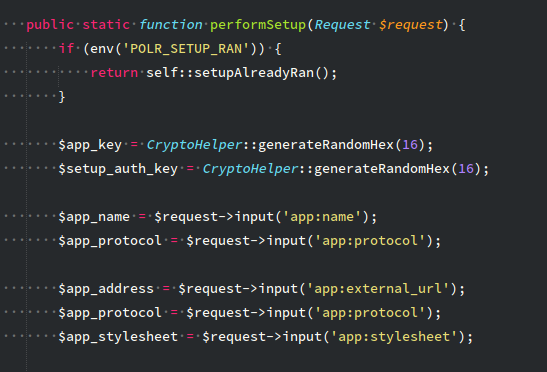
Certainly, I prefer camel casing but thought you guys used underscores when I saw this:
Any chance we could have a single file that executes all the commands? Like That runs all the required command? |
|
@overint I agree that having 3 scripts really sucks. I could probably merge the configure and deploy scripts, and just have the configure script part check if it has already run and just not run if it has (changing the passwords loses you access to your database). However, you would not want to merge the deploy.sh and build.sh scripts as you only want to run a build whenever you perform a code update, or just to have an updated container every couple weeks. The deploy command you would want to run whenever your containers die for whatever reason or after a reboot etc. I guess you could have deploy.sh and buildAndDeploy.sh scripts though, as you probably want to deploy after every build. Maybe in future there will be an official polr image, and people will never need to run the build, the deploy script will just pull it from dockerhub. Actually I'll have just the one init script and have it just have it ask the user questions such as do they want to build the container (or just building it if they dont have a local image). Once we are happy with what it does, we can have it take arguments to automatically answer those questions. E.g. |
…de that generates a file make sure it ends in a newline.
…turn into a docker-compose.yml file with their own changes.

 - E.g. some users may wish to not use the linked mysql container.
Thus we now ignore the docker-compose.yml file so that it doesn't cause issues if an update comes through and they have local changes.

Added an init script (written in BASH for now) that can be executed with ./init
- This script will ask the user a series of questions and help them deploy. It allows people who don't quite know what they are doing to get set up quickly, but still give power users flexibility to do their own thing.
* If the user has manually created a .env file, we use that wherever possible, otherwise we generate our environment variables file from copying and editing the .env.setup file. This will be used by docker-compose to set environment variables inside the container.
* The startup script no longer creates a .env file if it doesnt exist, we simply create the symlink for it so that if it ever exists in future, it will persist in our volume.
* If the .env file does exist inside the container on startup, we make sure tha the website can write to the file for the setup page's needs.
|
I'm hoping all of those changes address everything that was raised. If I've missed something, please let me know. If you are all happy, then we can put the instructions into the README or perhaps stick a docker-specific README in that folder? |

|
My Two cents: I was trying to use polr docker container in the multi-node environment, My Question is; What is the point of env file when you are mounting the Running this docker container on a large scale docker orchestration tool like Kubernetes, Mesos or ECS is tedious, as it will try to create a polr-data folder on each machine to maintain its state, which is essentially not an ideal solution. The whole idea of mounting file system into the container make the app stateful, which can be resolved by creating the env file from the environment. Example: |
|
@James9074 - Thank you for the reference. I have pulled the latest from @cydrobolt /master and have created a docker compose based image here - https://hub.docker.com/r/zubinraj/polr/ |

|
I'll be glad to help testing the docker image :) |

|
Sorry for hijacking this thread: |

|
Hi all! Just wanted to check in and see if there are any blocking concerns before merging this in. It would definitely expedite setup for new users |


|
Is this issue going to happen soon? |

No |
12 participants


This pull request aims to simplify the deployment of polr by adding support for docker. I have managed to do this by just adding a docker folder with all the necessary scripts/configuration files. The docker container will keep the state in a volume, so that state will persist across containers coming and going.
I have made a demonstration video of how it works.
The container uses Ubuntu 16.04 rather than something like alpine, so that it is easier for the community to maintain/update should the need arise.