I'm unable to do a literal search for the string "null" using the string "null" in the web UI quick filter - it assumes I want to search for the null value. This is due to an implementation detail in io.deephaven.engine.table.impl.select.MatchFilter when using MatchFilter#strValues:
Object convertStringLiteral(String str) {
    if (str.equals("null")) {
        return null;
    }
    ...
}
It may be that this is "as-desired", but it's a potential gotcha as it's different than every other string.

I see the importance of wanting to filter to null values, but I wonder if there might be a better way to expose this functionality? I wonder if an explicit option "is null" would be better? (This could also be a good place to introduce an "is empty" filter.)
I'm able to workaround this issue by going to advanced filters and explicitly selecting the "null" value.
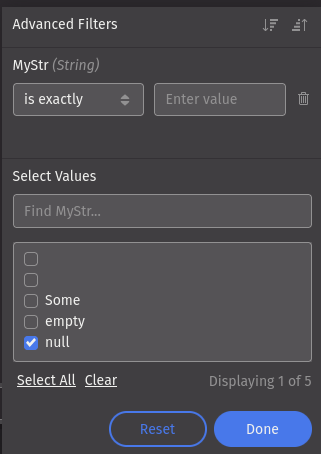
As another note, the values in the advanced filters box might want to use the text rendering that the grid cell uses, so the user can tell the difference between null and "".


I'm unable to do a literal search for the string "null" using the string "null" in the web UI quick filter - it assumes I want to search for the
nullvalue. This is due to an implementation detail inio.deephaven.engine.table.impl.select.MatchFilterwhen usingMatchFilter#strValues:It may be that this is "as-desired", but it's a potential gotcha as it's different than every other string.
I see the importance of wanting to filter to
nullvalues, but I wonder if there might be a better way to expose this functionality? I wonder if an explicit option "is null" would be better? (This could also be a good place to introduce an "is empty" filter.)I'm able to workaround this issue by going to advanced filters and explicitly selecting the "null" value.
As another note, the values in the advanced filters box might want to use the text rendering that the grid cell uses, so the user can tell the difference between
nulland "".