
A dynamic, modern UI for editing deeply nested Pydantic models with FastAPI integration.
Note
This project is not associated with the pydantic project. The code was primarily written using AI coding agents.


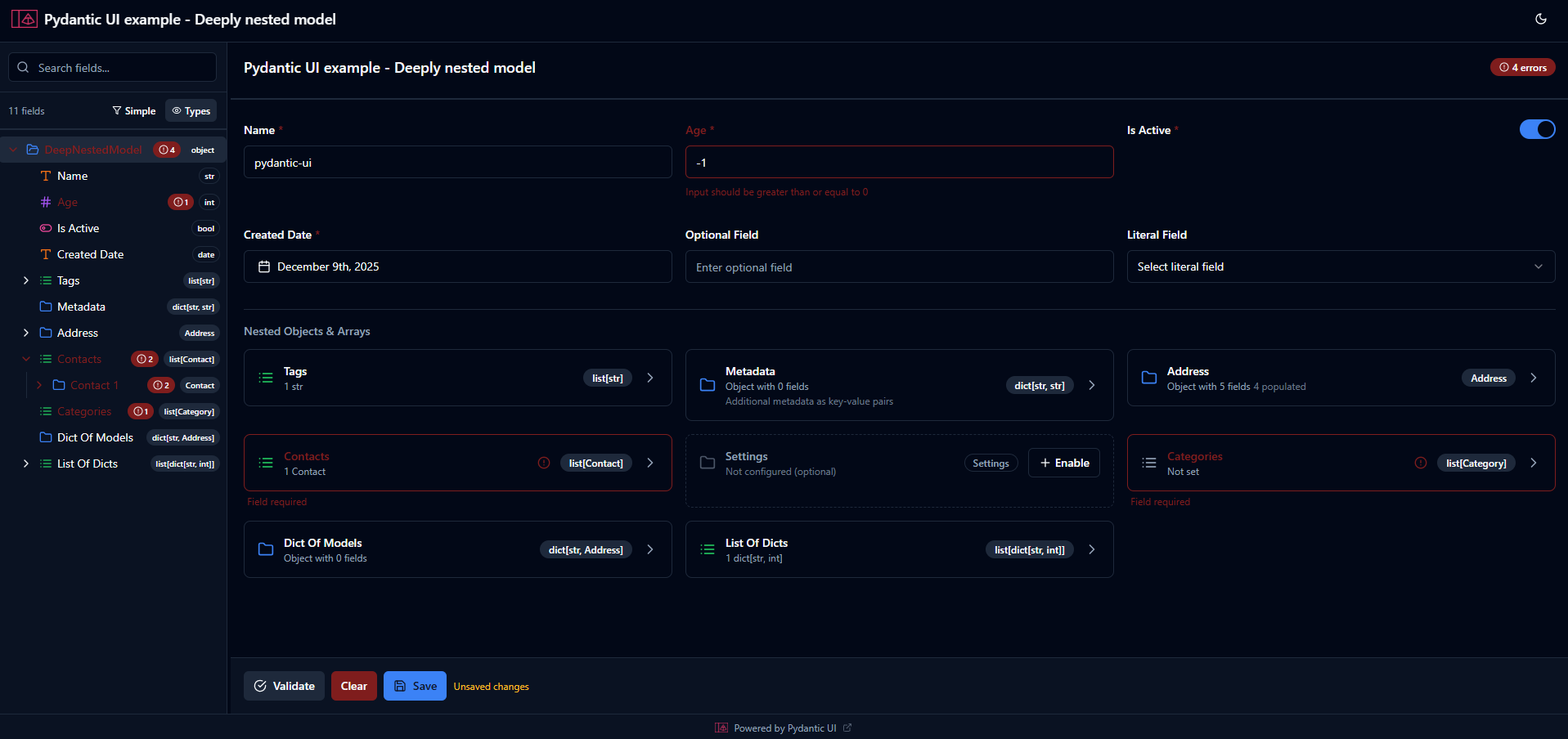
- 🌳 Tree Navigation: Sidebar showing hierarchical structure of nested models
- 🎨 Dynamic Renderers: Auto-detect appropriate input components based on field types
- ⚙️ Customizable: Override default renderers with sliders, dropdowns, date pickers, etc.
- 🌓 Theme Support: Light and dark mode with system preference detection
- ✅ Validation: Real-time validation using Pydantic validators
- 📦 Easy Integration: Mount as a FastAPI router in your existing application
- 🔘 Action Buttons: Custom action buttons with Python callbacks
- 📡 Real-time Updates: Server-Sent Events (SSE) for live UI updates
- 💾 Session Management: Per-user session state with data persistence
- 📋 Copy/Paste: Clipboard support for tree nodes
pip install pydantic-uifrom fastapi import FastAPI
from pydantic import BaseModel, Field
from pydantic_ui import create_pydantic_ui, DisplayConfig, FieldConfig, Renderer, UIConfig
# Define your Pydantic model
class Address(BaseModel):
street: str
city: str
zipcode: str
class Person(BaseModel):
name: str = Field(min_length=1, max_length=100)
age: int = Field(gt=0, lt=150)
email: str
address: Address = Field(description="Permanent address")
tags: list[str] = []
# Create FastAPI app and mount pydantic-ui
app = FastAPI()
app.include_router(
create_pydantic_ui(
Person,
prefix="/editor",
ui_config=UIConfig(
title="Person Editor",
show_save_reset=True,
attr_configs={
"age": FieldConfig(
renderer=Renderer.SLIDER,
display=DisplayConfig(
title="User Age",
)
)
},
),
),
)
if __name__ == "__main__":
import uvicorn
uvicorn.run(app, host="0.0.0.0", port=8000)Then visit http://localhost:8000/editor to see the UI.
The package exports the following from pydantic_ui:
| Export | Description |
|---|---|
create_pydantic_ui |
Factory function to create a FastAPI router for a Pydantic model |
UIConfig |
Global UI configuration class |
FieldConfig |
Per-field UI configuration class |
DisplayConfig |
Display configuration (title, subtitle, help_text, view overrides) |
ViewDisplay |
Per-view display overrides (tree, detail, table, card) |
Renderer |
Enum of available field renderers |
ActionButton |
Configuration for custom action buttons |
PydanticUIController |
Controller for programmatic UI interaction |
Note: If you're upgrading from an older version, see the Migration Guide for breaking changes in v0.4.0+.
All available options for UIConfig:
from pydantic_ui import create_pydantic_ui, UIConfig

ui_config = UIConfig(
    # Basic Settings
    title="Data Editor",              # Title shown in header (default: "Data Editor")
    description="",                   # Description below title

    # Logo/Branding
    logo_text=None,                   # Short text for logo (e.g., "P", "UI").
                                      # If not set, uses first letter of title
    logo_url=None,                    # URL to logo image. Overrides logo_text if set

    # Theme
    theme="system",                   # "light", "dark", or "system" (default: "system")

    # Form Behavior
    read_only=False,                  # Make entire form read-only (default: False)
    show_validation=True,             # Show validation errors (default: True)
    auto_save=False,                  # Auto-save changes (default: False)
    auto_save_delay=1000,             # Delay in ms before auto-saving (default: 1000)

    # Tree Panel
    collapsible_tree=True,            # Allow tree nodes to collapse (default: True)
    show_types=True,                  # Show type badges in tree (default: True)

    # Footer
    show_save_reset=False,            # Show Save/Reset buttons in footer (default: False)
    footer_text="Powered by Pydantic UI",  # Footer text (empty string hides footer)
    footer_url="https://github.com/idling-mind/pydantic-ui",  # Footer link URL

    # Layout
    responsive_columns={              # Responsive column breakpoints (based on detail panel width)
        640: 1,                       # 1 column when panel width is <= 640px
        1000: 2,                      # 2 columns when panel width is <= 1000px
        1600: 3                       # 3 columns when panel width is > 1000px
    },

    # Custom Actions (see Action Buttons section)
    actions=[],                       # List of ActionButton configurations

    # Control the display properties (title/subtitle) and renderer for specific fields
    # either based on class name or full path to the attribute. Look into examples to understand more.
    class_configs={},                  # Map[class_name, FieldConfig] - global per-class FieldConfig
    attr_configs={},                   # Map[path, FieldConfig] - per-field configs by path (e.g., 'users.[].age')
)

app.include_router(
    create_pydantic_ui(
        Person,
        ui_config=ui_config,
        prefix="/editor"
    ),
)Use Annotated with FieldConfig to customize individual fields:
from typing import Annotated
from pydantic_ui import FieldConfig, Renderer

class Settings(BaseModel):
    # Slider for numeric values
    volume: Annotated[int, FieldConfig(
        renderer=Renderer.SLIDER,
        display=DisplayConfig(
            title="Volume Level",      # Custom label (defaults to field name)
            subtitle="Adjust the volume",  # Help text below field
        ),
        placeholder="Enter value",     # Placeholder text
        props={"min": 0, "max": 100, "step": 5}  # Renderer-specific props
    )] = 50

    # Dropdown for enum-like fields
    theme: Annotated[str, FieldConfig(
        renderer=Renderer.SELECT,
        props={"options": ["light", "dark", "auto"]}
    )] = "auto"

    # Toggle instead of checkbox
    notifications: Annotated[bool, FieldConfig(
        renderer=Renderer.TOGGLE
    )] = True

    # Text area for long text
    bio: Annotated[str, FieldConfig(
        renderer=Renderer.TEXT_AREA,
        props={"rows": 5, "placeholder": "Tell us about yourself..."}
    )] = ""

    # Hidden fields (not shown in UI)
    internal_id: Annotated[str, FieldConfig(hidden=True)]

    # Read-only fields (visible but not editable)
created_at: Annotated[str, FieldConfig(read_only=True)]This project is licensed under the MIT License — see the LICENSE file for details.
You can configure specific classes globally using class_configs in UIConfig. This is useful when you want to apply the same configuration to a type wherever it appears in your model hierarchy.
from typing import NewType
from enum import Enum
from pydantic_ui import UIConfig, FieldConfig, Renderer

# Define custom types
Email = NewType('Email', str)

class Color(str, Enum):
    RED = "red"
    BLUE = "blue"

# Configure them globally
ui_config = UIConfig(
    class_configs={
        "Email": FieldConfig(
            renderer=Renderer.EMAIL,
            placeholder="user@example.com",
            display=DisplayConfig(
                subtitle="Enter a valid email address"
            )
        ),
        "Color": FieldConfig(
            renderer=Renderer.SELECT,
            display=DisplayConfig(
                title="Pick a color"
            )
        )
    }
)

# Now any field of type Email or Color will use these configs automatically
class User(BaseModel):
    primary_email: Email  # Uses global Email config
    backup_email: Email   # Uses global Email config
    favorite_color: Color # Uses global Color config

    # You can still override specific instances using Annotated
admin_email: Annotated[Email, FieldConfig(display=DisplayConfig(title="Admin Contact"))]You can also configure fields by path without using Annotated, using UIConfig.attr_configs:
ui_config = UIConfig(
    attr_configs={
        # Direct field path
        "server.name": FieldConfig(
            display=DisplayConfig(
                title="Application Name",
            ),
            placeholder="Enter your app name",
        ),

        # Array item fields using [] syntax
        "users.[].age": FieldConfig(
            display=DisplayConfig(
                title="User Age",
            ),
            renderer=Renderer.SLIDER,
            props={"min": 0, "max": 120, "step": 1},
        ),

        # Nested paths
        "database.password": FieldConfig(
            display=DisplayConfig(
                title="Database Password",
            ),
            props={"type": "password"},
        ),
    }
)

pydantic_ui_router = create_pydantic_ui(
    model=AppConfig,
    ui_config=ui_config,
    prefix="/config",
)| Renderer | Enum Value | Description | Props |
|---|---|---|---|
| Auto | Renderer.AUTO |
Auto-detect based on type | - |
| Text Input | Renderer.TEXT_INPUT |
Single-line text input | placeholder, maxLength |
| Text Area | Renderer.TEXT_AREA |
Multi-line text input | rows, placeholder |
| Number Input | Renderer.NUMBER_INPUT |
Numeric input | min, max, step |
| Slider | Renderer.SLIDER |
Range slider | min, max, step, marks |
| Checkbox | Renderer.CHECKBOX |
Checkbox | - |
| Toggle | Renderer.TOGGLE |
Toggle switch | - |
| Select | Renderer.SELECT |
Dropdown select | options |
| Multi-Select | Renderer.MULTI_SELECT |
Multi-select dropdown | options |
| Date Picker | Renderer.DATE_PICKER |
Date picker | format |
| DateTime Picker | Renderer.DATETIME_PICKER |
DateTime picker | format |
| Color Picker | Renderer.COLOR_PICKER |
Color picker | - |
| File Upload | Renderer.FILE_UPLOAD |
File upload | - |
| File Select | Renderer.FILE_SELECT |
File selector | - |
| Password | Renderer.PASSWORD |
Password input | - |
Renderer.EMAIL |
Email input | - | |
| URL | Renderer.URL |
URL input | - |
Add custom action buttons to the UI header that trigger Python callbacks:
from pydantic_ui import UIConfig, ActionButton

ui_config = UIConfig(
    title="App Settings",
    actions=[
        ActionButton(
            id="validate",             # Unique identifier (required)
            label="Validate",          # Button label (required)
            variant="secondary",       # "default", "secondary", "outline",
                                       # "ghost", "destructive"
            icon="check-circle",       # Lucide icon name (optional)
            tooltip="Run validation",  # Tooltip on hover (optional)
            disabled=False,            # Whether button is disabled
            confirm=None,              # Confirmation message before action
                                       # If set, shows dialog before triggering
        ),
        ActionButton(
            id="reset",
            label="Reset All",
            variant="destructive",
            icon="refresh-cw",
            confirm="Are you sure you want to reset all settings?"
        ),
        ActionButton(
            id="save",
            label="Save",
            variant="default",
            icon="save",
        ),
    ],
)from pydantic_ui import create_pydantic_ui, PydanticUIController
router = create_pydantic_ui(model=AppSettings, ui_config=ui_config, prefix="/settings")
app.include_router(router)
@router.action("validate")
async def handle_validate(data: dict, controller: PydanticUIController):
"""Handler receives current data and a controller for UI interaction."""
errors = []
# Custom validation logic
if data.get("environment") == "production" and data.get("server", {}).get("debug"):
errors.append({
"path": "server.debug",
"message": "Debug mode should not be enabled in production"
})
if errors:
await controller.show_validation_errors(errors)
await controller.show_toast("Validation failed", "error")
else:
await controller.clear_validation_errors()
await controller.show_toast("All validations passed!", "success")
return {"valid": len(errors) == 0}
@router.action("save")
async def handle_save(data: dict, controller: PydanticUIController):
"""Save handler with Pydantic validation."""
from pydantic import ValidationError
try:
validated = AppSettings.model_validate(data)
# Save to database, file, etc.
await controller.show_toast("Settings saved!", "success")
return {"saved": True}
except ValidationError as e:
await controller.show_toast(f"Validation error: {e}", "error")
return {"saved": False}The controller provides methods for programmatic UI interaction:
# Show validation errors
await controller.show_validation_errors([
    {"path": "users[0].age", "message": "Age must be positive"},
    {"path": "name", "message": "Name is required"}
])

# Clear all validation errors
await controller.clear_validation_errors()# Show toast notification
await controller.show_toast(
message="Operation completed!",
type="success", # "success", "error", "warning", "info"
duration=5000 # ms (0 for persistent)
)
# Broadcast toast to ALL connected sessions
await controller.broadcast_toast("Server restarting...", "warning")# Push new data to the UI
new_data = AppSettings(name="Updated", ...)
await controller.push_data(new_data) # Accepts BaseModel or dict
# Get current data from session
current_data = controller.get_current_data()
# Get validated model instance (returns None if invalid)
model_instance = controller.get_model_instance()
# Tell UI to refresh from server
await controller.refresh()
# Broadcast refresh to all sessions
await controller.broadcast_refresh()# Request user confirmation (async - waits for response)
confirmed = await controller.request_confirmation(
message="Delete all users?",
title="Confirm Deletion", # Dialog title
confirm_text="Delete", # Confirm button text
cancel_text="Cancel", # Cancel button text
variant="destructive" # "default" or "destructive"
)
if confirmed:
# User clicked confirm
delete_all_users()# Navigate to a URL
await controller.navigate_to("https://example.com")
# Open in new tab
await controller.navigate_to("/reports", new_tab=True)# Trigger a file download in the browser
# Data must be a base64 data URL
import base64
content = "Hello, World!"
b64_content = base64.b64encode(content.encode()).decode()
data_url = f"data:text/plain;base64,{b64_content}"
await controller.download_file("hello.txt", data_url)# Show progress bar (0-100)
await controller.show_progress(50)
# Update progress
await controller.show_progress(75)
# Hide progress bar
await controller.hide_progress()
# Or equivalently:
await controller.show_progress(None)When an action button triggers a file upload, access the uploaded file via the controller:
@router.action("upload")
async def handle_upload(data: dict, controller: PydanticUIController):
    file = controller.uploaded_file
    if file:
        # file is a dict with: name, size, type, data (base64 string)
        print(f"Received: {file['name']} ({file['size']} bytes)")
        # Decode the base64 data
        import base64
content = base64.b64decode(file['data'])| Method | Description |
|---|---|
show_validation_errors(errors) |
Display validation errors in the UI |
clear_validation_errors() |
Clear all validation errors |
show_toast(message, type, duration) |
Show a toast notification |
broadcast_toast(message, type, duration) |
Show toast to ALL connected sessions |
push_data(data) |
Push new data to the UI |
get_current_data() |
Get current data from session (sync) |
get_model_instance() |
Get validated model instance (sync) |
refresh() |
Tell UI to refresh data from server |
broadcast_refresh() |
Tell ALL UIs to refresh |
request_confirmation(...) |
Show confirmation dialog (async, waits for response) |
navigate_to(url, new_tab) |
Navigate the browser to a URL |
download_file(filename, data) |
Trigger a file download |
show_progress(progress) |
Show progress bar (0-100) or hide (None) |
hide_progress() |
Hide the progress bar |
uploaded_file |
Property: get uploaded file from current action |
Use decorators to set custom data loader/saver:
from pydantic_ui import create_pydantic_ui

router = create_pydantic_ui(Person, prefix="/editor")
app.include_router(router)

@router.data_loader
async def load_person() -> Person:
    """Load data from your database or file."""
    return await database.get_person(id=1)

@router.data_saver
async def save_person(data: Person) -> None:
    """Save data to your database or file."""
await database.update_person(id=1, data=data)initial_person = Person(
name="John Doe",
age=30,
email="john@example.com",
address=Address(street="123 Main St", city="NYC", zipcode="10001"),
)
app.include_router(
create_pydantic_ui(
Person,
initial_data=initial_person,
prefix="/editor"
),
)app.include_router(
create_pydantic_ui(
Person,
data_loader=lambda: load_from_db(),
data_saver=lambda data: save_to_db(data),
prefix="/editor"
),
)Complete signature for create_pydantic_ui:
def create_pydantic_ui(
    model: type[BaseModel],           # The Pydantic model class (required)
    *,
    ui_config: UIConfig | None = None,           # Global UI configuration (includes attr_configs)
    initial_data: BaseModel | None = None,       # Initial data to populate form
    data_loader: Callable[[], BaseModel | dict] | None = None,  # Data loader function
    data_saver: Callable[[BaseModel], None] | None = None,      # Data saver function
    prefix: str = "",                 # URL prefix for router
) -> APIRouter:
    ...
The returned router has additional attributes:
| Attribute | Description |
|---|---|
router.controller |
PydanticUIController instance |
@router.action(id) |
Decorator to register action handlers |
@router.data_loader |
Decorator to set custom data loader |
@router.data_saver |
Decorator to set custom data saver |
When mounted at /editor, the following endpoints are available:
| Method | Endpoint | Description |
|---|---|---|
| GET | /editor/ |
Serve the React UI |
| GET | /editor/api/schema |
Get the model schema |
| GET | /editor/api/data |
Get current session data |
| POST | /editor/api/data |
Update entire data (validates with Pydantic) |
| PATCH | /editor/api/data |
Partial update (path + value) |
| POST | /editor/api/validate |
Validate data without saving |
| GET | /editor/api/config |
Get UI configuration |
| GET | /editor/api/session |
Get or create session ID |
| GET | /editor/api/events |
SSE endpoint for real-time events |
| GET | /editor/api/events/poll |
Polling fallback for events |
| POST | /editor/api/actions/{id} |
Trigger action handler |
| POST | /editor/api/confirmation/{id} |
Handle confirmation response |
The UI automatically handles these types:
| Type | Renderer |
|---|---|
str |
Text Input |
int, float |
Number Input (Slider if min/max defined) |
bool |
Toggle |
datetime, date |
Date/DateTime Picker |
Enum, StrEnum |
Select Dropdown |
Literal["a", "b"] |
Select Dropdown |
list[T] |
Array Editor with add/remove |
dict[str, T] |
JSON Editor or Key-Value |
Optional[T] / T | None |
Nullable field |
Nested BaseModel |
Nested object navigation |
See the examples directory for complete examples:
- simple.py - Basic usage with field configs
- main.py - Full configuration example
- callbacks.py - Action buttons, validation, toasts, confirmations
# Run the simple example
cd examples/basic
python simple.py
# Visit http://localhost:8000/config

# Run the callbacks example
python callbacks.py
# Visit http://localhost:8000/settings# Clone the repository
git clone https://github.com/idling-mind/pydantic-ui.git
cd pydantic-ui
# Install dependencies
pip install -e ".[dev]"
# Install frontend dependencies
cd frontend
npm install# Backend tests (unit and integration)
uv run pytest
# Frontend unit tests
cd frontend
npm test
# E2E tests with Playwright
cd frontend
npm run test:e2e # Run all E2E tests
npm run test:e2e:ui # Interactive UI mode (recommended)
npm run test:e2e:headed # Watch tests run in browser
npm run test:e2e:debug # Debug mode with inspector
# View E2E test report
npx playwright show-reportFor detailed E2E testing documentation, see:
- E2E Testing Guide - Comprehensive guide
- Playwright Quick Reference - Quick reference card
- E2E Test README - Test directory documentation
# Build frontend and copy to package
cd frontend
npm run build:package

# Or use the PowerShell script (Windows)
./scripts/build-test.ps1

# Build Python package
python -m build# Full build and run
./scripts/build-test.ps1
# Skip frontend build (use existing)
./scripts/build-test.ps1 -SkipBuild
# Run specific example on different port
./scripts/build-test.ps1 -Example callbacks -Port 3000 -OpenBrowserPydantic UI includes comprehensive data-pydantic-ui-* attributes on all major UI components for easy testing, automation, and integration with tools like Playwright, Selenium, and Cypress.
| Attribute | Element | Description |
|---|---|---|
data-pydantic-ui="app-container" |
Main app container | Root application container |
data-pydantic-ui="header" |
Header component | Application header |
data-pydantic-ui="header-logo-title" |
Logo/title container | Combined logo and title area |
data-pydantic-ui="header-logo" |
Logo container | Application logo |
data-pydantic-ui="header-title" |
Title text | Application title text |
data-pydantic-ui="theme-toggle" |
Theme button | Light/dark theme toggle button |
| Attribute | Element | Description |
|---|---|---|
data-pydantic-ui="tree-panel-container" |
Tree panel container | Left sidebar container |
data-pydantic-ui="detail-panel-container" |
Detail panel container | Right main content container |
data-pydantic-ui="resize-handle" |
Resize handle | Draggable divider between panels |
| Attribute | Element | Description |
|---|---|---|
data-pydantic-ui="tree-panel" |
Tree panel | Tree navigation panel |
data-pydantic-ui="tree-search-container" |
Search container | Search field container |
data-pydantic-ui="tree-search" |
Search input | Tree field search input |
data-pydantic-ui="tree-toolbar" |
Toolbar | Tree toolbar with filter/type toggles |
data-pydantic-ui="tree-filter-simple" |
Filter button | Toggle simple fields visibility |
data-pydantic-ui="tree-toggle-types" |
Types button | Toggle type badges visibility |
data-pydantic-ui="tree-actions" |
Actions container | Expand/collapse/up actions |
data-pydantic-ui="tree-expand-all" |
Expand button | Expand all tree nodes |
data-pydantic-ui="tree-collapse-all" |
Collapse button | Collapse all tree nodes |
data-pydantic-ui="tree-up-level" |
Up button | Navigate up one level |
data-pydantic-ui="tree-content" |
Content container | Tree nodes container |
| Attribute | Element | Description | Additional Attributes |
|---|---|---|---|
data-pydantic-ui="tree-node" |
Tree node | Individual tree node | data-pydantic-ui-path: field pathdata-pydantic-ui-type: field typedata-pydantic-ui-selected: "true"/"false"data-pydantic-ui-expanded: "true"/"false" |
Example usage:
// Select a specific tree node by path
await page.locator('[data-pydantic-ui="tree-node"][data-pydantic-ui-path="user.address"]').click();

// Find all expanded nodes
const expandedNodes = await page.locator('[data-pydantic-ui="tree-node"][data-pydantic-ui-expanded="true"]').all();

// Find all object-type nodes
const objectNodes = await page.locator('[data-pydantic-ui="tree-node"][data-pydantic-ui-type="object"]').all();| Attribute | Element | Description |
|---|---|---|
data-pydantic-ui="detail-panel" |
Detail panel | Main editing panel |
data-pydantic-ui="detail-header" |
Header | Detail panel header |
data-pydantic-ui="detail-title" |
Title | Current field title |
data-pydantic-ui="detail-subtitle" |
Subtitle | Current field subtitle |
data-pydantic-ui="detail-path" |
Path display | Field path breadcrumb |
data-pydantic-ui="detail-content" |
Content area | Main editing content |
data-pydantic-ui="detail-footer" |
Footer | Action buttons footer |
data-pydantic-ui="save-reset-buttons" |
Button group | Save/reset button container |
data-pydantic-ui="save-button" |
Save button | Save changes button |
data-pydantic-ui="reset-button" |
Reset button | Reset changes button |
data-pydantic-ui="unsaved-indicator" |
Indicator | "Unsaved changes" text |
| Attribute | Element | Description | Additional Attributes |
|---|---|---|---|
data-pydantic-ui="nested-card" |
Card | Nested object/array card | data-pydantic-ui-path: field pathdata-pydantic-ui-type: "object" or "array"data-pydantic-ui-enabled: "true"/"false" |
Example usage:
// Click on a nested address card
await page.locator('[data-pydantic-ui="nested-card"][data-pydantic-ui-path="user.address"]').click();

// Find all enabled nested cards
const enabledCards = await page.locator('[data-pydantic-ui="nested-card"][data-pydantic-ui-enabled="true"]').all();All field renderers include standard attributes for identification:
| Attribute | Element | Description | Additional Attributes |
|---|---|---|---|
data-pydantic-ui="field" |
Field container | Field wrapper | data-pydantic-ui-field-type: renderer typedata-pydantic-ui-path: field path |
data-pydantic-ui="field-label" |
Label | Field label/title | |
data-pydantic-ui="field-subtitle" |
Subtitle | Field description | |
data-pydantic-ui="field-control" |
Input/Control | Actual input element (input, textarea, select, slider, etc.) |
Field Types:
text- Single-line text inputtextarea- Multi-line text inputnumber- Numeric inputslider- Range slidercheckbox- Checkbox inputtoggle- Toggle switchselect- Dropdown selectradio-group- Radio button groupcolor- Color picker with hex inputdate- Date/datetime pickerchecklist- Multiple checkboxes for array of stringssegmented-control- Segmented control (tabs-style selection)json- JSON editor (textarea)markdown- Markdown editor with previewfile-select- File path selectorfile-upload- File upload with drag-and-dropunion- Union type variant selector
Example usage:
// Find and fill a text field by path using field-control
await page.locator('[data-pydantic-ui="field"][data-pydantic-ui-path="user.name"] [data-pydantic-ui="field-control"]').fill('John Doe');

// Alternative: target the input directly
await page.locator('[data-pydantic-ui="field"][data-pydantic-ui-path="user.name"] input').fill('John Doe');

// Find all slider controls
const sliders = await page.locator('[data-pydantic-ui="field-control"][role="slider"]').all();

// Get field label text
const label = await page.locator('[data-pydantic-ui="field"][data-pydantic-ui-path="age"] [data-pydantic-ui="field-label"]').textContent();

// Check a checkbox
await page.locator('[data-pydantic-ui="field"][data-pydantic-ui-field-type="checkbox"] [data-pydantic-ui="field-control"]').check();

// Select from dropdown
await page.locator('[data-pydantic-ui="field"][data-pydantic-ui-field-type="select"] [data-pydantic-ui="field-control"]').click();| Attribute | Element | Description | Additional Attributes |
|---|---|---|---|
data-pydantic-ui="table-view" |
Container | Table view container | data-pydantic-ui-path: array path |
data-pydantic-ui="table-toolbar" |
Toolbar | Table action toolbar | |
data-pydantic-ui="table-add-row" |
Button | Add row button | |
data-pydantic-ui="table-duplicate-rows" |
Button | Duplicate selected rows | |
data-pydantic-ui="table-delete-rows" |
Button | Delete selected rows | |
data-pydantic-ui="table-grid" |
Grid | RevoGrid table element |
Example usage:
// Add a row to a table
await page.locator('[data-pydantic-ui="table-view"][data-pydantic-ui-path="users"] [data-pydantic-ui="table-add-row"]').click();

// Delete selected rows
await page.locator('[data-pydantic-ui="table-delete-rows"]').click();import { test, expect } from '@playwright/test';
test('edit user profile', async ({ page }) => {
await page.goto('http://localhost:8000/editor');
// Navigate to user.name field in tree
await page.locator('[data-pydantic-ui="tree-node"][data-pydantic-ui-path="user"]').click();
await page.locator('[data-pydantic-ui="tree-node"][data-pydantic-ui-path="user.name"]').click();
// Edit the name field
await page.locator('[data-pydantic-ui="field"][data-pydantic-ui-path="user.name"] [data-pydantic-ui="field-control"]').fill('Jane Smith');
// Navigate to age field using tree
await page.locator('[data-pydantic-ui="tree-node"][data-pydantic-ui-path="user.age"]').click();
// Adjust age slider
const slider = page.locator('[data-pydantic-ui="field"][data-pydantic-ui-path="user.age"] [data-pydantic-ui="field-control"]');
await slider.fill('30');
// Click nested address card
await page.locator('[data-pydantic-ui="nested-card"][data-pydantic-ui-path="user.address"]').click();
// Verify we're editing the address
await expect(page.locator('[data-pydantic-ui="detail-title"]')).toContainText('Address');
// Save changes
await page.locator('[data-pydantic-ui="save-button"]').click();
// Verify save success
await expect(page.locator('[data-pydantic-ui="detail-footer"]')).toContainText('Saved');
});MIT License - see LICENSE for details.