


Firmware for the WT32-ETH01 board (and boards with a W5500 ethernet module) that turns it into a compact network router.
Derived from esp32_nat_router. The original project uses WiFi as the downlink (AP) and (as one option) Ethernet as the uplink. This variant reverses that: WiFi STA is the uplink (Internet) and Ethernet is the downlink (LAN). If you are looking for a plain ESP32 Ethernet AP (Layer 2 bridge), check out esp32_eth_wifi_bridge.
The board connects to an existing WiFi network as a client (STA) and shares that connection with wired devices through its Ethernet port. The Ethernet side runs its own IP subnet, an optional DHCP server, and optional NAT — so Ethernet clients need no special configuration and get transparent Internet access.
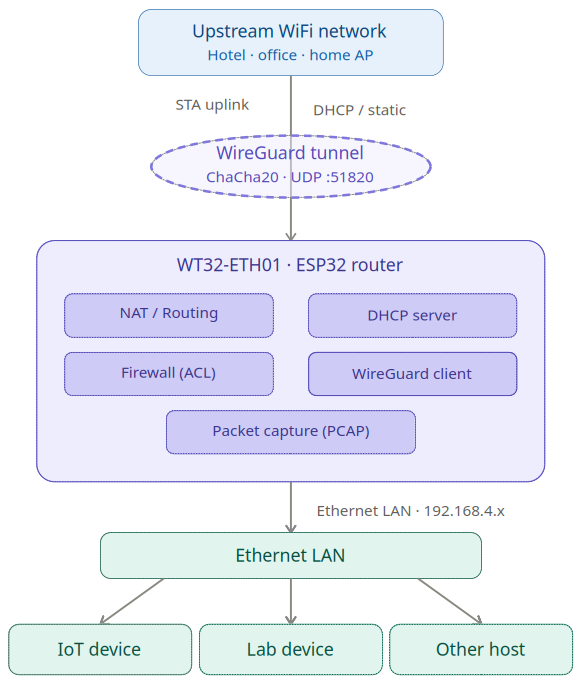
All traffic from Ethernet clients is NATed through the router's WiFi uplink address by default, so the upstream network sees only a single client. NAT can be disabled for routed (non-NATed) operation if the upstream network knows the 192.168.4.0/24 subnet. A WireGuard VPN tunnel can optionally replace or supplement the direct uplink path, with a kill switch that blocks unprotected traffic when the tunnel is down.
All settings are managed through a browser-based web interface (accessible at http://192.168.4.1 from the Ethernet LAN or via WiFi) or via the serial console at 115200 bps.
- Home lab gateway — connect a wired lab segment to a WiFi network without a dedicated router
- Isolated test network — provide controlled Internet access to an IoT net segment protected by ACLs
- Transparent monitoring tap — capture and inspect all traffic on the wired segment in Wireshark without any client changes
- WPA2-Enterprise bridge — give plain devices access to a corporate WiFi that requires 802.1X authentication
- VPN Gateway — connect a LAN segment upstream via a protected VPN tunnel
- Routed segment (no NAT) — operate as a pure IP router, forwarding traffic between the WiFi uplink and the Ethernet segment without address translation
- WiFi STA uplink with automatic reconnect on disconnect
- WPA2-Personal and WPA2-Enterprise (PEAP, TTLS, TLS) on the uplink
- Configurable static IP or DHCP for the WiFi uplink
- Ethernet LAN downlink with configurable IP
- NAT (NAPT) — enable or disable per configuration; when disabled the Ethernet segment is routed
- DHCP server on Ethernet — enable or disable independently of NAT
- DHCP reservations — assign fixed IPs to clients by MAC address
- Port forwarding (DNAT) — forward external TCP/UDP ports to internal hosts
- Stateless packet firewall with four directional ACL lists, 16 rules each
- Packet capture to Wireshark over TCP (PCAP streaming, ACL-triggered or promiscuous)
- WireGuard VPN client with kill switch and split-tunnel / route-all modes
- Remote console — password-protected TCP CLI on a configurable port
- Syslog forwarding — ship ESP log output to a remote syslog server via UDP
- OTA firmware update through the web interface
- Byte counters for the WiFi uplink
- Configurable TTL override, WiFi TX power, and timezone
- All settings persisted in NVS flash; survive firmware updates
The WT32-ETH01 is an ESP32-based module with an integrated LAN8720 Ethernet PHY. It exposes both a standard WiFi radio and a 10/100 Mbit/s Ethernet port on the same board.
| Parameter | Value |
|---|---|
| SoC | ESP32 (dual-core 240 MHz) |
| Flash | 4 MB |
| Ethernet PHY | LAN8720 |
| Ethernet MDC | GPIO 23 |
| Ethernet MDIO | GPIO 18 |
| PHY address | 1 |
| PHY power | GPIO 16 |
| Status LED | GPIO 2 (configurable) |
| Serial | 115200 bps |
LED behavior:
- Solid on: WiFi uplink connected
- Solid off: not connected
- Blinking: active, connection state indicator
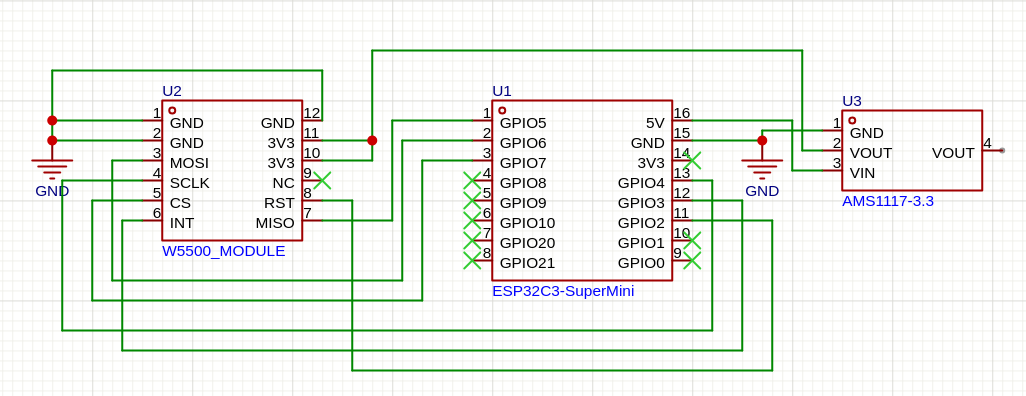
As a hardware alternative the router can run on an ESP32-C3 with an external W5500 SPI Ethernet module. Be aware that this hardware is much less performant than the WT32-ETH01 (about 4 mbps downstream / 1 mbps upstream, recommended only for real IoT use cases). It uses SPI to send and receive ethernet frames, it has only one CPU core, lower clock rate, and less RAM. There are precompiled binaries for an ESP32-C3 SuperMini board with the SPI connections as given below. If your setup differs, adjust the config.
Caution: The WiFi signal on an ESP32-C3 SuperMini board is often critical due to antenna issues. Typical symptoms can be, that you cannot connect to an AP correctly, even if you see it in a scan. Consider LOWERING the TX power with e.g. set_tx_power 15, as the signal gets distorted under max gain. If this doesn't help, search also the internet for possible DIY antenna fixes.
| Parameter | Value |
|---|---|
| SoC | ESP32-C3 (single-core RISC-V, 160 MHz) |
| Flash | 4 MB |
| Ethernet | W5500 (SPI, 10/100 Mbit/s) |
| Console | USB-JTAG (SuperMini) or UART (DevKit-M-1) |
Pin assignments are configurable via idf.py menuconfig → Ethernet Downlink.
The following setup is known to work and uses the C3's native SPI pins:
| W5500 Pin | ESP32-C3 GPIO | Function |
|---|---|---|
| GND | GND | Ground |
| 3.3V / VCC | 3V3 | Power |
| MISO | GPIO 5 | SPI Data In |
| MOSI | GPIO 6 | SPI Data Out |
| SCLK | GPIO 4 | SPI Clock |
| SCS (CS) | GPIO 7 | SPI Chip Select |
| INT | GPIO 3 | Interrupt |
| RST | GPIO 2 | Hardware Reset |
. $IDF_PATH/export.sh
idf.py set-target esp32c3
idf.py -B build_w5500_c3 \
  -D SDKCONFIG=sdkconfig.w5500_c3 \
  -D SDKCONFIG_DEFAULTS="sdkconfig.defaults;sdkconfig.defaults.w5500_c3" \
buildidf.py -B build_w5500_c3 -p /dev/ttyACM0 flash monitor # SuperMini (USB-JTAG)
idf.py -B build_w5500_c3 -p /dev/ttyUSB0 flash monitor # DevKit-M-1 (UART)- You may adapt the settings via
menuconfigor directly in sdkconfig.defaults.w5500_c3 to adapt for other ESP32 types and boards with a W5500. - The W5500 draws up to 250 mA, way to much for the SuperMini's internal 3.3V voltage regulator. Use an external power supply for the W5500.
- The W5500 module has no factory MAC address. The firmware derives one automatically from the ESP32-C3's base MAC.
- The onboard LED on the SuperMini (typically GPIO 8) can be configured via
set_led_gpio 8. - SPI clock defaults to 25 MHz. Increase via
set_spi_clockif wiring is short and clean; decrease if you see SPI errors (show statusshows SPI error counters).
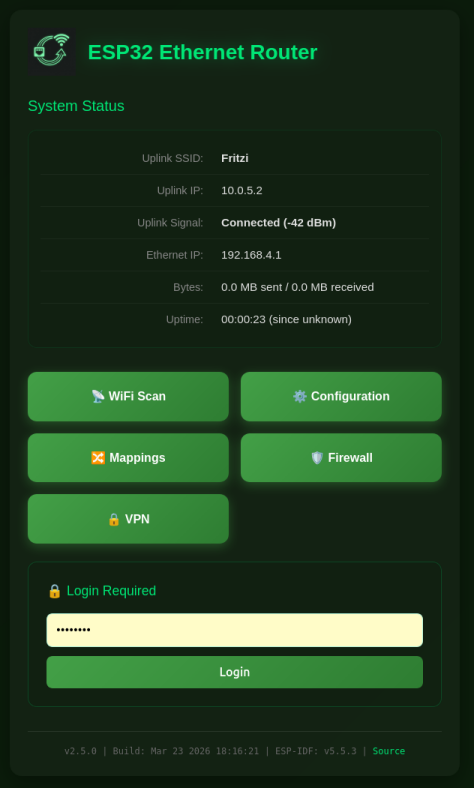
Access the web interface from any device connected to the Ethernet LAN. The default address is http://192.168.4.1.
/ — Status
Shows current connection state: uplink SSID, uplink IP, signal strength, Ethernet IP, VPN status (when a tunnel is configured), packet capture mode (when active), byte counters, and uptime. When a web password is set, the login form appears here.
Configuration
Grouped into sections. Changes trigger a reboot to apply.
- Ethernet Subnet Settings — LAN IP address, DNS server override, NAT toggle (enabled / disabled), DHCP server toggle (enabled / disabled)
- WiFi Settings (Uplink) — SSID, password, WPA2-Enterprise credentials (username, identity, EAP method, TTLS phase 2, certificate options), MAC address override
- Static IP Settings — static IP, subnet mask, gateway for the WiFi uplink; leave empty to use DHCP
- Remote Console — enable/disable, port, interface binding (ETH/STA/VPN), idle timeout
- PCAP Packet Capture — capture mode (off / ACL monitor / promiscuous), snaplen, live stats
- Device Management — OTA firmware upload, factory reset
- Web UI Settings — Access to the web UI
Mappings
Visible only when DHCP server or NAT is enabled.
- Connected Clients — live DHCP lease table (shown when DHCP server is enabled)
- DHCP Reservations — add or remove static MAC-to-IP assignments (shown when DHCP server is enabled)
- Port Forwarding — add or remove TCP/UDP port forward rules (shown when NAT is enabled)
Firewall
Manage the four ACL lists. Add rules by selecting direction, protocol, source address/port, destination address/port, and action. Delete rules by index. Per-rule hit counters show traffic statistics.
VPN
WireGuard peer configuration: private key, peer public key, optional preshared key, endpoint, tunnel IP, keepalive, kill switch, and routing mode.
WiFi Scan
Scans for available upstream networks and displays SSID, BSSID, channel, RSSI, and authentication type.
Set a password with set_router_password <password> or through the web interface. When set, the Configuration, Mappings, Firewall, and VPN pages require authentication. Sessions last 30 minutes. Clear the password by setting an empty string.
set_sta <ssid> <password>
set_sta_static <ip> <subnet> <gateway>
set_sta_static dhcp
set_sta_mac <AA:BB:CC:DD:EE:FF>
set_tx_power <dBm>
The router connects to the upstream WiFi network and reconnects immediately on disconnect. WPA2-Enterprise (PEAP/TTLS/TLS) can be configured in the web interface.
set_ap_ip <ip>
set_ap_dns <dns>
set_eth_nat <on|off>
set_eth_dhcps <on|off>
The Ethernet interface defaults to 192.168.4.1/24 with NAT and DHCP server enabled. Changes to NAT or DHCP server state take effect after reboot.
When NAT is disabled, the Ethernet segment is routed — clients use their own IP addresses, and the router forwards packets to the default gateway (WiFi uplink or VPN tunnel).
When DHCP server is disabled, clients must be configured with static IPs in the 192.168.4.x range (or whatever subnet you set).
dhcp_reserve add <AA:BB:CC:DD:EE:FF> <ip> [-n <name>]
dhcp_reserve del <AA:BB:CC:DD:EE:FF>
Reservations persist in NVS and are shown in the Mappings page. Up to 16 reservations are supported.
portmap add TCP <external_port> <internal_ip> <internal_port>
portmap add UDP <external_port> <internal_ip> <internal_port>
portmap del TCP <external_port>
portmap del UDP <external_port>
Only available when NAT is enabled. Rules persist in NVS.
set_hostname <name>
set_ttl <value>
set_tz <POSIX TZ string>
set_tz clear
set_ttl overrides the TTL field in forwarded packets, which can help with tethering restrictions. set_tz accepts a POSIX timezone string (e.g. CET-1CEST,M3.5.0,M10.5.0/3).
The firewall filters packets at four points in the data path:
| List | Direction | Description |
|---|---|---|
to_esp |
inbound on WiFi uplink | packets arriving from the Internet |
from_esp |
outbound on WiFi uplink | packets leaving to the Internet |
from_eth |
inbound on Ethernet | packets arriving from LAN clients |
to_eth |
outbound on Ethernet | packets going to LAN clients |
Rules are evaluated in order; the first match wins. Unmatched packets are allowed by default.
acl <list> <proto> <src> [<s_port>] <dst> [<d_port>] <action>
acl <list> del <index>
acl <list> clear
acl <list> clear_stats
acl show [<list>]
proto: IP, TCP, UDP, ICMP
address: CIDR notation (192.168.0.0/24), single IP, or any; named DHCP reservations can be used by device name
port: port number or * for any (TCP/UDP only)
action: allow, deny, allow_monitor, deny_monitor
The _monitor variants also send the matching packet to the PCAP capture stream, regardless of the global capture mode setting.
Drop all inbound TCP to the router's web port and block LAN clients from reaching the router management interface:
acl to_esp TCP any * any 80 deny
acl from_eth TCP any * 192.168.4.1 80 deny
Rules are stored in NVS under keys acl_0 through acl_3.
Traffic on the Ethernet interface can be streamed live to Wireshark over a TCP connection on port 19000. No client software other than netcat and Wireshark is required.
| Mode | Behavior |
|---|---|
off |
No capture |
acl |
Capture only packets matched by a _monitor ACL rule |
promisc |
Capture all Ethernet interface traffic |
pcap <off|acl|promisc>
pcap snaplen [<bytes>]
pcap status
Connect from a workstation on the LAN:
nc 192.168.4.1 19000 | wireshark -k -i -
The connection command is also shown in the PCAP section of the Configuration page. Snaplen limits the captured bytes per packet (64–1600, default 1600).
The router includes a WireGuard client that establishes a tunnel over the WiFi uplink. The VPN tunnel can be used as the default gateway for all Ethernet clients.
set_vpn private_key <base64 key>
set_vpn public_key <base64 key>
set_vpn preshared_key <base64 key>
set_vpn endpoint <host>
set_vpn port <udp_port>
set_vpn address <tunnel_ip>
set_vpn netmask <netmask>
set_vpn keepalive <seconds>
set_vpn killswitch <on|off>
set_vpn route_all <on|off>
set_vpn <on|off>
Kill switch (killswitch on): blocks Ethernet client Internet traffic when the VPN tunnel is down, preventing unprotected traffic from leaking through the plain WiFi uplink.
Route all (route_all on): sends all client traffic through the VPN tunnel. When disabled (split-tunnel), only traffic destined for the VPN peer subnet is routed through the tunnel; all other traffic uses the WiFi uplink directly.
VPN status (connected / disconnected) is shown on the index page when a tunnel is configured.
A TCP server provides a password-authenticated CLI session accessible over the network. It reuses the web interface password. Output from CLI commands is captured and forwarded to the remote session.
remote_console enable
remote_console disable
remote_console port <port>
remote_console bind <eth|sta|vpn[,...]>
remote_console timeout <seconds>
remote_console kick
remote_console status
Default port is 2323. Connect with any TCP client:
nc 192.168.4.1 2323
The service is disabled by default. A web password must be set before enabling it. Idle sessions are disconnected after the configured timeout (default 300 seconds; 0 disables the timeout). Only one session is active at a time.
The bind option controls which network interfaces the server listens on (ETH = Ethernet downlink, STA = WiFi uplink, VPN = WireGuard tunnel). Multiple interfaces can be specified comma-separated, e.g. eth,sta.
ESP log output can be forwarded to a remote syslog server over UDP.
syslog enable <server> [<port>]
syslog disable
syslog status
The default port is 514. The server address is resolved by DNS and re-resolved each time the WiFi uplink connects. Configuration is persisted in NVS.
Connect via serial at 115200 bps, or via the remote console.
| Command | Description |
|---|---|
show config |
WiFi and Ethernet configuration |
scan |
Scan for WiFi networks |
set_sta <ssid> <password> |
Set upstream WiFi credentials |
set_sta_static <ip> <mask> <gw> |
Set static IP for WiFi uplink |
set_sta_static dhcp |
Revert WiFi uplink to DHCP |
set_sta_mac <mac> |
Override WiFi MAC address |
set_ap_ip <ip> |
Set Ethernet interface IP |
set_ap_dns <dns> |
Set DNS server for Ethernet clients |
set_eth_nat <on|off> |
Enable or disable NAT (requires reboot) |
set_eth_dhcps <on|off> |
Enable or disable DHCP server (requires reboot) |
set_hostname <name> |
Set DHCP hostname |
set_ttl <value> |
Override TTL in forwarded packets |
bytes |
Show uplink byte counters |
bytes reset |
Reset byte counters |
ping <host> |
Send ICMP echo requests |
| Command | Description |
|---|---|
show mappings |
DHCP pool, reservations, port maps |
dhcp_reserve add <mac> <ip> [-n <name>] |
Add DHCP reservation |
dhcp_reserve del <mac> |
Remove DHCP reservation |
portmap add <TCP|UDP> <ext_port> <int_ip> <int_port> |
Add port forward rule |
portmap del <TCP|UDP> <ext_port> |
Remove port forward rule |
| Command | Description |
|---|---|
acl show [<list>] |
Show rules and hit counts |
acl <list> <proto> <src> [<sp>] <dst> [<dp>] <action> |
Add rule |
acl <list> del <index> |
Delete rule by index |
acl <list> clear |
Remove all rules from list |
acl <list> clear_stats |
Reset hit counters |
Lists: to_esp, from_esp, from_eth, to_eth
| Command | Description |
|---|---|
set_vpn <on|off> |
Enable or disable VPN tunnel |
set_vpn private_key <key> |
WireGuard private key (base64) |
set_vpn public_key <key> |
Peer public key (base64) |
set_vpn preshared_key <key> |
Preshared key (base64, optional) |
set_vpn endpoint <host> |
Peer endpoint address |
set_vpn port <port> |
Peer UDP port (default 51820) |
set_vpn address <ip> |
Tunnel IP address |
set_vpn netmask <mask> |
Tunnel subnet mask |
set_vpn keepalive <seconds> |
Persistent keepalive interval |
set_vpn killswitch <on|off> |
Block traffic when VPN is down |
set_vpn route_all <on|off> |
Route all traffic through VPN |
| Command | Description |
|---|---|
pcap <off|acl|promisc> |
Set capture mode |
pcap snaplen [<bytes>] |
Get or set max bytes per packet |
pcap status |
Show capture statistics |
| Command | Description |
|---|---|
remote_console enable |
Enable remote console |
remote_console disable |
Disable remote console |
remote_console port <port> |
Set TCP port |
remote_console bind <eth|sta|vpn[,...]> |
Set interface binding (comma-separated) |
remote_console timeout <seconds> |
Set idle timeout |
remote_console kick |
Disconnect active session |
remote_console status |
Show status |
log_level [<level>] [-t <tag>] |
Get or set log level (none/error/warn/info/debug/verbose) |
syslog enable <server> [<port>] |
Enable syslog forwarding |
syslog disable |
Disable syslog forwarding |
syslog status |
Show syslog configuration |
| Command | Description |
|---|---|
web_ui enable |
Enable web server (after reboot) |
web_ui disable |
Disable web server (after reboot) |
web_ui port <port> |
Set web server port (default 80) |
set_router_password <password> |
Set web interface password |
| Command | Description |
|---|---|
show status |
Connection state, IPs, heap |
version |
Chip model, IDF version, flash size |
heap |
Current and minimum free heap |
tasks |
FreeRTOS task list |
restart |
Software reset |
factory_reset |
Erase all NVS settings and reboot |
deep_sleep [-t <ms>] [--io <gpio> --io_level <0|1>] |
Enter deep sleep |
light_sleep [-t <ms>] [--io <gpio> --io_level <0|1>] |
Enter light sleep |
| Command | Description |
|---|---|
set_led_gpio <gpio|none> |
Set GPIO for status LED |
set_led_lowactive <true|false> |
Invert LED polarity (active-low LEDs) |
set_tx_power <dBm> |
Set WiFi transmit power |
set_spi_clock <MHz> |
Set W5500 SPI clock speed in MHz (1-80, requires reboot) — W5500 only |
w5500 <status|reset> |
Shows W5500 chip status and can reset it |
set_tz <TZ string> |
Set POSIX timezone |
Requires ESP-IDF v5.x. Source the ESP-IDF environment, then build for your target hardware.
. $IDF_PATH/export.sh
./build_firmware.sh
The script performs a clean build and copies the four binary files into the firmware/ directory. To reconfigure build options:
idf.py -B build_eth_sta menuconfig. $IDF_PATH/export.sh
./build_firmware_w5500_c3.shThe script performs a clean build and copies the four binary files into the firmware_w5500_c3/ directory. To reconfigure build options:
idf.py -B build_w5500_c3 menuconfig| File | Purpose |
|---|---|
sdkconfig.defaults |
Shared base config (IP forwarding, NAPT, DHCP server) |
sdkconfig.defaults.wt32_eth_sta_uplink |
WT32-ETH01 Ethernet PHY GPIOs (LAN8720) |
sdkconfig.defaults.w5500_c3 |
W5500 SPI pins, ESP32-C3 specifics, IRAM/perf tuning |
Each variant uses a separate sdkconfig file (sdkconfig vs sdkconfig.w5500_c3) so both can coexist in the same project directory.
OTA updates are also supported through the web interface (Device Management section) with partition rollback on failed updates.
Flash the binaries from the firmware/ directory using esptool.py:
esptool.py --chip esp32 --port /dev/ttyUSB0 --baud 460800 \
  write_flash \
  0x1000  firmware/bootloader.bin \
  0x8000  firmware/partition-table.bin \
  0xf000  firmware/ota_data_initial.bin \
  0x20000 firmware/esp32_eth_router.bin
To wipe the entire flash:
esptool.py --chip esp32 --port /dev/ttyUSB0 erase_flashFlash the binaries from the firmware_w5500_c3/ directory:
esptool.py --chip esp32c3 --port /dev/ttyACM0 --baud 460800 \
  write_flash \
  0x0000  firmware_w5500_c3/bootloader.bin \
  0x8000  firmware_w5500_c3/partition-table.bin \
  0xf000  firmware_w5500_c3/ota_data_initial.bin \
  0x20000 firmware_w5500_c3/esp32_eth_router.bin
Note: use /dev/ttyUSB0 for a DevKit-M-1 (UART) or /dev/ttyACM0 for a SuperMini (USB-JTAG). The ESP32-C3 bootloader address is 0x0000, not 0x1000 — using the wrong address will require a full flash erase to recover.
To wipe the entire flash:
esptool.py --chip esp32c3 --port /dev/ttyACM0 erase_flashAfter flashing either variant, connect via serial at 115200 bps and configure the upstream WiFi:
set_sta MyWiFiSSID MyPassword
The router will reboot and connect. Access the web interface at http://192.168.4.1 from a device connected to the Ethernet port.
To erase all settings and return to defaults:
factory_reset
The WireGuard submodul has the following licence_
Copyright (c) 2021 Kenta Ida (fuga@fugafuga.org)

The original license is below:
Copyright (c) 2021 Daniel Hope (www.floorsense.nz)
All rights reserved.

Redistribution and use in source and binary forms, with or without modification,
are permitted provided that the following conditions are met:
* Redistributions of source code must retain the above copyright notice, this
  list of conditions and the following disclaimer.
* Redistributions in binary form must reproduce the above copyright notice, this
  list of conditions and the following disclaimer in the documentation and/or
  other materials provided with the distribution.
* Neither the name of "Floorsense Ltd", "Agile Workspace Ltd" nor the names of
  its contributors may be used to endorse or promote products derived from this
  software without specific prior written permission.

THIS SOFTWARE IS PROVIDED BY THE COPYRIGHT HOLDERS AND CONTRIBUTORS "AS IS" AND
ANY EXPRESS OR IMPLIED WARRANTIES, INCLUDING, BUT NOT LIMITED TO, THE IMPLIED
WARRANTIES OF MERCHANTABILITY AND FITNESS FOR A PARTICULAR PURPOSE ARE
DISCLAIMED. IN NO EVENT SHALL THE COPYRIGHT OWNER OR CONTRIBUTORS BE LIABLE FOR
ANY DIRECT, INDIRECT, INCIDENTAL, SPECIAL, EXEMPLARY, OR CONSEQUENTIAL DAMAGES
(INCLUDING, BUT NOT LIMITED TO, PROCUREMENT OF SUBSTITUTE GOODS OR SERVICES;
LOSS OF USE, DATA, OR PROFITS; OR BUSINESS INTERRUPTION) HOWEVER CAUSED AND ON
ANY THEORY OF LIABILITY, WHETHER IN CONTRACT, STRICT LIABILITY, OR TORT
(INCLUDING NEGLIGENCE OR OTHERWISE) ARISING IN ANY WAY OUT OF THE USE OF THIS
SOFTWARE, EVEN IF ADVISED OF THE POSSIBILITY OF SUCH DAMAGE.

Author: Daniel Hope <daniel.hope@smartalock.com>