Describe the bug; what happened?
Setting the width of the Select element to be smaller, or when the select element resizes due to the window becoming smaller doesn't affect the SelectOption elements. Instead, the SelectOption elements remain their default size.
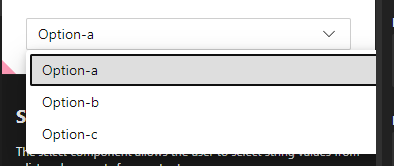
Also, on a scrollable page, the SelectOption list is set to the original location of the Select element instead of the current position.

Lastly, the dropdown list of options goes behind other UI elements.

What are the steps to reproduce the issue?
I was able to repro this by resizing the window and then opening the dropdown here: https://explore.fastdna.net/components/select/
I was able to repro the scroll issue by adding multiple Select elements with children, scrolling down the page, and then trying to open the select element.


Describe the bug; what happened?

Setting the width of the Select element to be smaller, or when the select element resizes due to the window becoming smaller doesn't affect the SelectOption elements. Instead, the SelectOption elements remain their default size.
Also, on a scrollable page, the SelectOption list is set to the original location of the Select element instead of the current position.

Lastly, the dropdown list of options goes behind other UI elements.

What are the steps to reproduce the issue?
I was able to repro this by resizing the window and then opening the dropdown here: https://explore.fastdna.net/components/select/
I was able to repro the scroll issue by adding multiple Select elements with children, scrolling down the page, and then trying to open the select element.