


Add MRGArchitect as a dependency in your Package.swift:
dependencies: [
    .package(url: "https://github.com/Mirego/MRGArchitect.git", from: "1.2.0")
]
Then add "MRGArchitect" to the dependencies array of any target that needs it.
Alternatively, in Xcode go to File → Add Package Dependencies…, enter the repository URL and choose the version.
Add MRGArchitect in your Podfile:
pod 'MRGArchitect'Then run pod install in your terminal at the root of your project.
Say you want properties for your LoginView. Create a LoginView.json file and add properties for your view inside a JSON object.
Instantiate your MRGArchitect in your LoginView.m and keep it in a member variable like so :
self.architect = [MRGArchitect architectForObject:self];From now on you are able to retrieve properties from your JSON file with MRGArchitect’s helpers like so :
  // returns BOOL
  [self.architect boolForKey:@"boolKey"];

  // returns NSString *
  [self.architect stringForKey:@"stringKey"];

  // returns NSInteger
  [self.architect integerForKey:@"integerKey"];

  // returns NSUInteger
  [self.architect unsignedIntegerForKey:@"unsignedIntegerKey"];

  // returns int
  [self.architect intForKey:@"intKey"];

  // returns unsigned int
  [self.architect unsignedIntForKey:@"unsignedIntKey"];

  // returns CGFloat
  [self.architect floatForKey:@"floatKey"];

  // returns UIColor *
  [self.architect colorForKey:@"colorKey"];

  // returns UIEdgeInsets
  [self.architect edgeInsetsForKey:@"edgeInsetsKey"];

  // returns CGPoint
  [self.architect pointForKey:@"pointKey"];

  // returns CGSize
  [self.architect sizeForKey:@"sizeKey"];

  // returns UIFont *
  [self.architect fontForKey:@"fontKey"];

  // returns CGRect
  [self.architect rectForKey:@"rectKey"];

  // returns MRGArchitectGradient (helper class with colors & locations)
[self.architect gradientForKey:@"gradientKey"];Say you also have properties that apply to all of your views. Instead of having one instance of MRGArchitect specific for your view and another instance for your generic properties, use the importation feature.
In your JSON file, import another file like so :
{
  "@imports": [
    "FileNameToImportWithoutExtension"
  ]
}MRGArchitect loads more than one file (if it finds more than one) for a given class name.
Here is the order it will search for files on iPhone :
<name>.json<name>~iphone.json<name>-568h.json<name>-568h~iphone.json<name>-667h.json<name>-667h~iphone.json<name>-736h.json<name>-736h~iphone.json<name>-812h.json<name>-812h~iphone.json<name>-896h.json<name>-896h~iphone.json
On iPad :
<name>.json<name>~ipad.json
These are the order the files will be loaded and so the order the properties will be compiled. For example :
- for a given class name, the property "foo" of
<name>.jsonwill be overriden by the property "foo" of<name>~iphone.json, on iPhone, - and the property "bar" of
<name>.jsonwill be overriden by the property "bar" of<name>~ipad.json, on iPad.
Of course, it only applies if these files exist.
MRGArchitect also supports size class dependant properties. For this to work, you need to provide a property file
<name>-traits.json with a data structure in this fashion:
{
    "[* *]": {
        "title":"Any Any"
    },
    "[+ *]": {
        "title":"Regular Any"
    },
    "[* -]": {
        "title":"Any Compact"
    },
    "[- *]": {
        "title":"Compact Any"
    },
    "[- +]": {
        "title":"Compact Regular"
    },
    "[+ +]": {
        "title":"Regular Regular"
    }
}
In your view, update MRGArchitect's trait collection when appropriate (see Apple's traitCollectionDidChange documentation):
self.architect.traitCollection = self.traitCollection;Properties whose size class description match the current size class will be loaded, from the most generic to the most precise. The following chart illustrate the current possibilities:
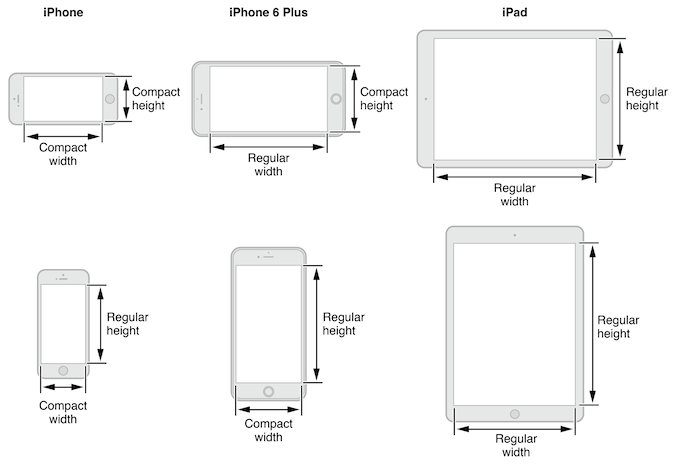
-
Colors :
"colorKey": "#FF0000",
// OR (ARGB format)
"colorWithAlphaKey": "#80FAFAFA"
-
Edge Insets :
"edgeInsetsKey": {
  "top": 1.0,
  "left": 2.0,
  "bottom": 3.0,
  "right": 4.0
},
// OR
"stringEdgeInsetsKey": "{4.0, 3.0, 2.0, 1.0}"
-
Points :
"pointKey": {
  "x": 1.0,
  "y": 2.0
},
// OR
"stringPointKey": "{2.0, 1.0}"
-
Sizes :
"sizeKey": {
  "width": 10.0,
  "height": 20.0
},
// OR
"stringSizeKey": "{20.0, 10.0}"
-
Fonts :
"fontKey": {
  "name": "HelveticaNeue",
  "size": 15.0
}
-
Rects :
"rectKey": {
  "origin": {
    "x": 10.0,
    "y": 10.0
  },
  "size": {
    "width": 64.0,
    "height": 64.0
  }
},
// OR
"stringRectKey": "{{10.0, 10.0}, {64.0, 64.0}}"
-
Gradients :
"gradientKey": [
    {
	    "location": 0.0,
	    "color": "#FFFFFF"
    },
    {
	    "location": 0.3,
	    "color": "#878787"
    },
    {
	    "location": 1.0,
	    "color": "#000000"
    }
]
MRGArchitect is © 2014-2019 Mirego and may be freely distributed under the New BSD license. See the LICENSE file.
Mirego is a team of passionate people who believe that work is a place where you can innovate and have fun. We're a team of talented people who imagine and build beautiful Web and mobile applications. We come together to share ideas and change the world.
We also love open-source software and we try to give back to the community as much as we can.