This section contains various resources, which will help you establish your dbt knowledge.
Ideal for starting your new dbt adventure!
List of contents:
- What is dbt and why companies are using it? https://seattledataguy.substack.com/p/what-is-dbt-and-why-are-companies?s=r
- Hackernews discussion on dbt (January 2022) https://news.ycombinator.com/item?id=29424445
- Up & Running: data pipeline with BigQuery and dbt https://getindata.com/blog/up-running-data-pipeline-bigquery-dbt/
- Overview of testing options with dbt https://datacoves.com/post/an-overview-of-testing-options-in-dbt-data-build-tool
- Integrating airflow and dbt https://www.astronomer.io/guides/airflow-dbt/
- Auto-generating an Airflow DAG using the dbt manifest https://engineering.autotrader.co.uk/2021/09/15/auto-generated-airflow-dag-for-dbt.html
- Creating dbt project on Windows https://www.youtube.com/watch?v=5rNquRnNb4E
- 5 tips to improve your dbt project https://www.youtube.com/watch?v=qOx8l_QFz9I
- Future of the modern data stack (December 2020) https://blog.getdbt.com/future-of-the-modern-data-stack/
- dbt Official Documentation https://docs.getdbt.com/docs/introduction
- Go to: https://console.cloud.google.com/vertex-ai/workbench/list/instances?project=dataops-demo-342817
- If you don't see a project or you see an error, click on project select button right to the Google Cloud Platform sign,
type dataops-demo-342817 and select it.

-
Click on New Notebook located in the topbar and then "Customize..."

-
Type notebook name (preferrably your name). In environment section, choose Debian 10 and "Custom container"
-
Provide link to the image: gcr.io/getindata-images-public/jupyterlab-dataops:bigquery-1.0.5

-
In machine configuration section, choose n1-standard-2 machine 2vCPU/7.5GB RAM (~0.074 USD / hour)
-
Leave everything else on default.
-
Create Jupyter notebook.
-
Wait until it's configured and click on Open Jupyterlab
You can find full documentation of our GID Data Platform Tool on https://github.com/getindata/data-pipelines-cli and also https://data-pipelines-cli.readthedocs.io/en/latest/index.html
You are now inside managed Vertex AI Workbench instance, which will serve as our transformations development workflow. This image lets you open:
- VSCode instance
- CloudBeaver, open source SQL IDE
- dbt docs
- python3 interactive terminal
- Now, open a VSCode instance. At the top, click on explore and open a home directory so you can easily create new files and track changes to directories inside VSCode.
-> Tip: In the toolbar click on 'Explore' and then 'Open Folder'. Click OK. You should be located in JOVYAN directory.

- Open a new terminal instance.
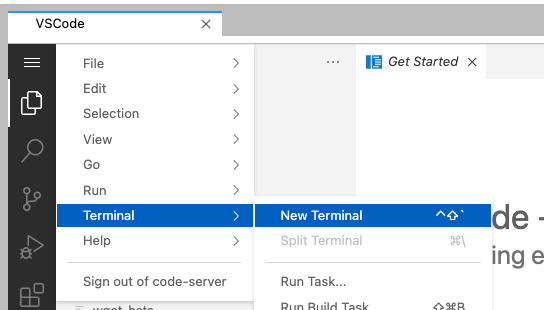
- Browse to the work directory with
cd workand execute commanddp init https://github.com/getindata/data-pipelines-cli-init-example. This will initialize data-pipelines-cli in the environment. Provide any username when prompted.
-> Tip: when copy+pasting for the 1st time, you might be asked for permissions to access your clipboard by Chrome. Accept.
- Run
dp create .This command will create a full data-pipelines-cli environment with dbt project as a core part of it.
IMPORTANT: provide dataops-demo-342817 as a GCP project name.
-> Tip: when prompted, you can simply press ENTER to use default values. Don't use it for GCP Project ID!
-> Tip: use underscores _
-> Tip: Example of provided values

- Run
git init. Data-pipelines-cli is a tool tightly coupled with CI/CD so we need to initialize git repository.
We won't use CI/CD in this exercise. - Run these commands in following order:
git add .git config --global user.email "you@example.com"git config --global user.name "Your Name"git commit -m 'Initial' - Your environment is now ready to execute some dbt code!
- Firstly, set up some seeds to load your static data to warehouse. You need to provide .yml file with a definition, and a .csv with actual data to be loaded in. Put them under
seedsdirectory. You can make additional directories insideseedsfor clarity.
-> Tip: you can find documentation on seeds on https://docs.getdbt.com/docs/building-a-dbt-project/seeds
- Next, setup data sources under
modelsdirectory, as they will act as a starting point for you transformations. Lookup tables names in BigQuery underraw_dataschema.
-> Tip: at any point of this tutorials, you can execute
dp seed,dp runanddp testcommands to see how your pipelines behave against the database.
-> Tip: execute
dp --helpto see a list of available commands
- Put tests in .yml files, based on patterns that you see in the data (please do that in real-life scenarios!). Look up for uniqueness and not_nulls in columns.
-> Tip: you can find documentation on tests on https://docs.getdbt.com/docs/building-a-dbt-project/tests
- Write your models inside
modelsdirectory. You can make additional directories there - a good practice is to separate them based on schema names you wish to have. Put tests in .yml files.
-> Tip: you can find documentation on models on https://docs.getdbt.com/docs/building-a-dbt-project/building-models
-> Tip: Ideas for transformations based on example data
provide mapping between real country names and identifiers found in raw_mapping.country
find out which country had most total sales
provide a metric on monthly revenue by month
-
Execute everything and look results in your personal schema.
-
Enrich your seeds, sources and models with descriptions and additional tests f.e. with dbt-expectations plugin. https://github.com/calogica/dbt-expectations
-
Run dp docs-serve in the terminal, and open dbt docs in new Vertex Workbench window.

- In dbt docs, look up 'Lineage Graph' to find DAG of your new project:

