
##Examples
using SqlBulkTools;

// Mockable IBulkOperations and IDataTableOperations Interface.
public class BookClub(IBulkOperations bulk, IDataTableOperations dtOps) {

  private IBulkOperations _bulk;
  private IDataTableOperations _dtOps;

  public BookClub(IBulkOperations bulk) {
    _bulk = bulk;
    _dtOps = dtOps;
  }
    // Do your stuff
}

// Or simply new up an instance.
var bulk = new BulkOperations(); // for Bulk Tools.
var dtOps = new DataTableOperations() // for Data Table Tools.

// The following examples are based on a cut down Book model

public class Book {
    public int Id {get; set;}
    public string ISBN {get; set;}
    public string Description {get; set;}
}
##New Features
The latest version of SqlBulkTools includes numerous improvements and new features.
- "Overcome SqlBulkCopy Limitations". Output column direction for identity columns for all bulk operations. Slight performance hit of ~5% because SqlBulkCopy does not natively support this feature.
- RemoveColumn method available when using AddAllColumns(). This is useful when you want to include all columns but exclude a couple.
- Support for all .NET Framework type to SQL Server Data Type Mappings (Value type, Char[], String, Byte[], SqlXml).
- Bug fixes and performance enhancements.
- BuildPreparedDataTable() as detailed below...
Easily create data tables for table variables or temp tables and benefit from the following features:
- Strongly typed column names.
- Resolve data types automatically.
- Populate list.
Once data table is prepared, any additional configuration can be applied.
DataTableOperations dtOps = new DataTableOperations();
books = GetBooks();

var dt = dtOps.SetupDataTable<Book>()
.ForCollection(books)
.AddColumn(x => x.Id)
.AddColumn(x => x.ISBN)
.AddColumn(x => x.Description)
.CustomColumnMapping(x => x.Description, "BookDescription")
.PrepareDataTable();

/* PrepareDataTable() returns a DataTable. Here you can apply additional configuration.
You can use GetColumn<T> to get the column name to be used in indexer. Any custom column mappings are applied */

dt.Columns[dtOps.GetColumn<Book>(x => x.Id)].AutoIncrement = true;
dt.Columns[dtOps.GetColumn<Book>(x => x.ISBN)].AllowDBNull = false;

// Additional configuration complete? Cool. Populate the datatable with rows by using BuildPreparedDataTable().

dt = dtOps.BuildPreparedDataTable();

// Another example...

// Feeling lazy? Build your data tables using AddAllColumns()

var dt = dtOps.SetupDataTable<Book>()
.ForCollection(books)
.AddAllColumns()
.RemoveColumn(x => x.Description) // Use RemoveColumn if you want to exclude a column.
.PrepareDataTable();

dt = dtOps.BuildPreparedDataTable(); // Returns a populated DataTablebooks = GetBooks();
bulk.Setup<Book>()
.ForCollection(books)
.WithTable("Books")
.AddAllColumns()
.BulkInsert();
bulk.CommitTransaction("DefaultConnection");
// Another example with identity output.
bulk.Setup<Book>()
.ForCollection(books)
.WithTable("Books")
.AddAllColumns()
.BulkInsert()
.SetIdentityColumn(x => x.Id, ColumnDirection.InputOutput);
bulk.CommitTransaction("DefaultConnection");
// The value of the Id property on each record in 'books' will be updated to reflect the value in database.
/*
Notes:
(1) It's also possible to add each column manually via the AddColumn method. Bear in mind that
columns that are not added will be assigned their default value according to the property type.
(2) It's possible to disable non-clustered indexes during the transaction. See advanced section
for more info.
*/var bulk = new BulkOperations();
books = GetBooks();
bulk.Setup<Book>()
.ForCollection(books)
.WithTable("Books")
.AddColumn(x => x.ISBN)
.AddColumn(x => x.Title)
.AddColumn(x => x.Description)
.BulkInsertOrUpdate()
.MatchTargetOn(x => x.ISBN)
bulk.CommitTransaction("DefaultConnection");
// Another example matching an identity column
bulk.Setup<Book>()
.ForCollection(books)
.WithTable("Books")
.AddAllColumns()
.BulkInsertOrUpdate()
.SetIdentityColumn(x => x.Id)
.MatchTargetOn(x => x.Id)
bulk.CommitTransaction("DefaultConnection");
/*
Notes:
(1) It's possible to use AddAllColumns for operations BulkInsert/BulkInsertOrUpdate/BulkUpdate.
(2) MatchTargetOn is mandatory for BulkUpdate, BulkInsertOrUpdate and BulkDelete... unless you want to eat
an InvalidOperationException.
(3) If model property name does not match the actual SQL column name, you can set up a custom
mapping. An example of this is shown in a dedicated section somewhere in this Readme...
(4) BulkInsertOrUpdate also supports DeleteWhenNotMatched which is false by default. With power
comes responsibility. Use at your own risk.
(5) If your model contains an identity column and it's included (via AddAllColumns, AddColumn or
MatchTargetOn) in your setup, you must use SetIdentityColumn to mark it as your identity column.
Identity columns are immutable and auto incremented. You can of course update based on an identity
column (using MatchTargetOn) but just make sure to use SetIdentityColumn to mark it as an
identity column.
*/var bulk = new BulkOperations();
books = GetBooksToUpdate();
bulk.Setup<Book>()
.ForCollection(books)
.WithTable("Books")
.AddColumn(x => x.ISBN)
.AddColumn(x => x.Title)
.AddColumn(x => x.Description)
.BulkUpdate()
.MatchTargetOn(x => x.ISBN)
/* Notes:
(1) Whilst it's possible to use AddAllColumns for BulkUpdate, using AddColumn for only the columns
that need to be updated leads to performance gains.
(2) MatchTargetOn is mandatory for BulkUpdate, BulkInsertOrUpdate and BulkDelete... unless you want to eat
an InvalidOperationException.
(3) MatchTargetOn can be called multiple times for more than one column to match on.
(4) If your model contains an identity column and it's included (via AddAllColumns, AddColumn or
MatchTargetOn) in your setup, you must use SetIdentityColumn to mark it as your identity column.
Identity columns are immutable and auto incremented. You can of course update based on an identity
column (using MatchTargetOn) but just make sure to use SetIdentityColumn to mark it as an
identity column.
*/
bulk.CommitTransaction("DefaultConnection");/* Tip: Considering you only need to match a key, use a DTO containing only the column(s) needed for
performance gains. */
public class BookDto {
public string ISBN {get; set;}
}
var bulk = new BulkOperations();
books = GetBooksIDontLike();
bulk.Setup<BookDto>()
.ForCollection(books)
.WithTable("Books")
.AddColumn(x => x.ISBN)
.BulkDelete()
.MatchTargetOn(x => x.ISBN)
bulk.CommitTransaction("DefaultConnection");
/*
Notes:
(1) Avoid using AddAllColumns for BulkDelete.
(2) MatchTargetOn is mandatory for BulkUpdate, BulkInsertOrUpdate and BulkDelete... unless you want to eat
an InvalidOperationException.
*//* If the property names in your model don't match the column names in the corresponding table, you
can use a custom column mapping. For the below example, assume that there is a 'BookTitle' column
name in database which is defined in the model as 'Title' */
var bulk = new BulkOperations();
books = GetBooks();
bulk.Setup<Book>()
.ForCollection(books)
.WithTable("Books")
.AddAllColumns()
.CustomColumnMapping(x => x.Title, "BookTitle")
.BulkInsert();
bulk.CommitTransaction("DefaultConnection");var bulk = new BulkOperations();
books = GetBooks();
bulk.Setup<Book>()
.ForCollection(books)
.WithTable("Books")
.WithSchema("Api") // Specify a schema
.WithBulkCopyBatchSize(4000)
.WithBulkCopyCommandTimeout(720) // Default is 600 seconds
.WithBulkCopyEnableStreaming(false)
.WithBulkCopyNotifyAfter(300)
.WithSqlCommandTimeout(720) // Default is 600 seconds
.WithSqlBulkCopyOptions(SqlBulkCopyOptions.TableLock)
.AddColumn(x => // ........
/* SqlBulkTools gives you the ability to disable all or selected non-clustered indexes during
the transaction. Indexes are rebuilt once the transaction is completed. If at any time during
the transaction an exception arises, the transaction is safely rolled back and indexes revert
to their initial state. */
// Example
bulk.Setup<Book>()
.ForCollection(books)
.WithTable("Books")
.WithBulkCopyBatchSize(5000)
.WithSqlBulkCopyOptions(SqlBulkCopyOptions.TableLock)
.AddAllColumns()
.TmpDisableAllNonClusteredIndexes()
.BulkInsert();
bulk.CommitTransaction("DefaultConnection");###How does SqlBulkTools compare to others?
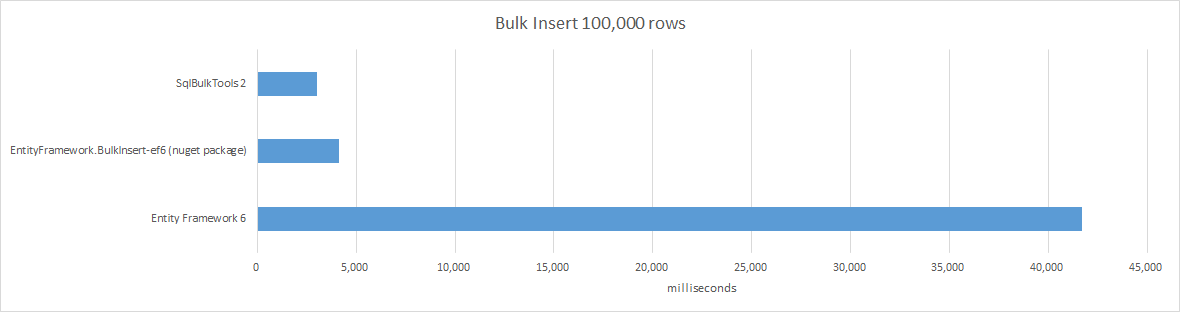
Test notes:
- Table had 6 columns including an identity column.
- There were 3 non-clustered indexes on the table.
- SqlBulkTools used the following setup options: AddAllColumns, TmpDisableAllNonClusteredIndexes.
#####Setup
Setup<T>()

// Example usage where col implements IEnumerable and is of type Book
bulk.Setup<Book>()
.ForCollection(books)

/* Setup is the main entry point. Because of the vast flexibility possible with SqlBulkTools,
a fluent interface helps to guide you through setup process. This design choice was made to
make it easier for you to use SqlBulkTools. Options that are not relevant to a particular
operation are not exposed. For example the MatchTargetOn method is not accessible from the
BulkInsert method because it would not make sense. */
#####CommitTransaction
CommitTransaction(string connectionName, SqlCredential credentials = null)
CommitTransaction(SqlConnection connection)
CommitTransactionAsync(string connectionName, SqlCredential credentials = null)
CommitTransactionAsync(SqlConnection connection)

/* A transaction will only take place if CommitTransaction is called. CommitTransaction is
always called after a valid setup is built and Async flavours are included for scalability.
CommitTransaction and CommmitTransactionAsync respectively are overloaded. It's up to you how
you would like to pass in your SQL configuration.
 */