A free Chrome extension that lets you highlight any text on a webpage and instantly fact-check it using Google Search and Gemini.
Click the image below for a preview video
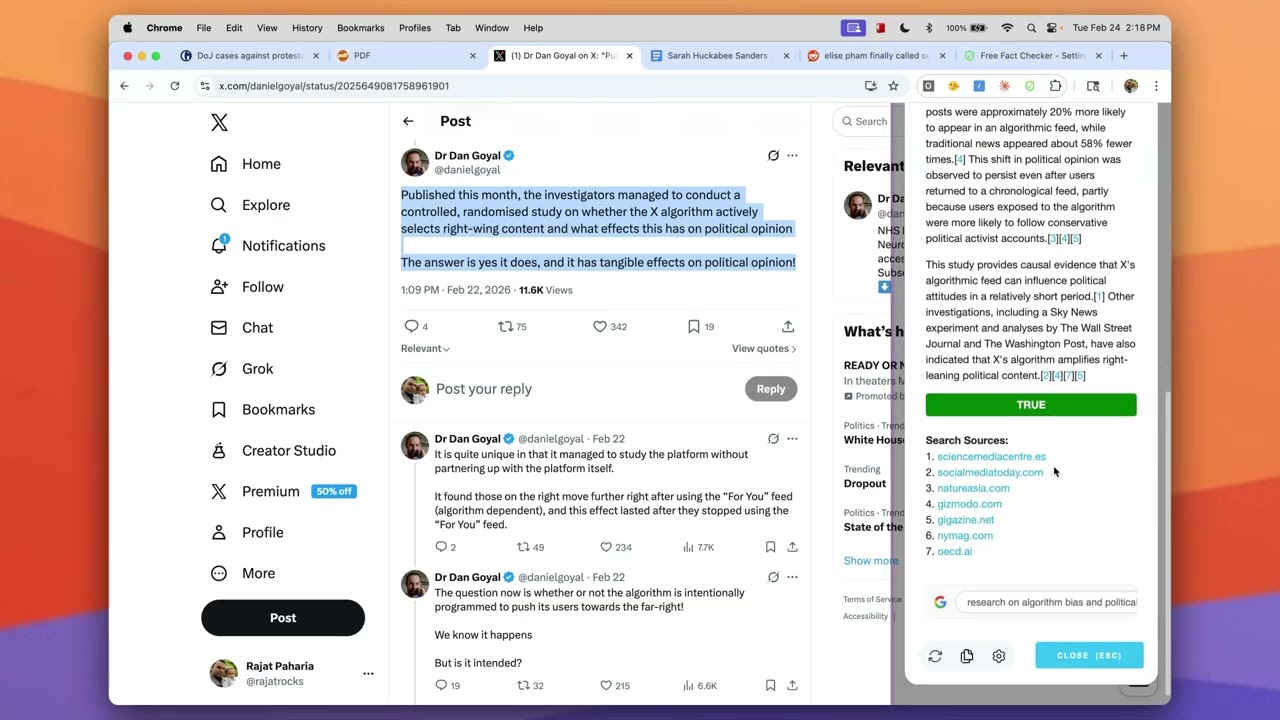
- Highlight Text — Select any statement on any webpage: news articles, social media, PDFs, anywhere you can highlight text. Then use the right-click menu, keyboard shortcut, or press the toolbar icon to trigger a fact check.
- Google Search Grounding — Your text is sent to Google Gemini, which finds real data about it using Google Search through a process called grounding.
- Get Cited Results — You get a fact-check with citations and sources. You will never get an AI's opinion — only answers grounded in Google Search.
- Works Everywhere — Facebook, X (Twitter), YouTube, Instagram, Bluesky, Reddit, major news sites, PDFs, Google Docs and Google Slides — any page where you can highlight text.
- Grounded in Search — Results come from Google Search, not AI opinion. If no data can be found, it will tell you instead of making something up.
- 100% Free — The extension is free. Google lets you make 20 grounding requests per day on a free Gemini API Key.
- No Tracking — Your queries go directly from your browser to Google's API using your own key. There is no tracking or analytics.
- No Login Required — Use it immediately after installing and adding your API key.
- Check Your Writing — Highlight any text in your own writing and get instant fact-checks to ensure accuracy.
- Source Code Available — The source code is available for you to review, edit, and install yourself.
Add Free Fact Checker from the Chrome Web Store. Works in Chrome, Edge, Brave, Vivaldi, Arc, and Opera.
Download release.zip from this repo, then:
- Unzip
release.zip— this creates a folder with the ready-to-load extension - Load into your browser
- Open
chrome://extensions(or the equivalent in your Chromium browser) - Enable Developer mode (toggle in the top right)
- Click Load unpacked
- Select the unzipped folder
- Open
- Get a free Gemini API Key — Go to Google AI Studio and create a free API key (takes about a minute)
- Add your key — Click the Free Fact Checker extension icon, open Settings, and paste in your API key
If you'd prefer to build the extension yourself:
-
Clone and build
git clone https://github.com/rajatrocks/free-fact-checker.git cd free-fact-checker npm install npm run build -
Load into your browser — Follow steps 2–4 above, selecting the
dist/folder
Is it really free? Yes. The extension is free and you can get a free Gemini API Key from Google. Google lets you make 20 grounding requests per day on the free plan. If you want more, you'll need to set up billing in AI Studio.
Why do I need my own API key? If we ran your requests through our server, Google would charge us for every request. By using your own free API key, everyone gets to use the Free Fact Checker for free without limits or subscriptions.
Can I trust this? The Free Fact Checker uses Google Search to find information. It will never give you an AI's opinion — only search-grounded answers. If Google Search can't find information about a claim, it will tell you that instead of making something up.
What browsers does it work in? All Chromium-based browsers including Chrome, Edge, Brave, Vivaldi, Arc, and Opera. It does not work on mobile browsers.
Is my usage being tracked? No. Your queries go directly from your browser to Google's API using your own key. There is no tracking, analytics, or telemetry of any kind.
What countries does it work in? Any country where you can get a Gemini API Key. Free keys are not available in all countries — check Google's availability page for details.
Who made this? The Free Fact Checker was originally created as an Agent in Ask Steve. We found it so useful that we decided to make it available as a standalone extension.
See more details at https://www.freefactchecker.com