Skip to content

Feature proposal: Navigate to class declaration#2132

Merged
testforstephen merged 18 commits intoredhat-developer:masterfrom
fvclaus:navigate-to-class-declaration
Mar 8, 2022
Merged

Feature proposal: Navigate to class declaration#2132
testforstephen merged 18 commits intoredhat-developer:masterfrom
fvclaus:navigate-to-class-declaration

Conversation

@fvclaus
Copy link
Copy Markdown
Contributor

@fvclaus fvclaus commented Sep 27, 2021

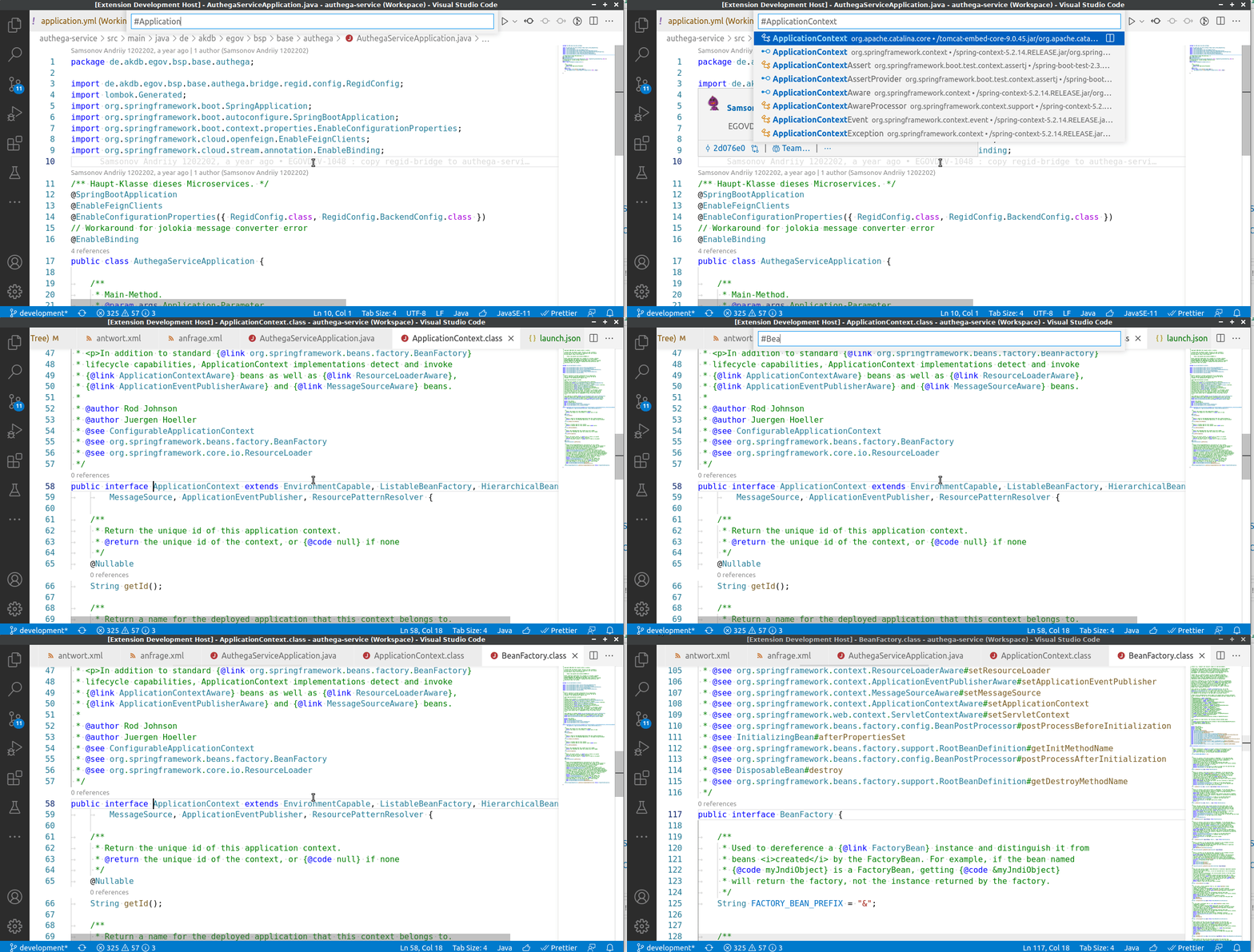
When you open a Java or Class file in IntelliJ or Eclipse, the IDE will always navigate to the main element. Currently, you are looking at a wall of imports:

open_classfile

I looked at the LSP spec, but didn't find anything that could help. I then added it to vscode-java:
navigate_to_top_element

@fbricon
Copy link
Copy Markdown
Collaborator

fbricon commented Sep 27, 2021

Although vscode has "editor.foldingImportsByDefault": true, your proposal works better for .class files, so definitely an interesting fix. I'll let one of @Eskibear, @testforstephen, @jdneo or @CsCherrYY review the code.

BTW, tslint fails the build with :

ERROR: /home/runner/work/vscode-java/vscode-java/src/fileEventHandler.ts[32, 1]: trailing whitespace
ERROR: /home/runner/work/vscode-java/vscode-java/src/fileEventHandler.ts[33, 42]: Missing semicolon
ERROR: /home/runner/work/vscode-java/vscode-java/src/fileEventHandler.ts[34, 95]: Missing semicolon
ERROR: /home/runner/work/vscode-java/vscode-java/src/fileEventHandler.ts[267, 33]: == should be ===
ERROR: /home/runner/work/vscode-java/vscode-java/src/fileEventHandler.ts[267, 67]: == should be ===
ERROR: /home/runner/work/vscode-java/vscode-java/src/fileEventHandler.ts[267, 71]: Missing semicolon
ERROR: /home/runner/work/vscode-java/vscode-java/src/fileEventHandler.ts[273, 1]: trailing whitespace
ERROR: /home/runner/work/vscode-java/vscode-java/src/fileEventHandler.ts[280, 33]: != should be !==
ERROR: /home/runner/work/vscode-java/vscode-java/src/fileEventHandler.ts[281, 17]: Expected a 'for-of' loop instead of a 'for' loop with this simple iteration


@testforstephen
Copy link
Copy Markdown
Collaborator

I looked at the LSP spec, but didn't find anything that could help. I then added it to vscode-java:

The LSP request Workspace Symbols Request supports returning SymbolInformation with a location to specify the range you want to reveal in the editor.

In fact, when you use Go to Symbol in Workspace... feature to search for a source file in your project, it already jumps to the location of the main class name. For binary classes, we just set the location to (0,0), and that's what we need to fix.

Also, when a user opens a file from File Explorer, you should never hack its original open behavior.

@fvclaus
Copy link
Copy Markdown
Contributor Author

fvclaus commented Sep 28, 2021

The LSP request Workspace Symbols Request supports returning SymbolInformation with a location to specify the range you want to reveal in the editor.

I was looking at the requests that are sent when I open a file by using Go to File...

In fact, when you use Go to Symbol in Workspace... feature to search for a source file in your project, it already jumps to the location of the main class name. For binary classes, we just set the location to (0,0), and that's what we need to fix.

I find it much easier to navigate a mixed codebase (e.g. Java/JS/HTML/XML) with Go to File..., because some files (e.g HTML) do not have symbol information, or you can't remember which symbols a certain file has (e.g. index.js). But you usually remember the file name. And you don't have to think about whether you need to use Go to File... or Go to Symbol.... It is not an issue for most other languages, because they often lack license information, imports or class docs.

Also, when a user opens a file from File Explorer, you should never hack its original open behavior.

It aligns more closely with the way IntelliJ or Eclipse will open Java files. The current behavior is especially "annoying" if you browse a codebase by clicking on different Java files. You always have to scroll down. If this behavior is considered too intrusive or incompatible with the way vscode "should work" then I can just close this MR. To be honest, I was expecting something along those lines.

@fvclaus
Copy link
Copy Markdown
Contributor Author

fvclaus commented Oct 11, 2021

@fbricon @testforstephen what is your position on navigation to the class declaration in Java files? Is there a better way to do it? If not, can we move forward with this or not?

@testforstephen testforstephen self-requested a review October 14, 2021 06:31
Comment thread src/fileEventHandler.ts Outdated
Signed-off-by: Frederik Claus <f.v.claus@googlemail.com>
@fvclaus fvclaus force-pushed the navigate-to-class-declaration branch from 4236720 to 7d9ec70 Compare October 27, 2021 10:17
@fvclaus
Copy link
Copy Markdown
Contributor Author

fvclaus commented Oct 27, 2021

@testforstephen I implemented all the changes. The regex provides a much better user experience than resolving the document symbols. Do we need a test for this? I played around with it a little and the following test works, but has some timing issues

'use strict';

import * as assert from 'assert';
import * as path from 'path';
import { Uri, extensions, commands, window, env } from 'vscode';
import { ExtensionAPI } from '../../src/extension.api';
import { getJavaConfiguration } from '../../src/utils';

const projectFsPath: string = path.join(__dirname, '..', '..', '..', 'test', 'resources', 'projects', 'maven', 'salut');
const fileFsPath: string = path.join(projectFsPath, 'src', 'main', 'java', 'java', 'Foo3.java');


async function sleep(timeout = 2000): Promise<void> {
    return new Promise(resolve => {
        setTimeout(resolve, timeout);
    });
}

suite.only('Navigate to class declaration', () => {

	suiteSetup(async function() {
        getJavaConfiguration().update('configuration.updateBuildConfiguration', 'automatic');
		getJavaConfiguration().update('server.launchMode', 'Standard');
		await extensions.getExtension('redhat.java').activate();
	});

	test('opening class file should navigate to first declaration', async function () {
        const api: ExtensionAPI = extensions.getExtension('redhat.java').exports;
        // Wait for LS
        await api.getDocumentSymbols({
			textDocument: {
				uri: Uri.file(fileFsPath).toString(),
			},
		}); 
        await commands.executeCommand('workbench.action.showAllSymbols');
        await env.clipboard.writeText("StringBuilderHelper")
        await commands.executeCommand('editor.action.clipboardPasteAction');
        await sleep(2000);
        await commands.executeCommand('workbench.action.acceptSelectedQuickOpenItem');
        await sleep(4000);

        const activeSelection = window.activeTextEditor.selection.active;
        assert.ok(activeSelection.line > 0 && activeSelection.character > 0);
        assert.ok(window.activeTextEditor.document.lineAt(activeSelection.line).text.includes("StringBuilderHelper"));
	});
});

I need to wait three times:

  • Until the LS is running
  • Until the symbol is resolved
  • Until the class file is opened

I couldn't find a good indicator for the first and none for the second and third. This solution would probably require tweaking the values until it works in all environments (CI pipeline).

Copy link
Copy Markdown
Collaborator

@testforstephen testforstephen left a comment

Choose a reason for hiding this comment

The reason will be displayed to describe this comment to others. Learn more.

The latest commit works well for "go to symbol" case, but conflicts with "go to definition". Usually "go to definition" will jump to a specific location, then this PR will redirect to type declaration. We need take care of it.

Regarding unit test, i'll let @jdneo to comment on it.

Comment thread src/fileEventHandler.ts Outdated
@jdneo
Copy link
Copy Markdown
Collaborator

jdneo commented Oct 29, 2021

Hi @fvclaus

Just some suggestions for consideration.

I think it's ok to wait until the LS is activated for the integrated test. How about this, we write two cases here, which:

  1. The first one moves the cursor to a dependency class (for example, a method of StringUtils in the project salut). then trigger the Go to Definition and check the correctness of the position. This case can be used to protect the new feature won't affect GTD.
  2. We save the Uri of the dependency class in case 1, and now, we directly open the text document with that Uri via window.showTextDocument(). Now we can check if the cursor goes to the class declaration.

Meanwhile, I think it worth adding some unit tests for the regexp itself - to check if it can match different kind of type declarations. (besides the current types, I guess record should also be added right?)

Signed-off-by: Frederik Claus <f.v.claus@googlemail.com>
@fvclaus
Copy link
Copy Markdown
Contributor Author

fvclaus commented Nov 30, 2021

The latest commit works well for "go to symbol" case, but conflicts with "go to definition". Usually "go to definition" will jump to a specific location, then this PR will redirect to type declaration. We need take care of it.

Regarding unit test, i'll let @jdneo to comment on it.

The problem is the event architecture for the extension host. vscode triggers an "editor changed" followed by "selection changed" event during "Go to definition". vscode also uses an event architecture for the editor. The selection and open editor information are stored in seperate places and are exchanged via events. Although vscode knows that the file should open with a selection != (0,0), the services that actually sends the event to the extension host do not yet have this information (they will after the next tick, when the internal events are actually sent). Because this is spread all over the codebase, this is unlikely to change. I did some measurements and on my machine it seems the event reaches the extension 30ms after opening the editor. I "fixed" this using setTimeout.

The above seemed like a bug to me so I opened a ticket on vscode: microsoft/vscode#136618
In the end what I think is an issue (the extension host getting a "wrong" position) was not touched, but they told me about resolveWorkspaceSymbol which exactly fits our use case. If the language server provides a "falsy" selection for a workspace symbol, vscode will call resolveWorkspaceSymbol with the selected symbol.

I tried it out and found an issue in the vscode-languageclient library which I fixed here: microsoft/vscode-languageserver-node#849. This is already released as part of 8.0.0-next5 release.
Assuming we could use the new version of vscode-languageclient,
it also requires registering provideWorkspaceSymbol which can be done like this:

const feature = this.languageClient.getFeature('workspace/symbol');
const provider: WorkspaceSymbolProvider = feature.getProviders()[0];
provider.resolveWorkspaceSymbol = (symbol, token) => {
    return new SymbolInformation(symbol.name, symbol.kind, "foo", new Location(Uri.parse("/foo"), new Position(120, 20)))
}

I placed this code in standardLanguageClient.ts in the case "ServiceReady" block, because that seems to be the first time the languageClient actually returns a feature.

It also requires changing the language server to not return a selection, which I have done here: eclipse-jdtls/eclipse.jdt.ls#1956
And implementation of the resolveWorkspaceSymbol logic on the language server side.

@testforstephen, What do you think?

@testforstephen
Copy link
Copy Markdown
Collaborator

testforstephen commented Dec 1, 2021

@fvclaus thanks for your discussions on microsoft/vscode#136618, I really like those conversations.

IMHO, using resolveWorkspaceSymbol is a clean way to go. If someday lazy resolving workspace symbol capability is placed to LSP, then we can migrate the implementation to language server side.

Current languageclient we use is 7.x, and 8.x should be backward-compatibility, I can verify new client version in VS Code. I'll invite @rgrunber to verify if language-client@8.x works in theia as well.

Update:
https://microsoft.github.io/language-server-protocol/specifications/specification-3-17/#workspace_symbolResolve
workspaceSymbol/resolve will be placed to LSP 3.17. Since LSP 3.17 is not finalized yet, we can implement it on client first.

Signed-off-by: Frederik Claus <f.v.claus@googlemail.com>
@fvclaus
Copy link
Copy Markdown
Contributor Author

fvclaus commented Feb 15, 2022

@testforstephen How can this feature be implemented only on the client?

I just checked this again and there have been some changes. It is no longer possible to sneak in the resolveWorkspaceSymbol function, because the extension host evaluates on provider registration, if the provider has support for resolveWorkspaceSymbol: https://github.com/microsoft/vscode/blob/61ff43bafe4b2e8cd69f18cfe4df691579970522/src/vs/workbench/api/common/extHostLanguageFeatures.ts#L1950-L1954

If resolveWorkspaceSymbol support is registered. It will be called for every Symbol (not just the ones missing range).
vscode-languageclient now supports this feature. It will register resolveWorkspaceSymbol, if the server indicates support with an additional property, resolveProvider: https://github.com/microsoft/vscode-languageserver-node/blob/f72faa0975cb2aaa85ce84da819944f84e1aac52/client/src/common/client.ts#L2189-L2206

I was curious to see whether this can already be implemented on the server. It does work, here is the PR: eclipse-jdtls/eclipse.jdt.ls#2008.

Here is the register request:

[Trace - 7:30:35 PM] Received request 'client/registerCapability - (2)'.
Params: {
    "registrations": [
        {
            "id": "c6e72bd9-ba8b-4865-bfad-1998816c7a34",
            "method": "workspace/symbol",
            "registerOptions": {
                "resolveProvider": true
            }
        }
    ]
}

vscode-languageclient will send a workspaceSymbol/resolve for every symbol:


[Trace - 7:30:58 PM] Sending request 'workspaceSymbol/resolve - (33)'.
Params: {
    "name": "StringBuilder",
    "kind": 5,
    "location": {
        "uri": "jdt://contents/java.base/java.lang/StringBuilder.class?%3Djdt.ls-java-project%2F%5C%2Fhome%5C%2Fdev%5C%2F.sdkman%5C%2Fcandidates%5C%2Fjava%5C%2F11.0.6.hs-adpt%5C%2Flib%5C%2Fjrt-fs.jar%60java.base%3D%2Fjavadoc_location%3D%2Fhttps%3A%5C%2F%5C%2Fdocs.oracle.com%5C%2Fen%5C%2Fjava%5C%2Fjavase%5C%2F11%5C%2Fdocs%5C%2Fapi%5C%2F%3D%2F%3Cjava.lang%28StringBuilder.class"
    },
    "containerName": "java.lang"
}


[Trace - 7:30:58 PM] Received response 'workspaceSymbol/resolve - (33)' in 22ms.
Result: {
    "name": "StringBuilder",
    "location": {
        "uri": "jdt://contents/java.base/java.lang/StringBuilder.class?=jdt.ls-java-project/%5C/home%5C/dev%5C/.sdkman%5C/candidates%5C/java%5C/11.0.6.hs-adpt%5C/lib%5C/jrt-fs.jar%60java.base=/javadoc_location=/https:%5C/%5C/docs.oracle.com%5C/en%5C/java%5C/javase%5C/11%5C/docs%5C/api%5C/=/%3Cjava.lang(StringBuilder.class",
        "range": {
            "start": {
                "line": 84,
                "character": 19
            },
            "end": {
                "line": 84,
                "character": 32
            }
        }
    },
    "containerName": "java.lang"
}

I left workspace/symbol as is to keep backwards compatibility with clients that do not support workspaceSymbols/resolve. This means that some work will be done twice, for example calculating the location of Java types of the current project (which is already calculated by workspace/symbol). Should this be optimized? We could check if the range is != (0,0) and then just return immediately.

@testforstephen Do we want to proceed with this? Is it possible to use a newer version of vscode-languageclient already? If not, I can close this PR. Can you also decide if the server code can be merged or if it can be merged with some modifications?

The client just requires a new vscode-languageclient version (and some fixes for typings that changed). I also updated the vscode dependencies. Without them vscode-languageclient throws a few compile errors. After updating, there are only 2 left:

Error: node_modules/vscode-languageserver-types/lib/umd/main.d.ts(850,10): error TS1336: An index signature parameter type cannot be a type alias. Consider writing '[uri: string]: TextEdit[]' instead.
Error: node_modules/vscode-languageserver-types/lib/umd/main.d.ts(874,10): error TS1336: An index signature parameter type cannot be a type alias. Consider writing '[id: string]: ChangeAnnotation' instead.

@testforstephen
Copy link
Copy Markdown
Collaborator

@fvclaus Usually when LSP introduces some new capabilities, we wait for lsp4j to add these new bindings, and then update lsp4j version in eclipse.jdt.ls. After that, the server can support the new capabilities officially.

Given that symbol/resolve is from upcoming LSP 3.17, which is not officially announced yet. We can implement it first via registering a WorkspaceSymbolProvider with client. As for how to implement resolveWorkspaceSymbol, you can either use pure JS code, or call a delegateCommand to ask server side to implement it.

See https://github.com/eclipse/eclipse.jdt.ls/pull/1408/files and https://github.com/redhat-developer/vscode-java/pull/1393/files for more info on the use of delegateCommand.

Signed-off-by: Frederik Claus <f.v.claus@googlemail.com>
@fvclaus fvclaus force-pushed the navigate-to-class-declaration branch from a9b7da5 to c9a2999 Compare February 18, 2022 18:53
Signed-off-by: Frederik Claus <f.v.claus@googlemail.com>
@fvclaus fvclaus force-pushed the navigate-to-class-declaration branch from c9a2999 to a5d4301 Compare February 18, 2022 19:00
Signed-off-by: Frederik Claus <f.v.claus@googlemail.com>
@fvclaus
Copy link
Copy Markdown
Contributor Author

fvclaus commented Feb 18, 2022

@testforstephen Thanks for the pointers. I implemented resolveWorkspaceSymbol using a new command. My hope is that the code on the server side can be reused once the new LSP version is out. On the client side, I cannot just register a new WorkspaceSymbolProvider, I have to replace the one provided by vscode-languageclient.

Can you take a look at the code?

Comment thread src/providerDispatcher.ts Outdated
Copy link
Copy Markdown
Collaborator

@testforstephen testforstephen left a comment

Choose a reason for hiding this comment

The reason will be displayed to describe this comment to others. Learn more.

Have a try, it works well.

But it seems the registration for the new WorkspaceSymbolProvider is a little delay. For example, when I use "Go to Symbol" feature to search a binary class (e.g. String) at 1st time, resolveWorkspaceSymbol is not called. Try a second time, then it can jump to the class definition location.

Screen.Recording.2022-02-28.at.11.28.10.mov

Signed-off-by: Frederik Claus <f.v.claus@googlemail.com>
Comment thread src/providerDispatcher.ts Outdated
Signed-off-by: Frederik Claus <f.v.claus@googlemail.com>
@fvclaus
Copy link
Copy Markdown
Contributor Author

fvclaus commented Mar 2, 2022

Have a try, it works well.

But it seems the registration for the new WorkspaceSymbolProvider is a little delay. For example, when I use "Go to Symbol" feature to search a binary class (e.g. String) at 1st time, resolveWorkspaceSymbol is not called. Try a second time, then it can jump to the class definition location.

I tried, but cannot reproduce this on my machine. Is there a timeout resolving the workspace symbol? Is there anything special about your project?

Signed-off-by: Frederik Claus <f.v.claus@googlemail.com>
@testforstephen
Copy link
Copy Markdown
Collaborator

I'm using extension host debug mode to launch the extension. The sample project is https://github.com/spring-projects/spring-petclinic. I can always reproduce it when using serverStatus.onServerStatusChanged.

@fvclaus
Copy link
Copy Markdown
Contributor Author

fvclaus commented Mar 3, 2022

@testforstephen I tried it with the petclinic project and Java 1.8, but unfortunately was not able to reproduce the issue.
By extension host debug mode, you are referring to either the Remote Server or the JDTLS Client launch configuration, correct?

From the video, it seems that the project has been completely openend and the custom WorkspaceSymbolProvider should have been registered or could it be that the provider is not yet registered the first time you search for symbol?

If this cannot be a timing issue, what vscode version are you using?

@testforstephen testforstephen added this to the End March 2022 milestone Mar 8, 2022
Copy link
Copy Markdown
Collaborator

@testforstephen testforstephen left a comment

Choose a reason for hiding this comment

The reason will be displayed to describe this comment to others. Learn more.

LGTM.

@testforstephen
Copy link
Copy Markdown
Collaborator

I tried it in macOS via both "Launch Extension" and "Launch Extension - JDTLS Client", it has delay with "serverStatus.onServerStatusChanged" approach. I didn't observe issue in the latest implementation, it works well now.

@fvclaus Thank you for keeping patience in the long discussion and taking time to address all suggestions.

@testforstephen testforstephen merged commit 49d341d into redhat-developer:master Mar 8, 2022
@fvclaus
Copy link
Copy Markdown
Contributor Author

fvclaus commented Mar 8, 2022

@testforstephen, thanks for all the feedback along the way. It was interesting and fun to develop, but I am glad we got this wrapped up now.

Sign up for free to join this conversation on GitHub. Already have an account? Sign in to comment

Projects

None yet

Development

Successfully merging this pull request may close these issues.

5 participants