Detect lightweight java language server#14
Conversation


 datho7561
left a comment
datho7561
left a comment
datho7561
left a comment
There was a problem hiding this comment.
This is pretty helpful for switching to the full Java language server from the lightweight mode. Before the user responds to the dialog box, NPEs will be generated, since the client program doesn't wait for the user to respond before starting lsp4mp. If 'no' is selected in the first dialog, then the microprofile server is left running, which means NPE are still generated.

|
@fbricon could you give us feedback please about this fix. |

|
See microsoft/vscode-java-debug@20cd68c for reference |

|
I agree with trying to avoid starting up lsp4mp if the java language server is in lightweight mode. I opened an issue redhat-developer/vscode-java#1571 to try and get some clarifications about the best way to go about implementing this. I can detect the current server mode on start up. But since vscode-java can start in lightweight and switch over to standard after activation, if we detect lightweight at start up it can display a warning to switch to standard even though vscode-java is in the process of switching over to Standard which i dont think makes for a good UX. |
|
After some discussion in this issue: redhat-developer/vscode-java#1571 It seems that it can be problematic to check the java language server mode immediately on extension activation. This is because when you import a new project vscode-java starts off in lightweight mode and prompts the user to switch to standard. The flow for importing a new java project seems to be: So for new Java projects, if we check the mode immediately on extension activation it will return lightweight, even though the user could be in the process of switching to standard mode using the prompt from vscode. Which means we could end up displaying an unnecessary warning message. For an example: I click yes to import the project and switch to standard. But since immediately at activation vscode-java returns
It seems for all the other Java extensions, they detect server mode only when java features are needed instead of immediately on extension activation. My thoughts are that would could do something like only check the Java language server mode after a user has opened a file or something similar. Any thoughts @fbricon @angelozerr @datho7561 ? |

 rzgry
force-pushed
the
detect-lightweight
branch
from
rzgry
force-pushed
the
detect-lightweight
branch
from
d48c15b to
38f669b
Compare
|
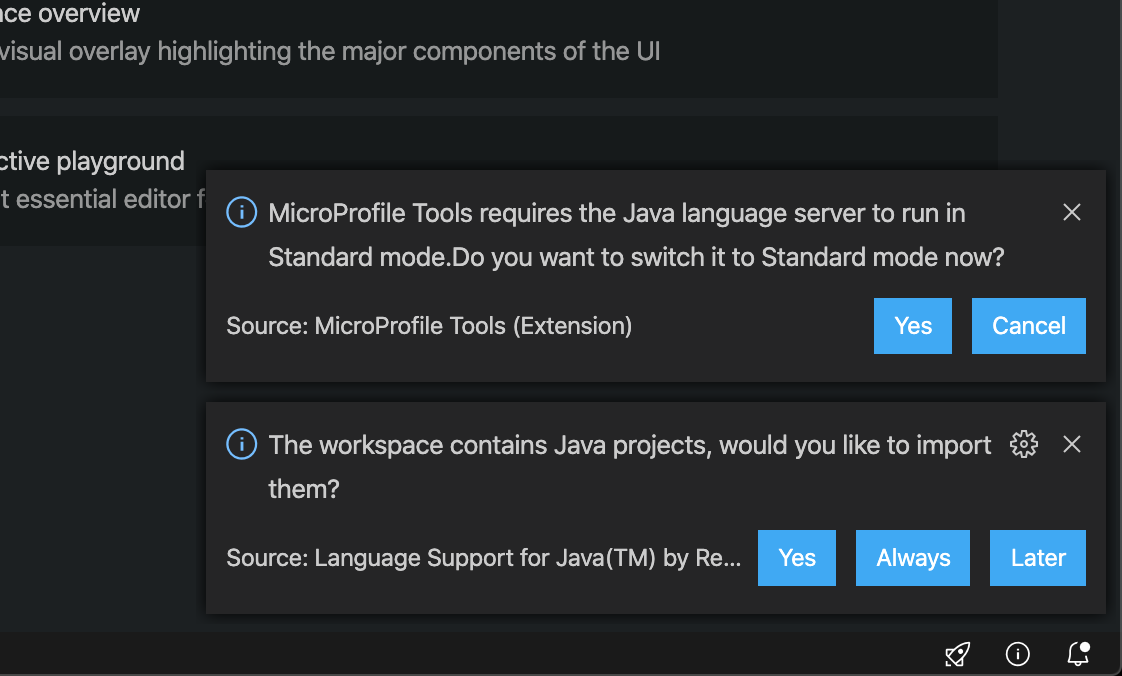
Update the PR to only start the MicroProfile language server once the java language server is in hybrid mode. After testing redhat-developer/vscode-java#1581 it fixed the problem when a new importing a project for the most part. If someone selects yes to import a new project before vscode-java is done activating, they will no longer receive a second prompt while the standard server is in the process of launching. You can still get two prompts when importing a project if the user has not selected Yes to import the project by the time vscode-java has finished activating. But i think this is acceptable? Ex: |
|
I think we can start that way. |
rzgry
force-pushed
the
detect-lightweight
branch
from
38f669b to
ad0632b
Compare
|
Updated the options for the prompt to switch to Standard to be |
datho7561
left a comment
datho7561
left a comment
There was a problem hiding this comment.
Works well for me. The behaviour is pretty intuitive.
 rzgry
force-pushed
the
detect-lightweight
branch
from
rzgry
force-pushed
the
detect-lightweight
branch
from
ad0632b to
353261f
Compare

4 participants


Fixes #12
Detects if java ls started in lightweight mode and prompts user to switch to standard. The user ends up getting a second prompt from vscode-java to ask if they are sure.