Skip to content

Create component new workflow#2844

Closed
msivasubramaniaan wants to merge 14 commits intoredhat-developer:mainfrom
msivasubramaniaan:create-component-new-workflow
Closed

Create component new workflow#2844
msivasubramaniaan wants to merge 14 commits intoredhat-developer:mainfrom
msivasubramaniaan:create-component-new-workflow

Conversation

@msivasubramaniaan
Copy link
Copy Markdown
Collaborator

@msivasubramaniaan msivasubramaniaan commented Apr 21, 2023

Signed-off-by: msivasubramaniaan msivasub@redhat.com

Fix: #2697

Signed-off-by: msivasubramaniaan <msivasub@redhat.com>
@codecov
Copy link
Copy Markdown

codecov bot commented Apr 21, 2023

Codecov Report

Patch coverage: 24.00% and project coverage change: -0.27 ⚠️

Comparison is base (5ac67a2) 33.47% compared to head (2c09c24) 33.21%.

Additional details and impacted files
@@            Coverage Diff             @@
##             main    #2844      +/-   ##
==========================================
- Coverage   33.47%   33.21%   -0.27%     
==========================================
  Files          56       56              
  Lines        4116     4191      +75     
  Branches      779      805      +26     
==========================================
+ Hits         1378     1392      +14     
- Misses       2738     2799      +61     
Impacted Files Coverage Δ
src/webview/devfile-registry/registryViewLoader.ts 31.46% <0.00%> (+0.34%) ⬆️
src/webview/git-import/gitImportLoader.ts 15.85% <0.00%> (ø)
.../webview/create-component/createComponentLoader.ts 17.07% <17.07%> (ø)
src/util/workspace.ts 25.58% <28.57%> (-0.74%) ⬇️
src/openshift/component.ts 15.22% <75.00%> (-0.09%) ⬇️
src/registriesView.ts 35.18% <100.00%> (+0.81%) ⬆️

... and 1 file with indirect coverage changes

☔ View full report in Codecov by Sentry.
📢 Do you have feedback about the report comment? Let us know in this issue.

@datho7561
Copy link
Copy Markdown
Contributor

A few things that I've noticed so far:

  1. There are two "create component" buttons in the components section now; we should remove the old one along with the code associated with it
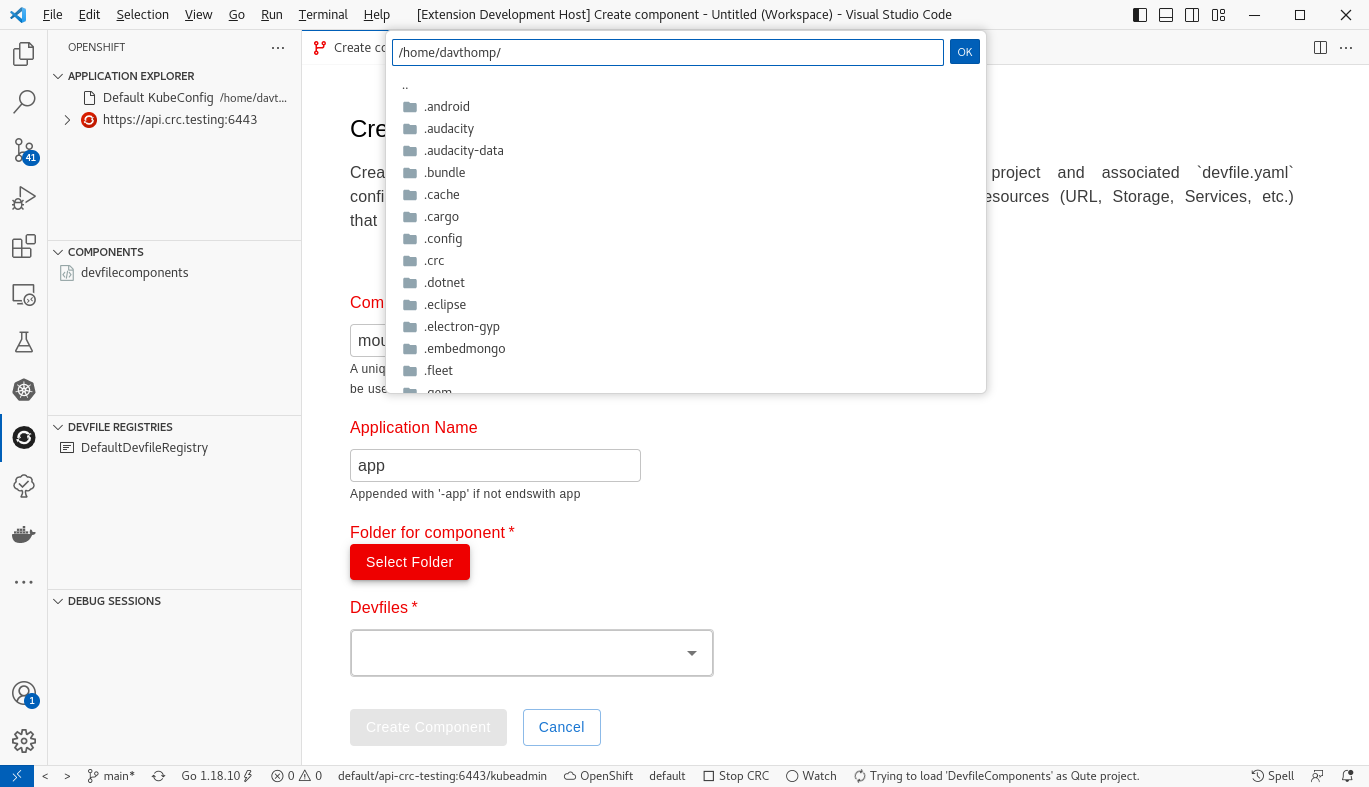
  2. It was unclear whether the component that I was creating was being created in the folder I selected, or in a subfolder (i.e. ./the/folder/i/picked/component-name/devfile.yaml vs ./the/folder/i/picked/devfile.yaml). I think we should add a field description that says something like "the devfile and code will be added directly into this folder".
  3. A point related to 2: if you are using the "files.simpleDialog.enable": true, VS Code setting, there is no option to create folders in the dialog. It might be nice to create a folder named after the component to hold the devfile and sample code, eg. ./the/folder/i/picked/component-name/devfile.yaml
  4. I expected the WebView to close when I click "Create Component", and it doesn't
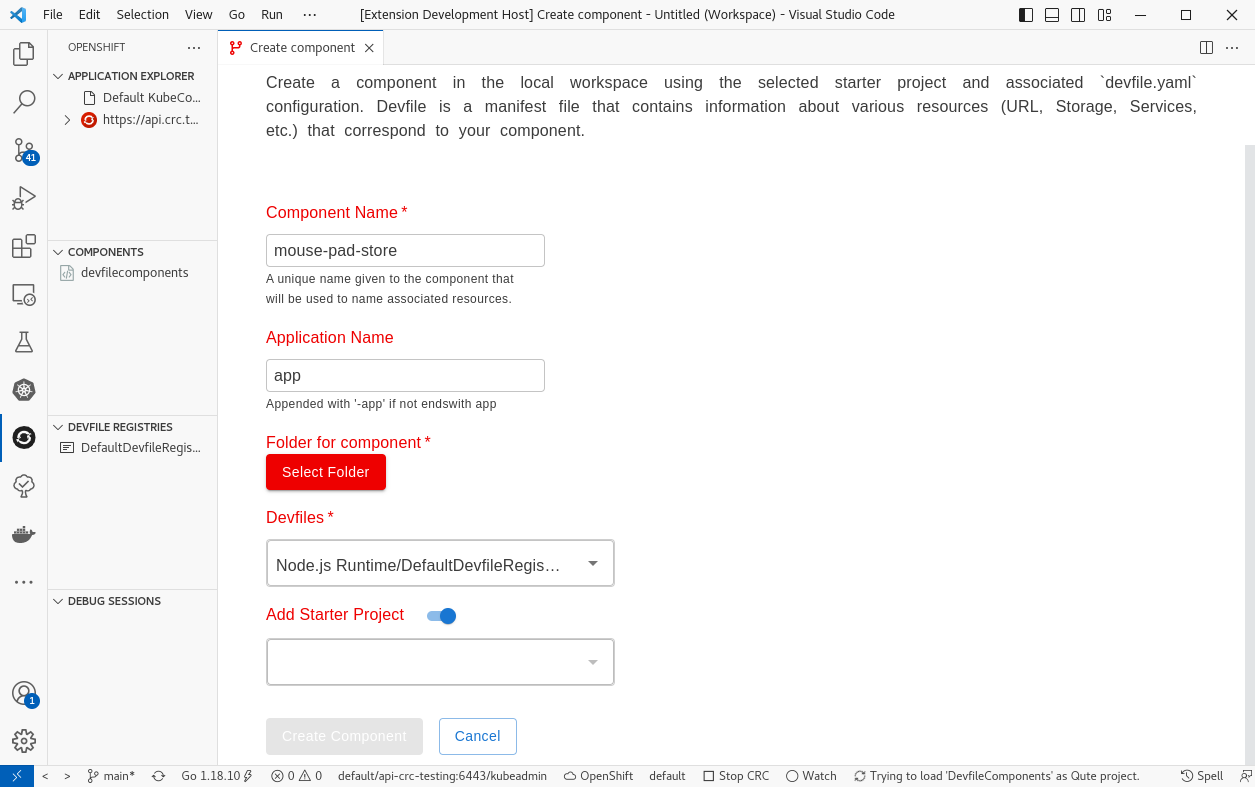
  5. When there are multiple starter examples, such as with Vert.X, I can select the different values (eg. I pick vertx-crud-example), but when I click anywhere outside the box in the webview, it resets to vertx-http-example. Because of this, I can only set up a project with whatever starter code is initially selected

Comment thread src/webview/create-component/createComponentLoader.ts
@msivasubramaniaan
Copy link
Copy Markdown
Collaborator Author

A few things that I've noticed so far:

  1. There are two "create component" buttons in the components section now; we should remove the old one along with the code associated with it
  2. It was unclear whether the component that I was creating was being created in the folder I selected, or in a subfolder (i.e. ./the/folder/i/picked/component-name/devfile.yaml vs ./the/folder/i/picked/devfile.yaml). I think we should add a field description that says something like "the devfile and code will be added directly into this folder".
  3. A point related to 2: if you are using the "files.simpleDialog.enable": true, VS Code setting, there is no option to create folders in the dialog. It might be nice to create a folder named after the component to hold the devfile and sample code, eg. ./the/folder/i/picked/component-name/devfile.yaml
  4. I expected the WebView to close when I click "Create Component", and it doesn't
  5. When there are multiple starter examples, such as with Vert.X, I can select the different values (eg. I pick vertx-crud-example), but when I click anywhere outside the box in the webview, it resets to vertx-http-example. Because of this, I can only set up a project with whatever starter code is initially selected

Yes I am working on those only. I have added the work-in-progress label already. Anyway thanks for the points added.

@datho7561
Copy link
Copy Markdown
Contributor

I have added the work-in-progress label already

Okay. Sorry about that. It's looking great so far!

@msivasubramaniaan
Copy link
Copy Markdown
Collaborator Author

I have added the work-in-progress label already

Okay. Sorry about that. It's looking great so far!

NP 😊

Signed-off-by: msivasubramaniaan <msivasub@redhat.com>
@msivasubramaniaan
Copy link
Copy Markdown
Collaborator Author

@datho7561 I have completed the full code flow. Please start reviewing now

@datho7561
Copy link
Copy Markdown
Contributor

Okay, sorry I'm reviewing a bit late. Here's some things I ran into:

  • It's not clear if the devfile and sample code will be generated in the folder you select, or if a new subfolder will be generated that contains the devfile and sample code. I think it would be better to generate a new subfolder. eg. if you name your component my-component and pick the folder /my/projects/folder, create the folder /my/projects/folder/my-component and generate the devfile in this folder (/my/projects/folder/my-component/devfile.yaml). I think this is better, because the UI to pick folders in VS Code doesn't have the option to create folders, and it won't let you select a folder that doesn't exist:
    Screenshot from 2023-04-24 16-30-26
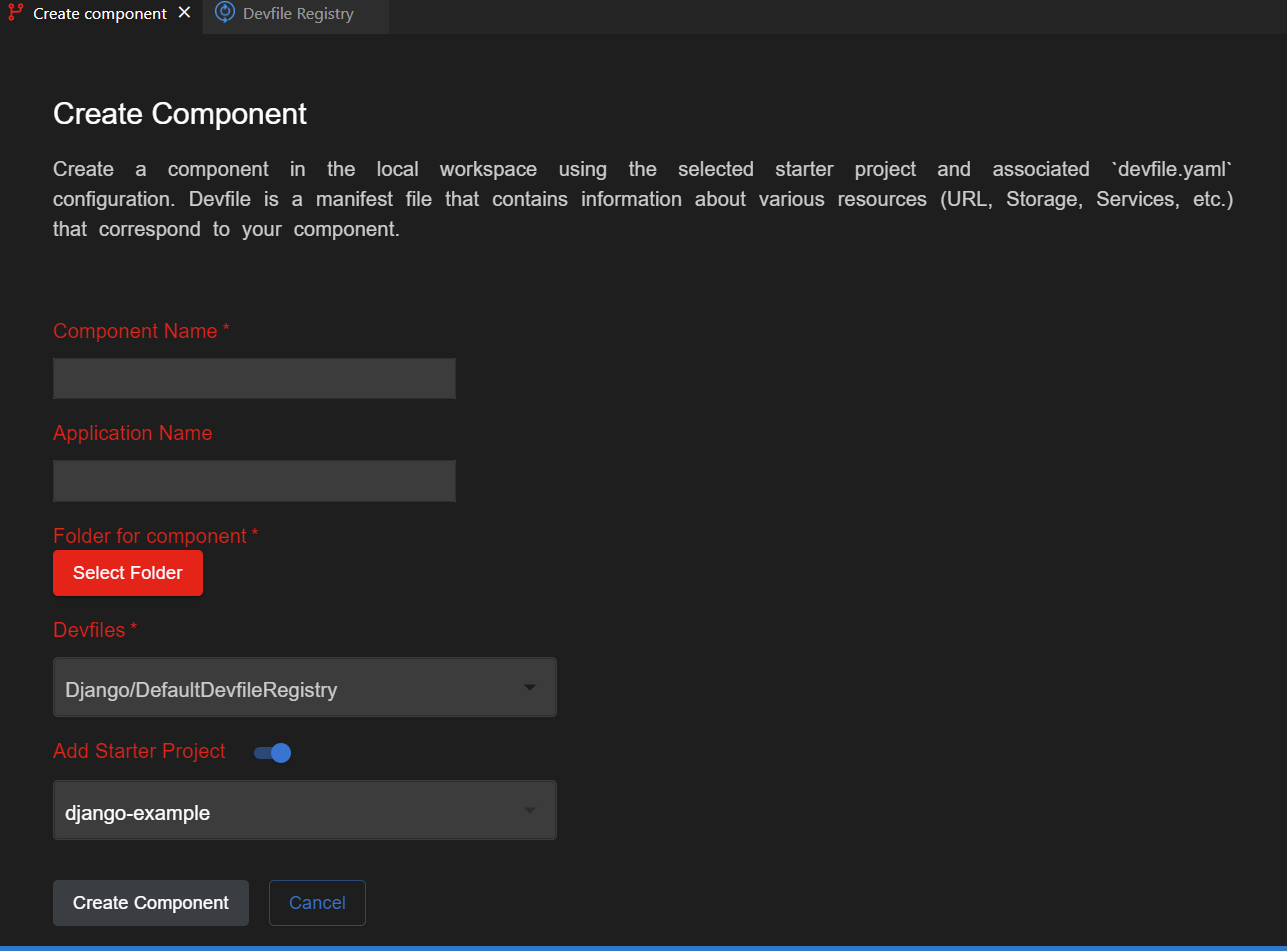
  • If I select a devfile that has exactly one starter project, then the dropdown to select the starter project appears, but it's empty. I think we should hide this dropdown if there is only one option.
    Screenshot from 2023-04-24 16-34-40
  • There is a field for setting the name of the application. However, throughout most of the code base, we assume the name of the application is app, since this is what odo does. I think it might be better to hardcode the name of the application to app and not have this field in the form at all
  • I haven't had a chance to look through the source code, I'll get to that tomorrow morning

@msivasubramaniaan
Copy link
Copy Markdown
Collaborator Author

Okay, sorry I'm reviewing a bit late. Here's some things I ran into:

  • It's not clear if the devfile and sample code will be generated in the folder you select, or if a new subfolder will be generated that contains the devfile and sample code. I think it would be better to generate a new subfolder. eg. if you name your component my-component and pick the folder /my/projects/folder, create the folder /my/projects/folder/my-component and generate the devfile in this folder (/my/projects/folder/my-component/devfile.yaml). I think this is better, because the UI to pick folders in VS Code doesn't have the option to create folders, and it won't let you select a folder that doesn't exist:
    Screenshot from 2023-04-24 16-30-26
  • If I select a devfile that has exactly one starter project, then the dropdown to select the starter project appears, but it's empty. I think we should hide this dropdown if there is only one option.
    Screenshot from 2023-04-24 16-34-40
  • There is a field for setting the name of the application. However, throughout most of the code base, we assume the name of the application is app, since this is what odo does. I think it might be better to hardcode the name of the application to app and not have this field in the form at all
  • I haven't had a chance to look through the source code, I'll get to that tomorrow morning
  1. Currently the component creates under the folder, without any subfolder. If subfolder then what would be the name of that
  2. I don't see any empty of starter-project when only one starter project. It will default selected that one and I am disable the user selection of the select.
    image
  3. The App name is not an mandatory one. User can provide opt name or leaves at empty. If it empty and it default taken as component-name-app

@datho7561
Copy link
Copy Markdown
Contributor

If subfolder then what would be the name of that

The name of the subfolder should be the component name

I don't see any empty of starter-project when only one starter project.

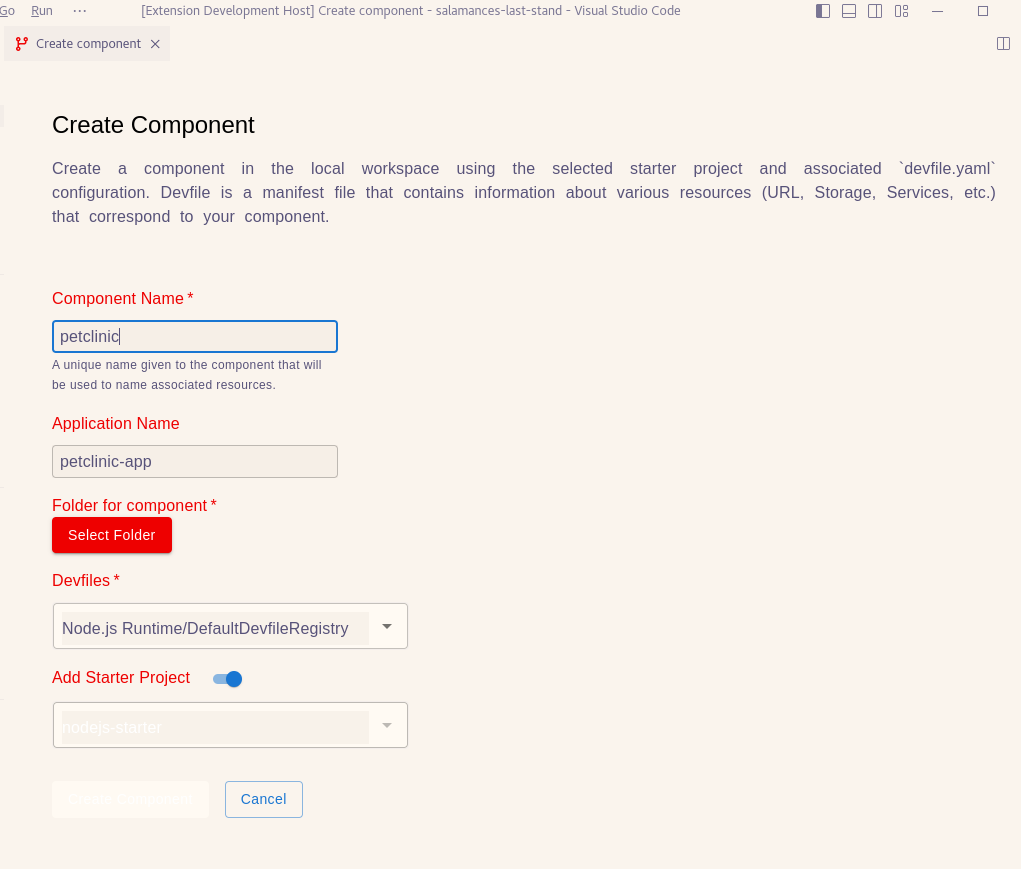
Maybe this only happens with light theme, let me double check...

If it empty and it default taken as component-name-app

Okay, I understand this, but we don't display the app name anywhere or ask for the app name anywhere else, so I don't think it's worth asking for it. If we use a default app name, I think it makes sense to go with the one odo is using, which is app.

@datho7561
Copy link
Copy Markdown
Contributor

I don't see any empty of starter-project when only one starter project.

Yep; this issue is that in the light theme, it's white text on a white background:

starter-project-name-white-on-white

@msivasubramaniaan
Copy link
Copy Markdown
Collaborator Author

I don't see any empty of starter-project when only one starter project.

Yep; this issue is that in the light theme, it's white text on a white background:

starter-project-name-white-on-white

Thanks for the good catch. Need to concentrate on css based themes

Copy link
Copy Markdown
Contributor

@datho7561 datho7561 left a comment

Choose a reason for hiding this comment

The reason will be displayed to describe this comment to others. Learn more.

Alright. Here are some things I found while looking through the code

Comment thread src/webview/create-component/app/index.html Outdated
Comment thread src/webview/devfile-registry/registryViewLoader.ts Outdated
Comment thread src/webview/create-component/createComponentLoader.ts Outdated
Comment thread src/webview/create-component/app/component.tsx Outdated
Comment thread src/webview/create-component/app/component.tsx
Comment thread src/webview/create-component/app/component.tsx Outdated
Comment thread src/webview/create-component/createComponentLoader.ts
Signed-off-by: msivasubramaniaan <msivasub@redhat.com>
@msivasubramaniaan
Copy link
Copy Markdown
Collaborator Author

If subfolder then what would be the name of that

The name of the subfolder should be the component name

I don't see any empty of starter-project when only one starter project.

Maybe this only happens with light theme, let me double check...

If it empty and it default taken as component-name-app

Okay, I understand this, but we don't display the app name anywhere or ask for the app name anywhere else, so I don't think it's worth asking for it. If we use a default app name, I think it makes sense to go with the one odo is using, which is app.

Removed application name field

Signed-off-by: msivasubramaniaan <msivasub@redhat.com>
Copy link
Copy Markdown
Contributor

@datho7561 datho7561 left a comment

Choose a reason for hiding this comment

The reason will be displayed to describe this comment to others. Learn more.

Okay, a few more things I noticed

if (!validationMessage) validationMessage = OpenShiftItem.lengthName(`${event.name} should be between 2-63 characters`, event.name, 0);
panel?.webview.postMessage({
action: event.action,
error: !validationMessage ? false : true,
Copy link
Copy Markdown
Contributor

Choose a reason for hiding this comment

The reason will be displayed to describe this comment to others. Learn more.

Boolean(validationMessage)


function validateComponentName(event: any) {
let validationMessage = OpenShiftItem.emptyName(`Required ${event.name}`, event.name.trim());
if (!validationMessage) validationMessage = OpenShiftItem.validateMatches(`Not a valid ${event.name}.
Copy link
Copy Markdown
Contributor

Choose a reason for hiding this comment

The reason will be displayed to describe this comment to others. Learn more.

I think it would be better to have ${event.name} is not a valid component name, since event.name represents the name that the user inputs for the component

const folderDropDownItems: any[] = [];
folderDropDownItems.push('New Folder');
folderDropDownItems.push(...wsFolderItems);
return (
Copy link
Copy Markdown
Contributor

Choose a reason for hiding this comment

The reason will be displayed to describe this comment to others. Learn more.

I think it would a good idea to turn this into an if statement instead of a ternary expression in the returned value. eg.

if (compDescriptions.length === 0) {
  return <LoadScreen .../>
} else if (showLoadScreen) {
  return <LoadScreen .../>
} else {
  return <>
    // the main form UI
  </>;
}

I think it would be easier to read the code

Comment thread src/webview/create-component/app/component.tsx
@mohitsuman
Copy link
Copy Markdown
Contributor

We are going to work on new workflow, hence closing this PR.

@mohitsuman mohitsuman closed this Jul 13, 2023
@msivasubramaniaan msivasubramaniaan deleted the create-component-new-workflow branch September 8, 2023 13:54
Sign up for free to join this conversation on GitHub. Already have an account? Sign in to comment

Labels

None yet

Projects

None yet

Development

Successfully merging this pull request may close these issues.

Create component new WebView workflow

3 participants