A Guide on Configuring a Gradio Queue for High-Volume Traffic #2558
There are no files selected for viewing
| Original file line number | Diff line number | Diff line change |
|---|---|---|
| @@ -0,0 +1,101 @@ | ||
| # Setting Up a Gradio Demo for Maximum Performance | ||
|
|
||
| Let's say that your Gradio demo goes *viral* on social media -- you have lots of users trying it out simultaneously, and you want to provide your users with the best possible experience or, in other words, minimize the amount of time that each user has to wait in the queue to see their prediction. | ||
|
|
||
| How can you configure your Gradio demo to handle the most traffic? In this Guide, we dive into some of the parameters of Gradio's `.queue()` method as well as some other related configuations, and discuss how to set these parameters in a way that allows you to serve lots of users simultaneously withminimal latency. | ||
|
|
||
| This is an advanced guide, so make sure you know the basics of Gradio already, such as [how to create and launch a Gradio demo](https://gradio.app/quickstart/). Most of the information in this Guide is relevant whether you are hosting your demo on [Hugging Face Spaces](https://hf.space) or on your own server. | ||
|
|
||
| ## Enabling Gradio's Queueing System | ||
|
|
||
| By default, a Gradio demo does not use queueing and instead sends prediction requests via a POST request to the server where your Gradio server and Python code are running. However, regular POST requests have two big limitations: | ||
|
|
||
| (1) They time out -- most browsers raise a timeout error | ||
| if they do not get a response to a POST request after a short period of time (e.g. 1 min). | ||
| This can be a problem if your inference function takes longer than 1 minute to run or | ||
| if many people are trying out your demo at the same time, resulting in increased latency. | ||
|
|
||
| (2) They do not allow bi-directional communication between the Gradio demo and the Gradio server. This means, for example, that you cannot get a real-time ETA of how long your prediction will take to complete. | ||
|
|
||
| To address these limitations, any Gradio app can be converted to use **websockets** instead, simply by adding `.queue()` before launching an Interface or a Blocks. Here's an example: | ||
|
|
||
| ```py | ||
| app = gr.Interface(lambda x:x, "image", "image") | ||
| app.queue() # <-- Sets up a queue with default parameters | ||
| app.launch() | ||
| ``` | ||
|
|
||
| In the demo `app` above, predictions will now be sent over a websocket instead. | ||
| Unlike POST requests, websockets do not timeout and they allow bidirectional traffic. On the Gradio server, a **queue** is set up, which adds each request that comes to a list. When a worker is free, the first available request is passed into the worker for inference. When the inference is complete, the queue sends the prediction back through the websocket tothe particular Gradio user who called that prediction. | ||
|
abidlabs marked this conversation as resolved.
Outdated
|
||
|
|
||
| Note: If you host your Gradio app on [Hugging Face Spaces](https://hf.space), the queue is already **enabled by default**. You can still call the `.queue()` method manually in order to configure the queue parameters described below. | ||
|
|
||
| ## Queuing Parameters | ||
|
|
||
| There are several parameters that can be used to configure the queue and help reduce latency. Let's go through them one-by-one. | ||
|
|
||
| ### The `concurrency_count` parameter | ||
|
|
||
| The first parameter we will explore is the `concurrency_count` parameter of `queue()`. This parameter is used to set the number of worker threads in the Gradio server that will be processing your requests in parallel. By default, this parameter is set to `1` but increasing this can linearly multiply the capacity of your server to handle requests. | ||
|
|
||
| So why not set this parameter much higher? Keep in mind that since requests are processed in parallel, each request will consume memory to store the data and weights for processing. This means that you might get out-of-memory errors if you increase the the `concurrency_count` too high. | ||
|
|
||
| **Recommendation**: Increase the `concurrency_count` parameter as high as you can until you hit memory limits on your machine. You can [read about Hugging Face Spaces machine specs here](https://huggingface.co/docs/hub/spaces-overview). | ||
|
Contributor
There was a problem hiding this comment. Hello @abidlabs, a beautiful guide as always, good work! IMO this recommendation is not a good one, because increasing concurrency does not directly translate into performance due to various reasons as costs associated with context switching and GIL limitations. So I would suggest to change it to smt like, 'Increase concurrency as long as you see improvement in the throughput.'
Member
Author
There was a problem hiding this comment. Ah I see, thanks for the suggestion @farukozderim! I'll update the Guide to reflect that |
||
|
|
||
| ### The `max_size` parameter | ||
|
|
||
| A more blunt way to reduce the wait times is simply to prevent too many people from joining the queue in the first place. You can set the maximum number of requests that the queue processes using the `max_size` parameter of `queue()`. If a request arrives when the queue is already of the maximum size, it will not be allowed to join the queue and instead, the user will receive an error saying that the queue is full and to try again. By default, `max_size=None`, meaning that there is no limit to the number of users that can join the queue. | ||
|
|
||
| Paradoxically, setting a `max_size` can often improve user experience because users are not dissuaded by very long queue wait times. Users who are more interested and invested in your demo will keep trying to join the queue, and will be able to get their results faster. | ||
|
|
||
| **Recommendation**: For a better user experience, set a `max_size` that is reasonable given your expectations of how long users might be willing to wait for a prediction. | ||
|
|
||
| ### The `max_batch_size` parameter | ||
|
|
||
| Another way to increase the parallelism of your Gradio demo is to write your function so that it can accept **batches** of inputs. Most deep learning models can process batches of samples more efficiently than processing individual samples. | ||
|
|
||
| If you write your function to process a batch of samples, Gradio will automatically batch incoming requests together and pass them into your function as a batch of samples. You need to set `batch` to `True` (by default it is `False`) and set a `max_batch_size` (by default it is `4`) based on the maximum number of samples your function is able to handle. These two parameters can be passed into `gr.Interface()` or to an event in Blocks such as `.click()`. | ||
|
|
||
| While setting a batch is conceptually similar to having workers process requests in parallel, it is often *faster* than setting the `concurrency_count` for deep learning models. The downside is that you might need to adapt your function a little bit to accept batches of samples instead of individual samples. | ||
|
Collaborator
There was a problem hiding this comment. Do we have an answer as to whether I wonder if we should mention that
Member
Author
There was a problem hiding this comment. I assigned a GPU to this Space and it seems to work just fine: https://huggingface.co/spaces/abidlabs/image-classifier. Specifically, I was able to process requests in parallel and cut the latency in half on average by using A user just needs to keep in mind that their GPU memory might be different than their CPU memory so they need to ensure that multiple workers will not OOM their GPU. I'll add a note in the hardware section |
||
|
|
||
| Here's an example of a saimple function that does *not* accept a batch of inputs -- it processes a single input at a time: | ||
|
abidlabs marked this conversation as resolved.
Outdated
|
||
|
|
||
| ```py | ||
| import time | ||
|
|
||
| def trim_words(word, length): | ||
| return w[:int(length)] | ||
|
|
||
| ``` | ||
|
|
||
| Here's the same function rewritten to take in a batch of samples: | ||
|
|
||
| ```py | ||
| import time | ||
|
|
||
| def trim_words(words, lengths): | ||
| trimmed_words = [] | ||
| for w, l in zip(words, lengths): | ||
| trimmed_words.append(w[:int(l)]) | ||
| return [trimmed_words] | ||
|
|
||
| ``` | ||
|
|
||
| The second function can be used with `batch=True` and an appropriate `max_batch_size` parameter. | ||
|
|
||
| **Recommendation**: If possible, write your function to accept batches of samples, and then set `batch` to `True` and the `max_batch_size` as high as possible based on your machine's memory limits. If you set `max_batch_size` as high as possible, you will most likely need to set `concurrency_count` back to `1` since you will no longer have the memory to have multiple workers running in parallel. | ||
|
|
||
| ### Upgrading your Hardware (GPUs, TPUs, etc.) | ||
|
|
||
| If you have done everything above, and your demo is still not fast enough, you can upgrade the hardware that your model is running on. Changing the model from running on CPUs to running on GPUs will usually provide a 10x-50x increase in inference time for deep learning models. | ||
|
|
||
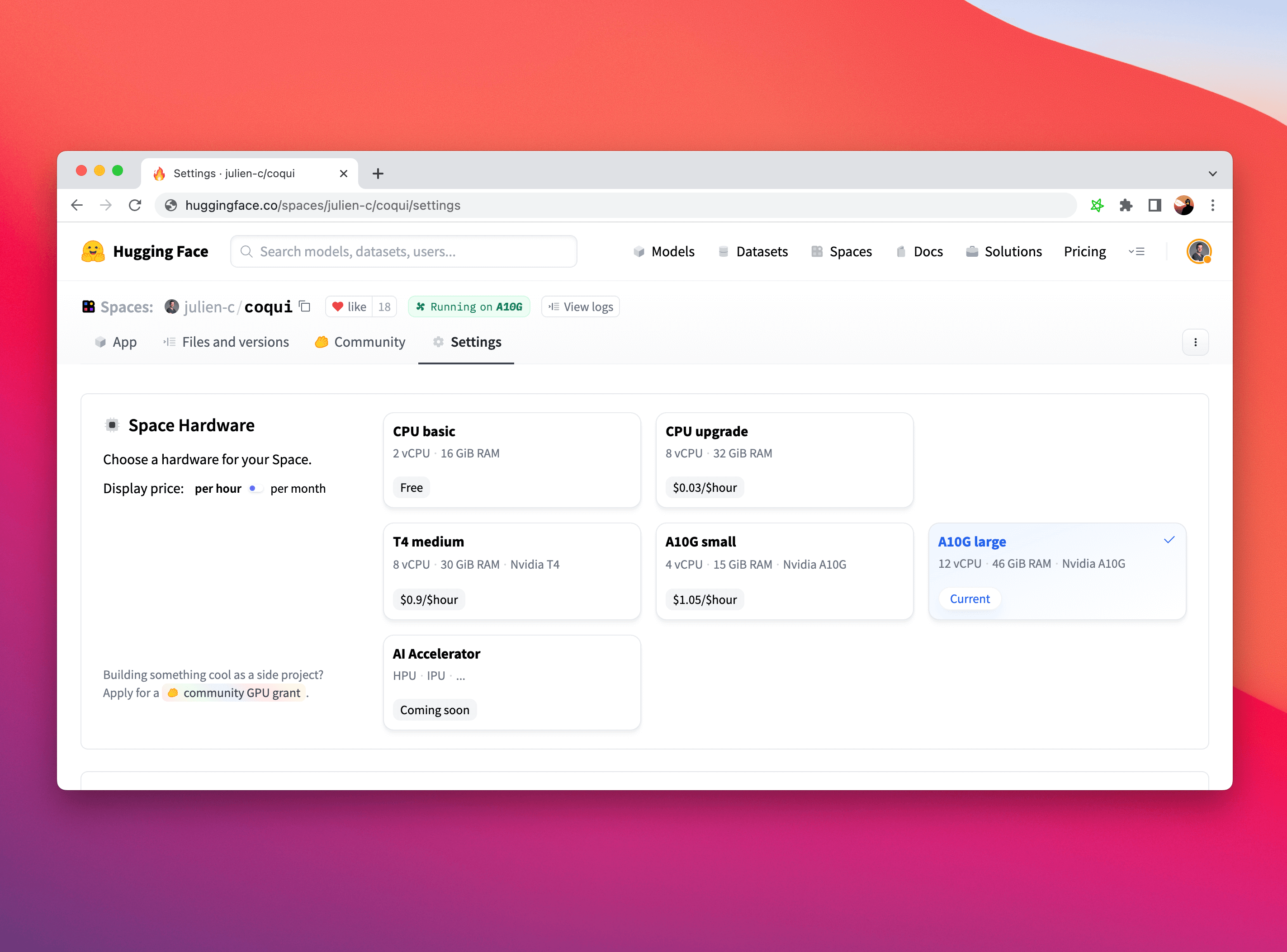
| It is particularly straightforward to upgrade your Hardware on Hugging Face Spaces. Simply click on the "Settings" tab in your tab and choose the Space Hardware you'd like. | ||
|
|
||
|  | ||
|
|
||
| While you might need to adapt portions of your code to run on a GPU (here's a [handy guide](https://cnvrg.io/pytorch-cuda/) if you are using PyTorch), Gradio is completely agnostic to the choice of hardware and will work completely fine if you use it with CPUs, GPUs, TPUs, or any other hardware! | ||
|
|
||
| ## Conclusion | ||
|
|
||
| Congratulations! You know how to set up a Gradio demo for maximum performance. Good luck on your next viral demo! | ||
|
|
||


Uh oh!
There was an error while loading. Please reload this page.